
第1页 / 共8页
试读已结束,还剩7页,您可下载完整版后进行离线阅读
THE END
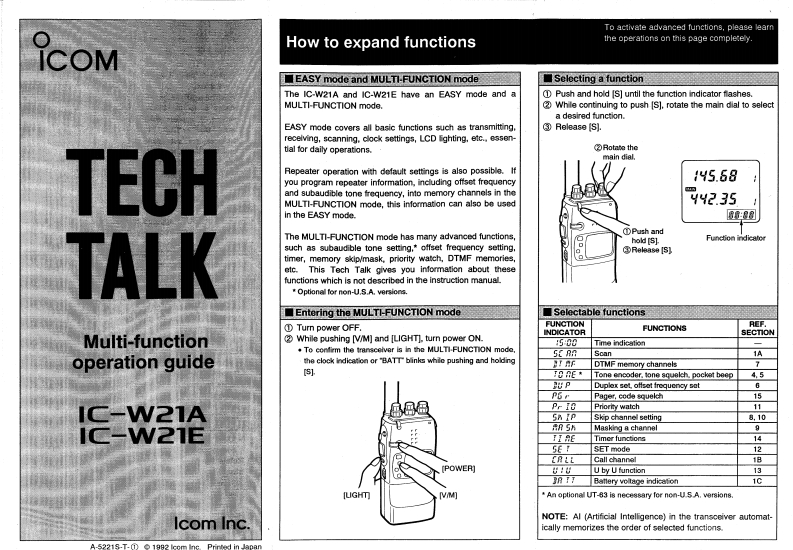
To activate advanced functions,please learnHow to expand functionsthe operations on this page completely.ICOMEASY mode and MULTI-FUNCTION modeI Selecting a functionThe IC-W21A and IC-W21E have an EASY mode and aPush and hold [S]until the function indicator flashes.MULTI-FUNCTION mode.While continuing to push [S].rotate the main dial to selecta desired function.EASY made covers all basic functions such as transmitting.③Release [S.]recelving,scanning.clock settings,LCD Eghting.etc..essen-tial for daily operations.②Rotate theTECHmain dial.Repeater operation with default settings is also possible.Ifyou program repeater information,including offset frequency45.68and subaudible tone frequency,into memory channels in theMULTI-FUNCTION mode,this information can also be used2.35in the EASY mode.E:8The MULTI-FUNCTION mode has many advanced functions,①Push andTALKhold [S].such as subaudible tone setting,*offset frequency setting.Release [S]timer,memory skip/mask,priority watch,DTMF memories,etc.This Tech Talk gives you information about thesefunctions which is not described in the instruction manualOptional for non-U.S.A.versions.Entering the MULTI-FUNCTION modeSelectable functions①Turn power OFF.FUNCTIONFUNCTIONSREF.INDICATORSECTIONMulti-function②While pushing [V/M]and [LIGH可.turn power ONS00.To confirm the transcelver is in the MULTI-FUNCTION mode,Time indication5C AAScan1Aoperation guidethe clock indication or BATT"blinks whie pushing and holdingrDTMF memory channels7[5].TO RE*Tone encoder.tone squelch.pocket beep4.5BUPDuplex set,offset froqucney sat6P5Pager,code squelch15Iew经抢Pr itPrority watch11SA IPSkip channel setting8,10ER SNMasking a channelTI AETimer functions14SE TSET mode12CALLCall channel18POWER]U by U function13JA ITBatlery voltage indication1C[UGHTAn optionall UT-63 is necessary for non-U.5A.version8.Icom IncNOTE:Al (Artificial Intelligence)in the transceiver automat-ically memorizes the order of selected functions.188


请登录后查看评论内容