
第1页 / 共2页
试读已结束,还剩1页,您可下载完整版后进行离线阅读
THE END
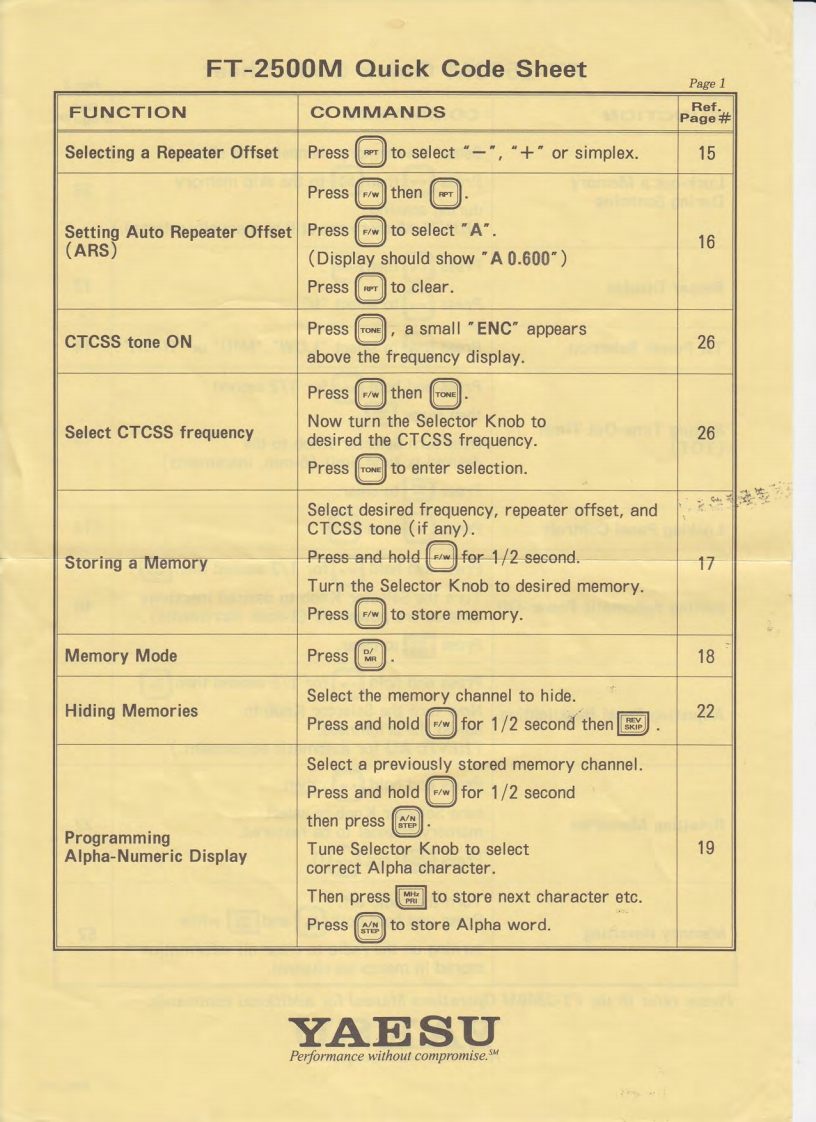
FT-2500M Quick Code SheetPage 1FUNCTIONCOMMANDSRef.Page#Selecting a Repeater OffsetPressto select“-",“+"or simplex..15PressF/WthenSetting Auto Repeater OffsetPressMto select "A".(ARS】16(Display should show "A 0.600")Pressto clear.PressTONEa small "ENC"appearsCTCSS tone ON26above the frequency display.PresswNow turn the Selector Knob toSelect CTCSS frequencydesired the CTCSS frequency.26PressTONEto enter selection.Select desired frequency,repeater offset,andCTCSS tone (if any).Storing a MemoryPress-and holdfor 1/2second.17Turn the Selector Knob to desired memory.Pressto store memory.Memory ModePress18Select the memory channel to hide.Hiding MemoriesPress and hold for 1/2 second then22Select a previously stored memory channel.Press and holdF/wfor 1/2 secondthen presssProgrammingAlpha-Numeric DisplayTune Selector Knob to select19correct Alpha character.Then press to store next character etc.Pressto store Alpha word.YAESUPerformance without compromise.sM


请登录后查看评论内容