
第1页 / 共2页
试读已结束,还剩1页,您可下载完整版后进行离线阅读
THE END
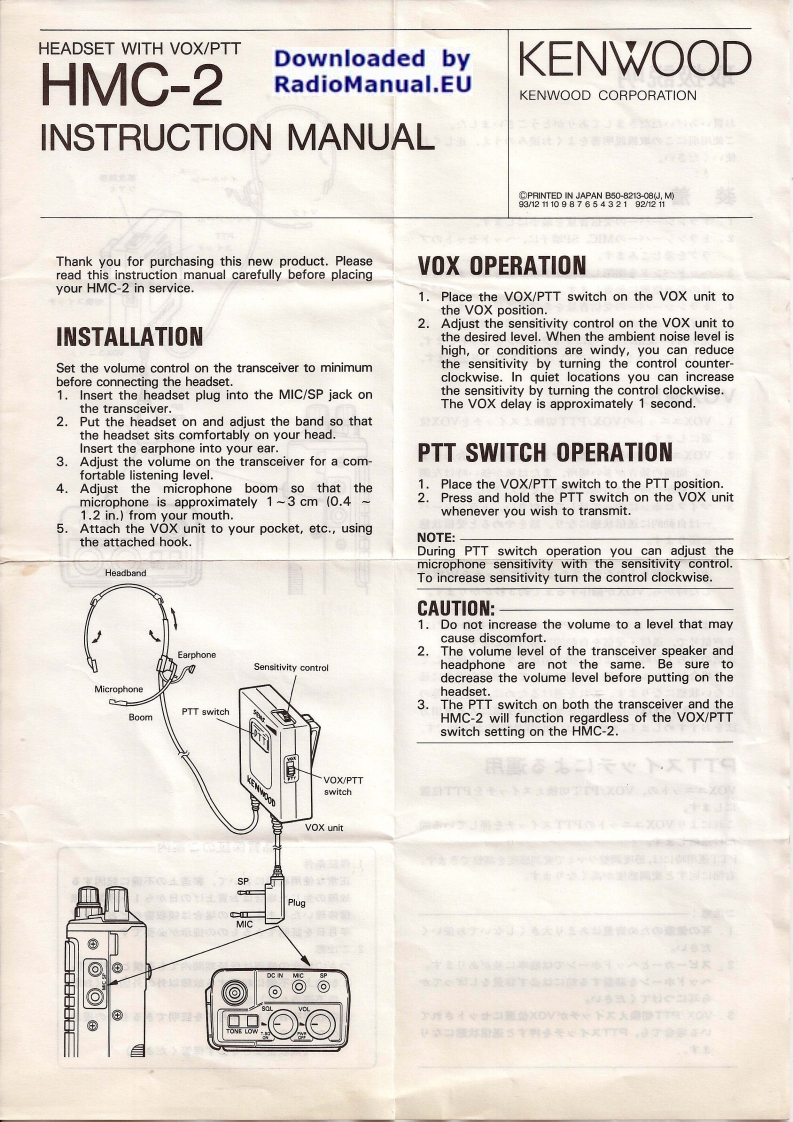
HEADSET WITH VOX/PTTDownloaded byHMC-2KENWOODRadioManual.EUKENWOOD CORPORATIONINSTRUCTION MANUALeT邢g86592828Thank you for purchasing this new product.Pleaseread this instruction manual carefully before placingVOX OPERATIONyour HMC-2 in service.1.Place the VOX/PTT switch on the VOX unit tothe VOX position.2.Adjust the sensitivity control on the VOX unit toINSTALLATIONthe desired level.When the ambient noise level ishigh,or conditions are windy,you can reduceSet the volume control on the transceiver to minimumthe sensitivity by turning the control counter-before connecting the headset.clockwise.In quiet locations you can increase1,Insert the headset plug into the MIC/SP jack onthe sensitivity by turning the control clockwise.the transceiver.The VOX delay is approximately 1 second.2.Put the headset on and adjust the band so thatthe headset sits comfortably on your head.Insert the earphone into your ear.3.Adjust the volume on the transceiver for a com-PTT SWITCH OPERATIONfortable listening level.4.Adjust the microphone boom so that the1.Place the VOX/PTT switch to the PTT position.microphone is approximately 1 -3 cm (0.42.Press and hold the PTT switch on the VOX unit1.2 in.from your mouth.whenever you wish to transmit.5.Attach the VOX unit to your pocket,etc.,usingthe attached hook.NOTE:During PTT switch operation you can adjust themicrophone sensitivity with the sensitivity control.HeadbandTo increase sensitivity turn the control clockwise.CAUTION:1.Do not increase the volume to a level that maycause discomfort.Earphone2.The volume level of the transceiver speaker andSensitivity controlheadphone are not the same.Be sure todecrease the volume level before putting on theMicrophoneheadset.3.The PTT switch on both the transceiver and theBoomPTT switchHMC-2 will function regardless of the VOX/PTTswitch setting on the HMC-2.VOX/PTTswitchVOX unitSPPlug


请登录后查看评论内容