
第1页 / 共14页
试读已结束,还剩13页,您可下载完整版后进行离线阅读
THE END
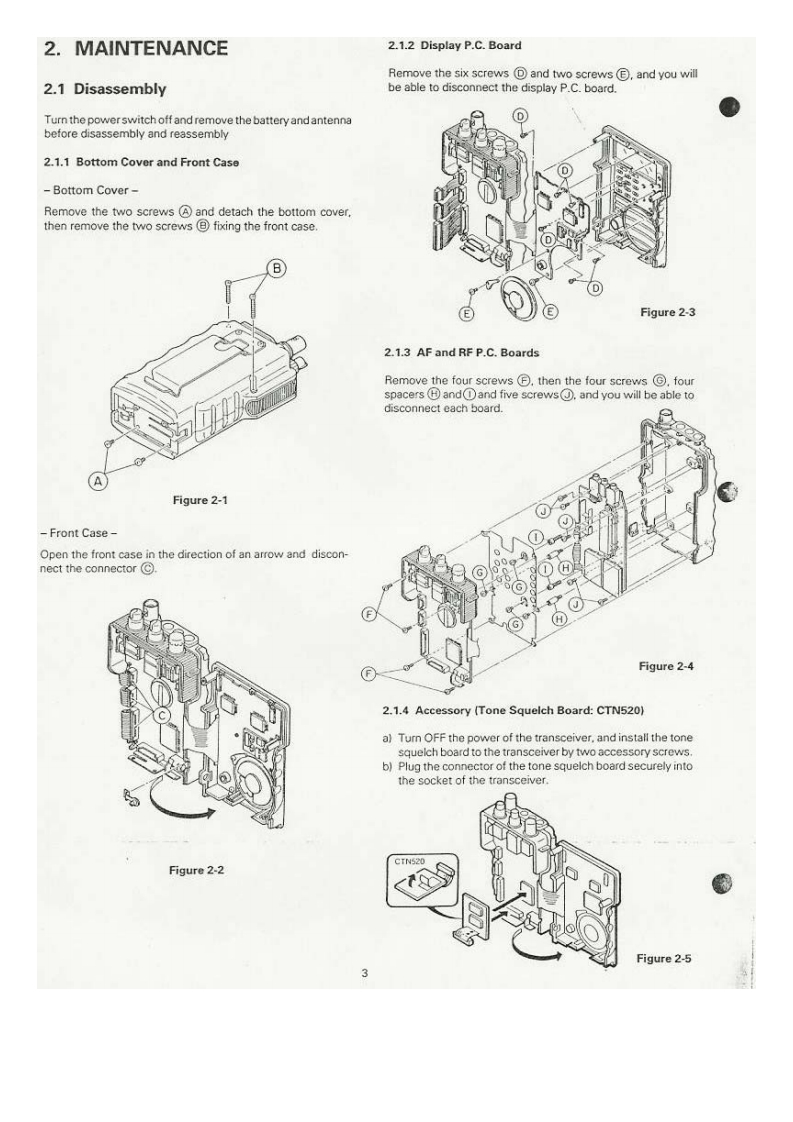
2.MAINTENANCE2.1.2 Display P.C.BoardRemove the six screws回and two screws©,and you will2.1 Disassemblybe able to disconnect the display P.C.board.Turn the powerswitch off and remove the battery and antennabefore disassembly and reassembly2.1.1 Bottom Cover and Front Case0Bottom Cover-Remove the two screws and detach the bottom cover,then remove the two screws(B fixing the front caseDFigure 2-32.1.3 AF and RF P.C.BoardsRemove the four screws⑤,then the four screws©,fouspacers (H andand five screws.and you will be able todisconnect each board.Figure 2-1Front Case-①o的Open the front case in the direction of an arrow and discon-0nect the connector©HGHFigure 2-42.1.4 Accessory (Tone Squelch Board:CTN520)a)Turn OFF the power of the transceiver.and install the tonesquelch board to the transceiver by two accessory screws.b)Plug the connector of the tone squelch board securely intothe socket of the transceiver.CTN520Figure 2-2Figure 2-5


请登录后查看评论内容