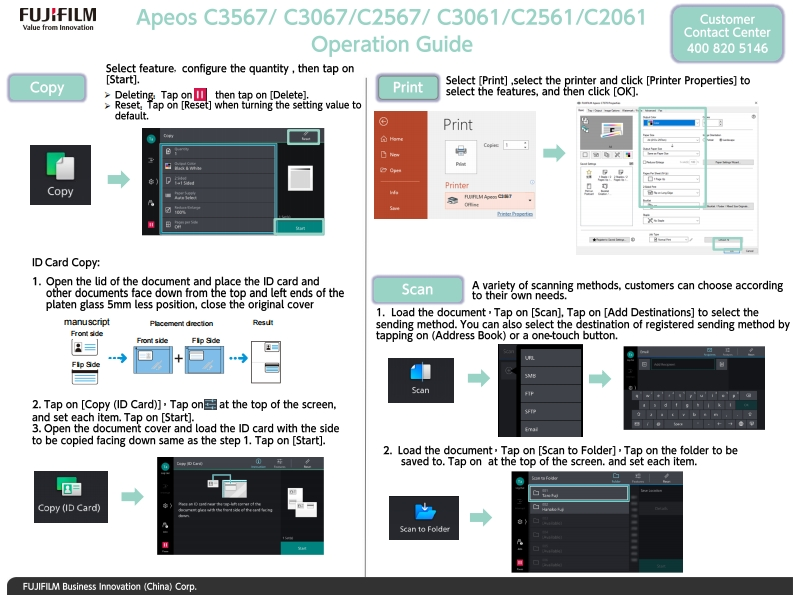
FUJIFILMApe0sC3567/C3067/C2567/C3061/C2561/C2061CustomerValue from InnovationContact CenterOperation Guide4008205146Select feature.configure the quantity then tap on[Start].CopySelect [Print],select the printer and click [Printer Properties]toDeleting:Tap on then tap on [Delete].Printselect the features,and then click [OK].Reset.Tap on [Reset]when turning the setting value todefault.PrintHame母CopNE日D CPrinterCopy■电时PirketapoticID Card Copy:1.Open the lid of the document and place the ID card andother documents face down from the top and left ends of theScanA variety of scanning methods,customers can choose accordingto their own needs.platen glass 5mm less position,close the original cover1.Load the document.Tap on [Scan].Tap on [Add Destinations]to select themanuscriptPlacement drectionResutsending method.You can also select the destination of registered sending method byFront sideFront sideFlp Sdetapping on (Address Book)or a one-touch button.Flp SdScan2.Tap on [Copy (ID Card)].Tap on at the top of the screen.and set each item.Tap on [Start]3.Open the document cover and load the ID card with the sideto be copied facing down same as the step 1.Tap on [Start].2.Load the document.Tap on [Scan to Folder]Tap on the folder to besaved to.Tap on at the top of the screen.and set each item.Copy (ID Card)Scan to Folde▣FUJIFILM Business Innovation (China)Corp.


请登录后查看评论内容