
第1页 / 共2页
试读已结束,还剩1页,您可下载完整版后进行离线阅读
THE END
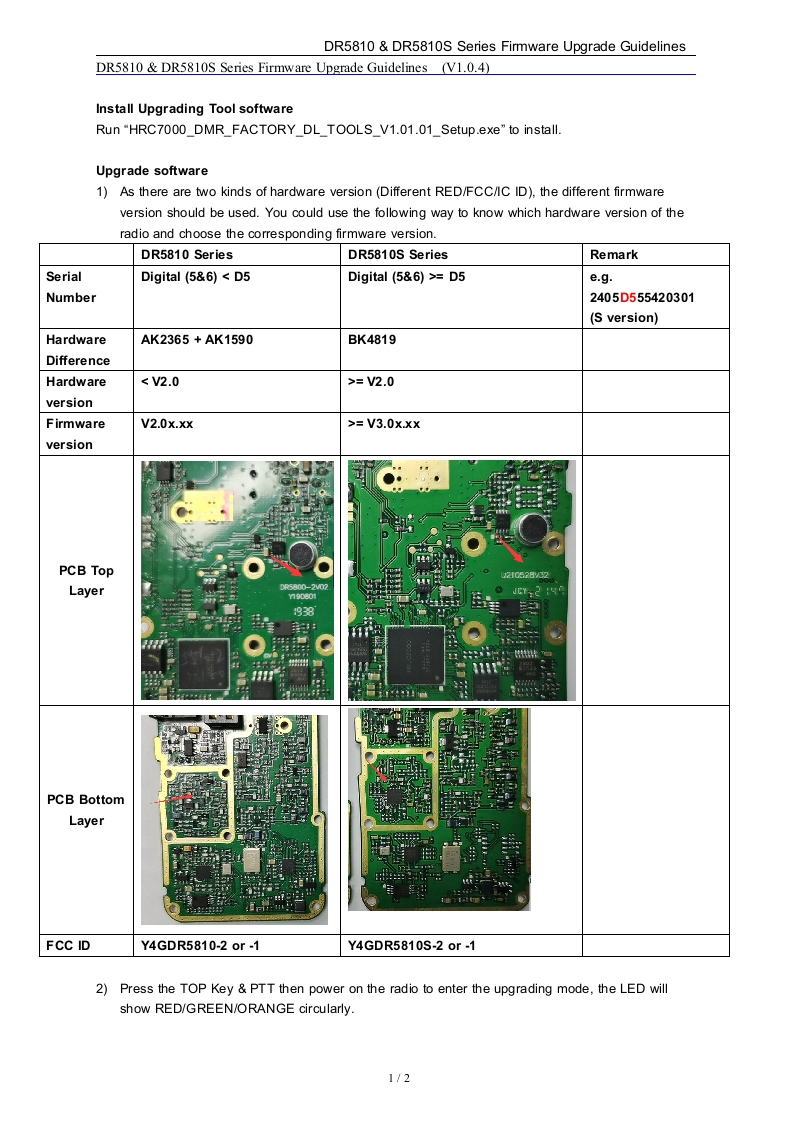
DR5810&DR5810S Series Firmware Upgrade GuidelinesDR5810 DR5810S Series Firmware Upgrade Guidelines (V1.0.4)Install Upgrading Tool softwareRun"HRC7000_DMR_FACTORY_DL_TOOLS_V1.01.01_Setup.exe"to install.Upgrade software1)As there are two kinds of hardware version(Different RED/FCC/IC ID),the different firmwareversion should be used.You could use the following way to know which hardware version of theradio and choose the corresponding firmware version.DR5810 SeriesDR5810S SeriesRemarkSerialDigital (5&6)=D5e.g.Number2405D555420301(S version)HardwareAK2365+AK1590BK4819DifferenceHardware=V2.0versionFirmwareV2.0x.xx>=V3.0x.xxversionPCB Top210528/2Layer98PCB BottomCLayerFCC IDY4GDR5810-2or-1Y4GDR5810S-2 or -12)Press the TOP Key PTT then power on the radio to enter the upgrading mode,the LED willshow RED/GREEN/ORANGE circularly.1/2


请登录后查看评论内容