
第1页 / 共2页
试读已结束,还剩1页,您可下载完整版后进行离线阅读
THE END
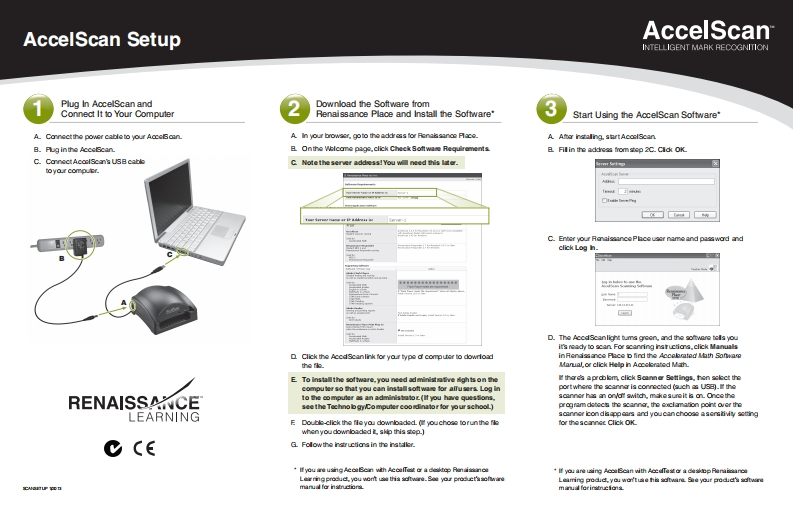
AccelScan SetupAccelScanINTELLIGENT MARK RECOGNITIONPlug In AocelScan andDownload the Software fromConnect It to Your ComputerRenaissance Place and Install the Software"Start Using the AocelScan Software*A Conectthe power cableto your Acceoan.A.In your browac,goto the address for Rena地ns月ceB.Pug inthe AcceScan.B.Onthe Welcome page,click Check Software RequirementsB.Fill in the address from step 2C.Cldk OKC.ConectAcoclScan's USB cableC.Note the server addess!You will need this later.mtoyo.r computr.a☐w■C.Enter your RanaissancePlceusor name and passwod andclick Log h.市中行市中市中带市中时出卡的中一D.The AccdScanlight tums greon,and the software tels youit's ready to scan For scanring isructios,click ManualsD Click the Accdscanlink for your type d computer to dowrloadinRendissarce Place D fird the Accolmatod Math Sonam的超k.Manal,or click Help n Accelerated MathE To insta■the software,.you need ad ministm6e中sonfa的apk上click Soann er Settings.hon sclct thecompu0 r so that you can instal■softwase for alfu sen线Logaportwhere the scanna is connected (auch as USB).theRENAISSANCEto the co mputer as an administator(If you have ques Sons.scanner has an on/of switch,mkesureit is an.Oncethesee the Techno b gyco mputer coodinator for yo ur schooL)program detecs the scanne,the cxclamation point over theLEARNINGsoanner icondis appears and youcan choose asemtiviy sotingE Doublo-click the fleyou downloaded.(youchoso torun the flfor thescarnec Click OK.when youdownloaded t skip this stop.)C ceG.Follow the instructions in the.If you ire using AcoSein with AcolTest or a destop Ranaiscnoa·量yo are using AooBcan with AccdTa装a deskop RanicnoLarr宙produet,you went u当atwe.So your produet'ssonwin0Leaming ped以yo wartuse hi色dare鱼ayour pedie坐dw国CNOHU在Dnuanua fo nstret金tmrua ferinrcio皇


请登录后查看评论内容