
第1页 / 共2页
试读已结束,还剩1页,您可下载完整版后进行离线阅读
THE END
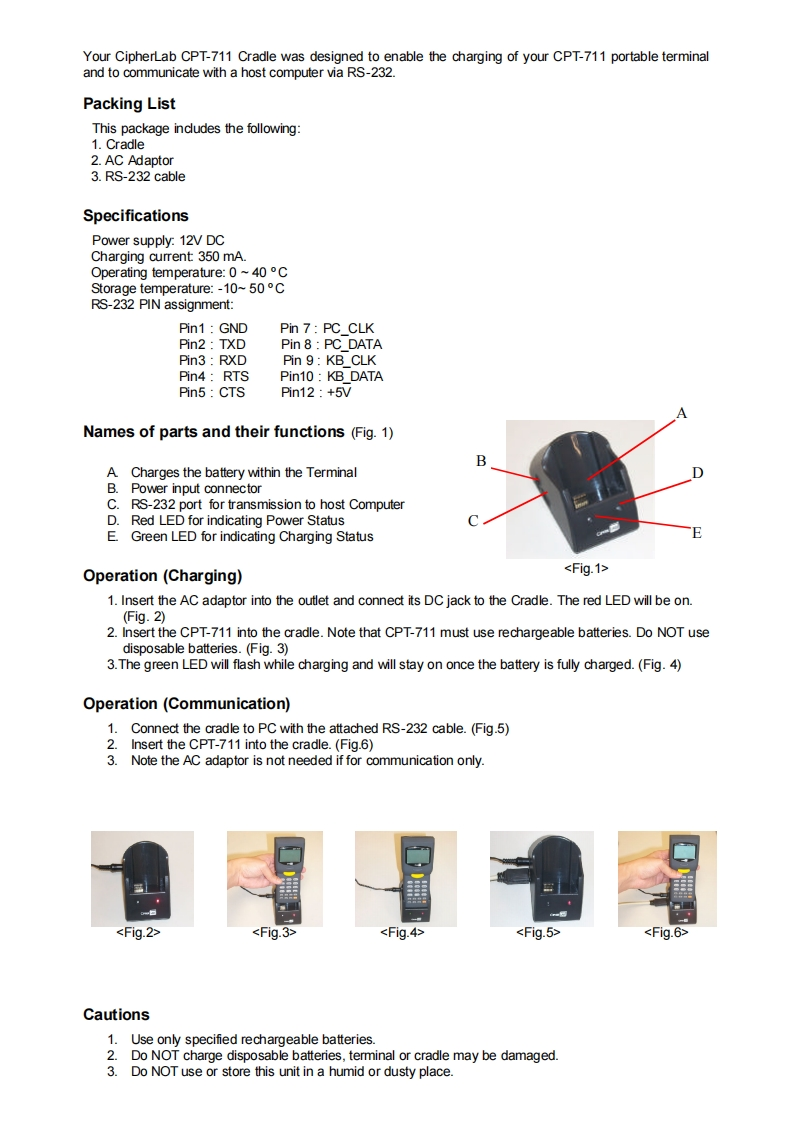
Your CipherLab CPT-711 Cradle was designed to enable the charging of your CPT-711 portable terminaland to communicate with a host computer via RS-232.Packing ListThis package includes the following:1.Cradle2.AC Adaptor3.RS-232 cableSpecificationsPower supply:12V DCCharging current 350 mA.Operating temperature:0~40CStorage temperature:-10~50CRS-232 PIN assignment:Pin1:GNDPin 7:PC CLKPin2:TXDPin 8 PC DATAPin3 RXDPin 9:KB CLKPin4:RTSPin10:KB DATAPin5:CTSPin12:+5VNames of parts and their functions (Fig.1)BA Charges the battery within the TerminalB.Power input connectorC.RS-232 port for transmission to host ComputerDRed LED for indicating Power StatusEGreen LED for indicating Charging StatusOperation(Charging)1.Insert the AC adaptor into the outlet and connect its DC jack to the Cradle.The red LED will be on.(Fig.2)2.Insert the CPT-711 into the cradle.Note that CPT-711 must use rechargeable batteries.Do NOT usedisposable batteries.(Fig.3)3.The green LED will flash while charging and will stay on once the battery is fully charged.(Fig.4)Operation(Communication)1.Connect the cradle to PC with the attached RS-232 cable.(Fig.5)2.Insert the CPT-711 into the cradle.(Fig.6)3.Note the AC adaptor is not needed if for communication only.Cautions1.Use only specified rechargeable batteries.2.Do NOT charge disposable batteries,terminal or cradle may be damaged.3.Do NOT use or store this unit in a humid or dusty place.


请登录后查看评论内容