
第1页 / 共6页
试读已结束,还剩5页,您可下载完整版后进行离线阅读
THE END
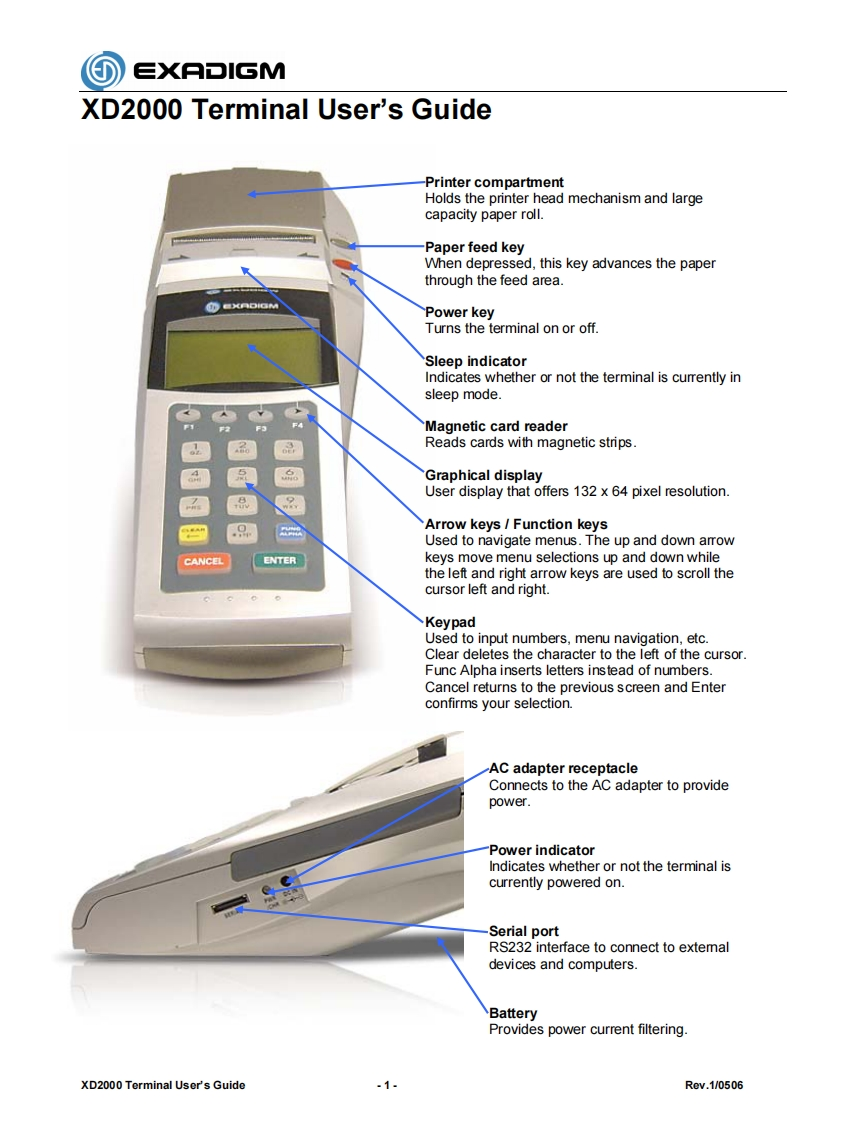
EXADIGMXD2000 Terminal User's GuidePrinter compartmentHolds the printer head mechanism and largecapacity paper roll.Paper feed keyWhen depressed,this key advances the paperthrough the feed area.Power keyTurns the terminal on or off.Sleep indicatorIndicates whether or not the terminal is currently insleep modeF2Magnetic card reader3Reads cards with magnetic strips.Graphical displayUser display that offers 132 x 64 pixel resolution..9Arrow keys Function keysUsed to navigate menus.The up and down arrowCANCELENTERkeys move menu selections up and down whilethe left and right arrow keys are used to scroll thecursor left and right.KeypadUsed to input numbers,menu navigation,etc.Clear deletes the character to the left of the cursor.Func Alpha inserts letters instead of numbers.Cancel returns to the previous screen and Enterconfirms your selection.AC adapter receptacleConnects to the AC adapter to providepower.Power indicatorIndicates whether or not the terminal iscurrently powered on.Serial portRS232 interface to connect to extemaldevices and computers.BatteryProvides power current filtering.XD2000 Terminal User's Guide1Rev.1/0506


请登录后查看评论内容