
第1页 / 共2页
试读已结束,还剩1页,您可下载完整版后进行离线阅读
THE END
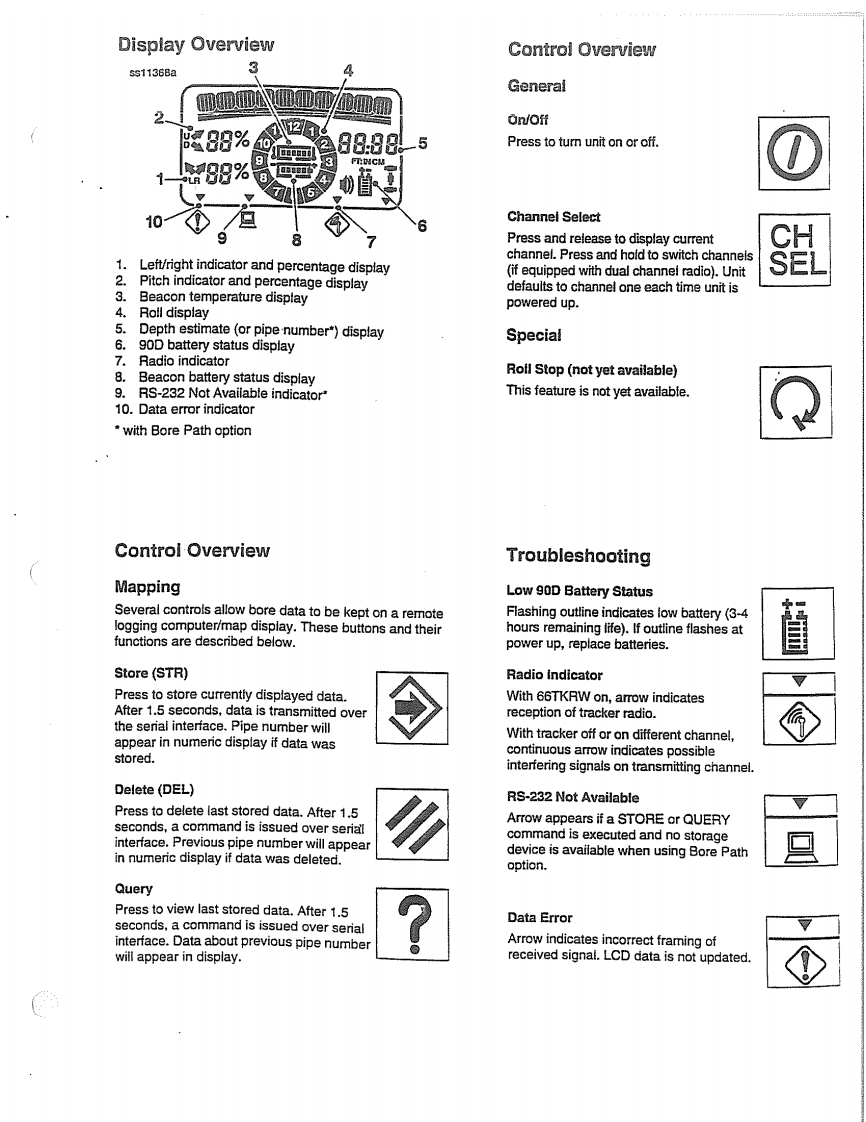
Display OverviewControl Overviewss1136Ba3GeneralOn/Off88%1-5Press to turn unit on or off.四88.888%10Channel SelectPress and release to display currentchannel.Press and hold to switch channels1.Left/right indicator and percentage display2.Pitch indicator and percentage display(if equipped with dual channel radio).UnitBeacon temperature displaydefaults to channel one each time unit is3.powered up.4.Roll display5.Depth estimate(or pipe number")displaySpecial6.90D battery status display7.Radio indicator8.Beacon battery status displayRoll Stop (not yet available)9.RS-232 Not Available indicator"This feature is not yet available.10.Data error indicatorwith Bore Path optionControl OverviewTroubleshootingMappingLow 90D Battery StatusSeveral controls allow bore data to be kept on a remoteFlashing outline indicates low battery(3-4logging computer/map display.These buttons and theirhours remaining life).If outline flashes atfunctions are described below.power up,replace batteries.Store(STR)Radio IndicatorPress to store currently displayed data.With 66TKRW on,arrow indicatesAfter 1.5 seconds,data is transmitted overreception of tracker radio.the serial interface.Pipe number willappear in numeric display if data wasWith tracker off or on different channel,continuous arrow indicates possiblestored.interfering signals on transmitting channel.Delete (DEL)RS-232 Not AvailablePress to delete last stored data.After 1.5seconds,a command is issued over serialArrow appears if a STORE or QUERYinterface.Previous pipe number will appearcommand is executed and no storagein numeric display if data was deleted.device is available when using Bore Pathoption.QueryPress to view last stored data.After 1.5seconds,a command is issued over serialData Errorinterface.Data about previous pipe numberArrow indicates incorrect framing ofwill appear in display.received signal.LCD data is not updated.


请登录后查看评论内容