
第1页 / 共8页
试读已结束,还剩7页,您可下载完整版后进行离线阅读
THE END
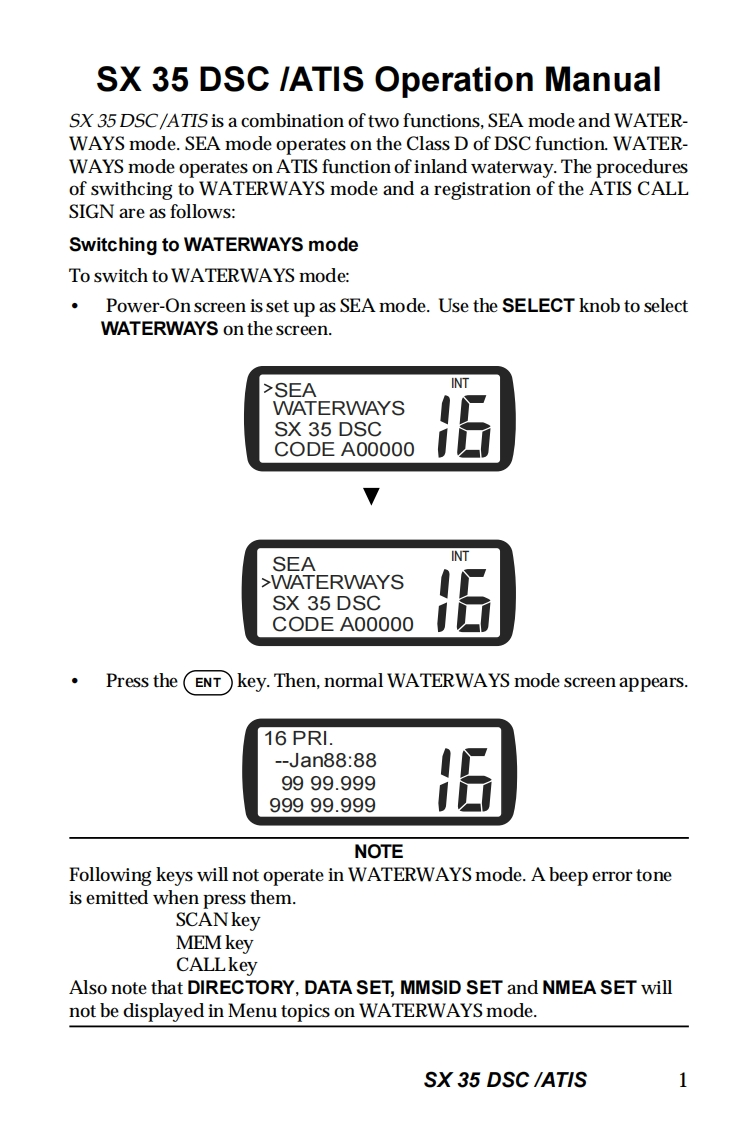
SX 35 DSC /ATIS Operation ManualSX 35 DSC/ATIS is a combination of two functions,SEA mode and WATERWAYS mode.SEA mode operates on the Class D of DSC function.WATER-WAYS mode operates on ATIS function of inland waterway.The proceduresof swithcing to WATERWAYS mode and a registration of the ATIS CALLSIGN are as follows:Switching to WATERWAYS modeTo switch to WATERWAYS mode:Power-On screen is set up as SEA mode.Use the SELECT knob to selectWATERWAYS on the screen.>SEAINTWATERWAYSSX 35 DSCCODE A00000SEAINT>WATERWAYSSX 35 DSCCODE A00000·Press the(ENT)Ikey.Then,normal WATERWAYS mode screen appears.16 PRI-Jan88:889999.99999999.999NOTEFollowing keys will not operate in WATERWAYS mode.A beep error toneis emitted when press them.SCANkeyMEM keyCALLkeyAlso note that DIRECTORY,DATA SET,MMSID SET and NMEA SET willnot be displayed in Menu topics on WATERWAYS mode.SX 35 DSC /ATIS1


请登录后查看评论内容