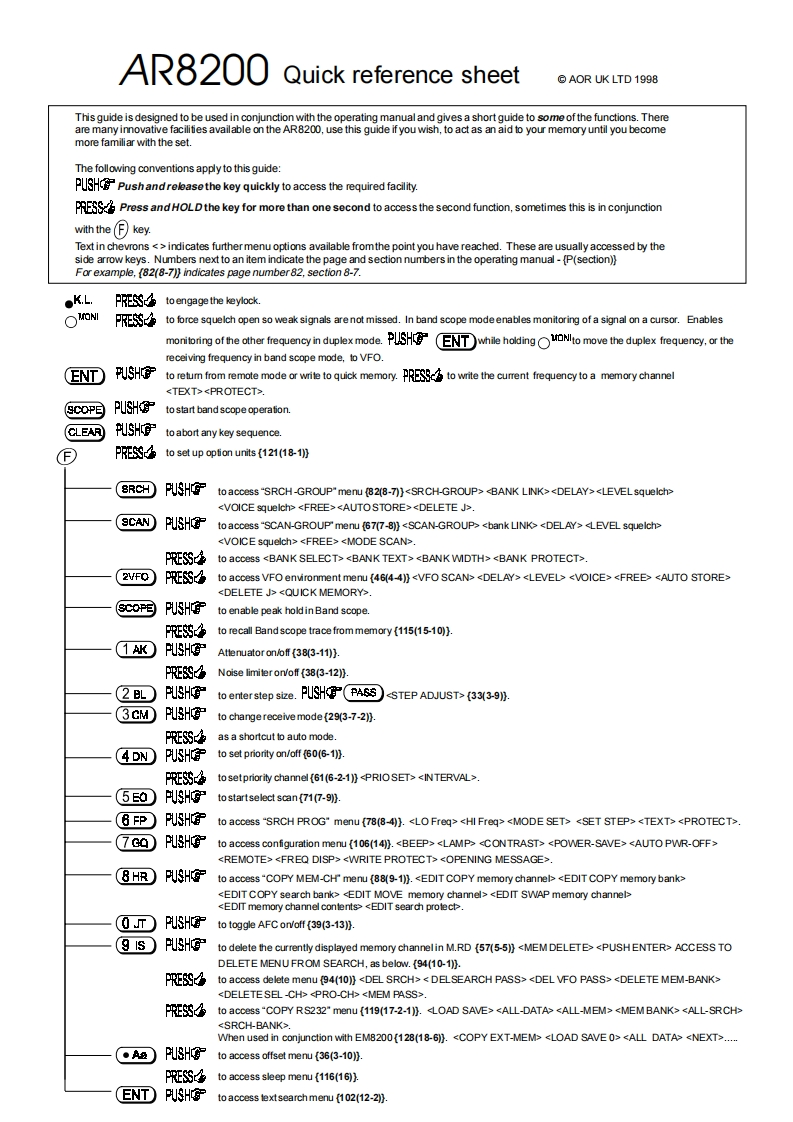
AR8200Quick reference sheet©AOR UK LTD1998This guide is designed to be used in conjunction with the operating manual and gives a short guide to some of the functions.Thereare many innovative facilities available on the AR8200,use this guide if you wish,to act as an aid to your memory until you becomemore familiar with the set.The following conventions apply to this guide:Pushandreleasethe key quickly to access the required facility.Press andHOLDthe key for more than one second to access the second function,sometimes this is in conjunctionwith the(月keyText in chevrons <>indicates furthermenu options available fromthe point you have reached.These are usually accessed by theside arrow keys.Numbers next to an item indicate the page and section numbers in the operating manual-[P(section))For example,(82(8-7))indicates page number82,section 8-7.●KL.PRESSto engage the keylock.ONIFE略心to force squelch open so weak signals are not missed.In band scope modeenables monitoring of a signal on a cursor.Enablesmonnfeother frequency in duplexmode.while holding tomove the duplex frequency.or thereceiving frequency in band scope mode,to VFOENTTUSH府to retum from remote mode or write to quick memory.to write the cumrent frequencyto a memory channel
.(SCOPEPUSHto start band scope operationCLEARPUSHto abort any key sequencePRESSto set up option units (121(18-1))BRCHPUSHOPto access"SRCH-GROUP"menu (82(8-7)}SCANPUSHto access"SCAN-GROUP"menu (67(7-8)).PRESSto access 2VFO)PRESSto access VFO environment menu (46(4-4))coP国PUSHto enable peak hold in Band scope.PRESSto recall Band scope trace from memory (115(15-10)).1AKPUSHOAtlenuator on/of(38(3-11)).PRESSNoise limiter on/off (38(3-12)).2L)PUSH守to enterstep size.PHPASS(33(3-9).3GMPUSHto change receive mode (29(3-7-2)).PRESSas a shortcut to auto mode.4 DN PUSHO度to set priority on/off (60(6-1)).PRESSto setpriority channel (61(6-2-1)).(5E0)PUSHOto startselect scan(71(7-9)).6FPPUSH府to access"SRCH PROG"menu (78(8-4)).7G0PUSHOto access configuration menu {106(14))..⑧HR PUSHGto access"COPY MEM-CH'menu (88(9-1))..n)PUSHPto toggle AFC on/off (39(3-13)).9s)PUSHOto delete the currently displayed memory channelin M.RD (57(5-5))ACCESS TODELETE MENU FROM SEARCH,as below.(94(10-1)).PRESSto access delete menu (94(10))


请登录后查看评论内容