
第1页 / 共10页
试读已结束,还剩9页,您可下载完整版后进行离线阅读
THE END
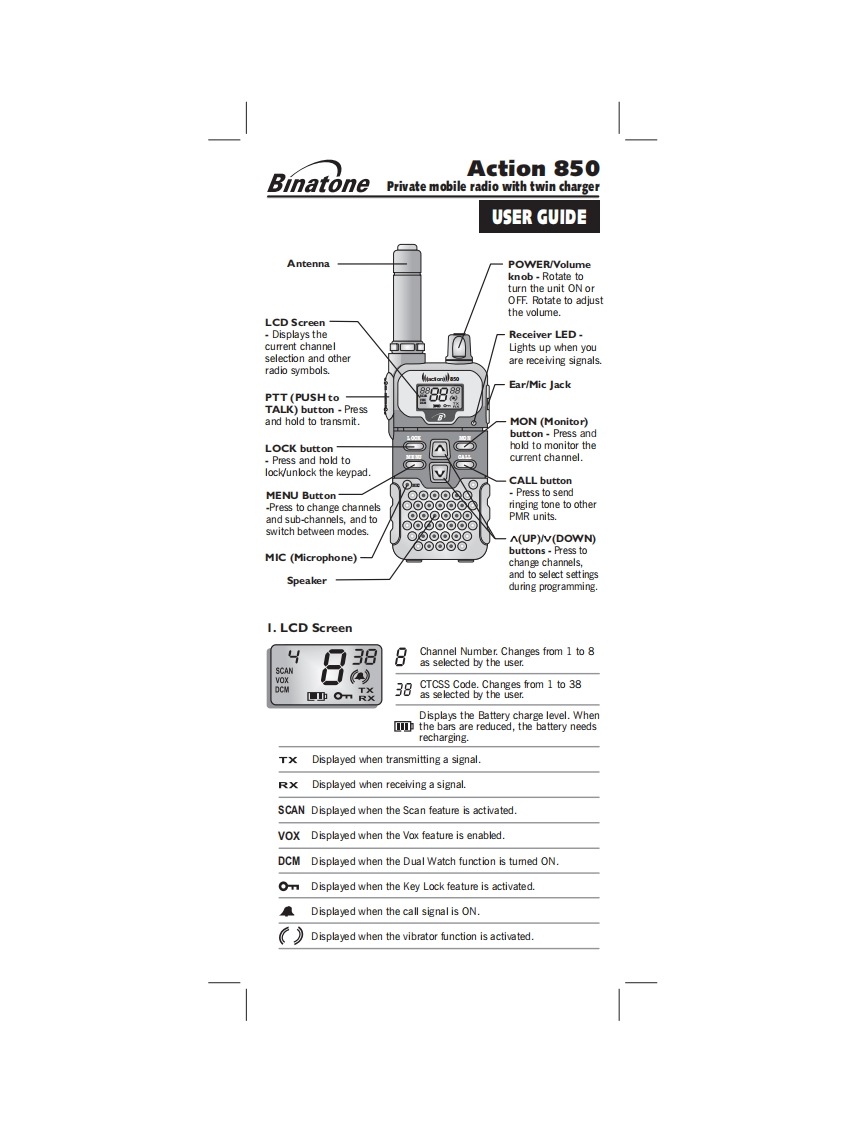
Action 850BinatonePrivate mobile radio with twin chargerUSER GUIDEAntennaPOWER/Volumeknob-Rotate toturn the unit ON orOFF.Rotate to adjustthe volume.LCD ScreenDisplays theReceiver LED-current channelLights up when youselection and otherare receiving signals.radio symbols.Ear/Mic JackPTT(PUSHtoTALK)button -Pressand hold to transmit.MON (Monitor)button Press andLOCK buttonhold to monitor thePress and hold tocurrent channel.lock/unlock the keypad.CALL buttonMENU Button-O⊙⊙O①Press to send-Press to change channels○oo⊙o⊙Cringing tone to otherand sub-channels,and toPMR units.switch between modes.A(UP)/V(DOWN)○⊙⊙⊙⊙buttons-Press toMIC (Microphone)change channels,Speakerand to select settingsduring programming.1.LCD Screen388Channel Number.Changes from 1 to 8as selected by the user.SCANCTCSS Code.Changes from 1 to 38m0m炎38as se lected by the userDisplays the Battery charge level.Whenthe bars are reduced,the battery needsrecharging.TxDisplayed when transmitting a signalRXDisplayed when receiving a signal.SCAN Displayed when the Scan feature is activated.VOX Displayed when the Vox feature is enabled.DCM Displayed when the Dual Watch function is tumed ON.Displayed when the Key Lock feature is activatedDisplayed when the call signal is ON.Displayed when the vibrator function is activated.


请登录后查看评论内容