
第1页 / 共2页
试读已结束,还剩1页,您可下载完整版后进行离线阅读
THE END
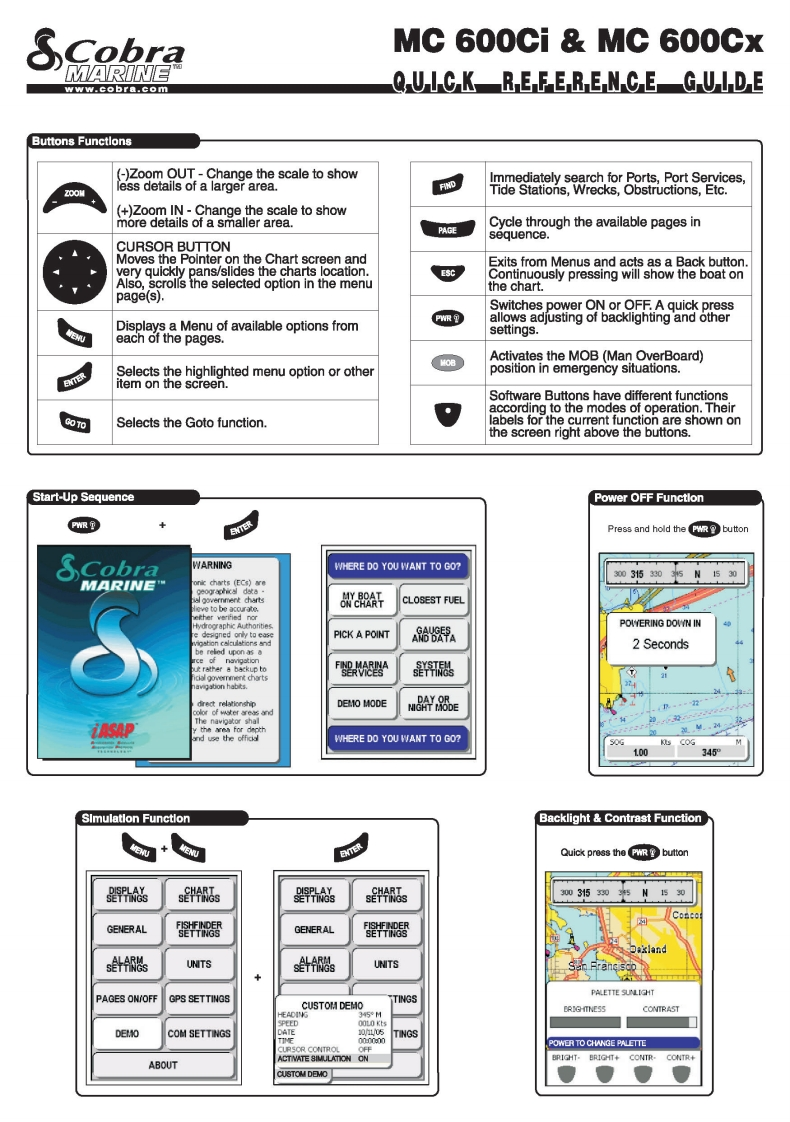
SCobraMC 600Ci MC 600CxMARINEwww.cobra.comQUIC K RE FER E N CE GUIDEButtons Functlons(-)Zoom OUT-Change the scale to showImmediately search for Ports,Port Services,ZOOHess details of a larger area.Tide Stations,Wrecks,Obstructions,Etc.(+)Zoom IN-Change the scale to showmore details of a smaller area.PAGECycle through the available pages insequence.CURSOR BUTTONMoves the Pointer on the Chart screen andExits from Menus and acts as a Back buttonvery quickly pans/slides the charts location.ESCAlso,scrolls the selected option in the menuContinuously pressing will show the boat onthe chart.page(s).Switches power ON or OFF.A quick pressW佩Displays a Menu of available options fromallows adjusting of backlighting and othersettings.each of the pages.M08Activates the MOB (Man OverBoard)Selects the highlighted menu option or otherposition in emergency situations.item on the screen.Software Buttons have different functionsaccording to the modes of operation.TheirSelects the Goto function.labels for the current function are shown onthe screen right above the buttons.Start-Up SequencePower OFF FunctlonPWRENTERPress and hold the GR buttonSCobraWARNINGWHERE DO YOU WANT TO GO?30315305N530MARINECLOSEST FUELe to be acourate.xAether verified norPOWYERING DOWN INPICK A POINTAD DATA2 Secondsbe reled upon as aout rather a backup to是思TDEM1O MODEu688EThe navipator shal..4WHERE DO YOU WANT TO GO?100345SImulatlon FunctlonBacklight Contrast FunctionQuick press the FuR button0SETTRes0SETTNeS303530N50GENERALSETTHOSGENERAL圈ands微UNITS针UNITS+PAGES ON/OFFPALETTE SUNLIGHTGPS SETTINGSCUSTOM DEMOTINGS45ERIGHTNESSCONTRAST0006tDEMOCOM SETTINGSTINGSCURSOR CONTROLPOWER TO CHANGE PALETTEBRIGHT-BRIGHT+CONTR-CONTR+ABOUTCUSTOM DEMO


请登录后查看评论内容