
第1页 / 共6页
试读已结束,还剩5页,您可下载完整版后进行离线阅读
THE END
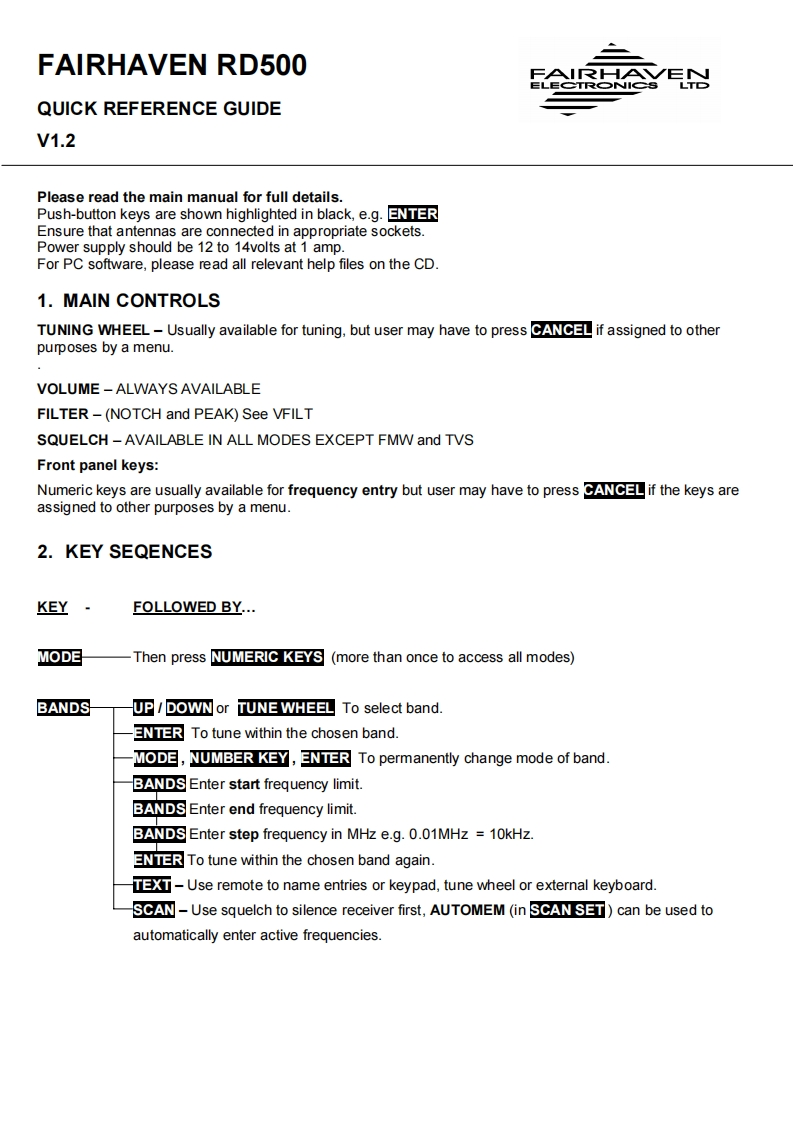
FAIRHAVEN RD500FAIRHA√EJELECTRONICSLTDQUICK REFERENCE GUIDEV1.2Please read the main manual for full details.Push-button keys are shown highlighted in black,e.g.REnsure that antennas are connected in appropriate sockets.Power supply should be 12 to 14volts at 1 amp.For PC software,please read all relevant help files on the CD.1.MAIN CONTROLSTUNING WHEEL-Usually available for tuning,but user may have to press ANif assigned to otherpurposes by a menu.VOLUME -ALWAYS AVAILABLEFILTER-(NOTCH and PEAK)See VFILTSQUELCH -AVAILABLE IN ALL MODES EXCEPT FMW and TVSFront panel keys:Numeric keys are usually available for frequency entry but user may have to press Aif the keys areassigned to other purposes by a menu.2.KEY SEQENCESKEYFOLLOWED BY...MODEThen press NUMERIC KEYS (more than once to access all modes)BANDSUP/DOWN or TUNE WHEEL To select band.RTo tune within the chosen band.MODE,NUMBER KEY,ENTER To permanently change mode of band.BANDS Enter start frequency limit.BANDS Enter end frequency limit.BANDS Enter step frequency in MHz e.g.0.01MHz 10kHz.RTo tune within the chosen band again.-Use remote to name entries or keypad,tune wheel or external keyboard.SCAN-Use squelch to silence receiver first,AUTOMEM (in SCANSET)can be used toautomatically enter active frequencies.


请登录后查看评论内容