
第1页 / 共2页
试读已结束,还剩1页,您可下载完整版后进行离线阅读
THE END
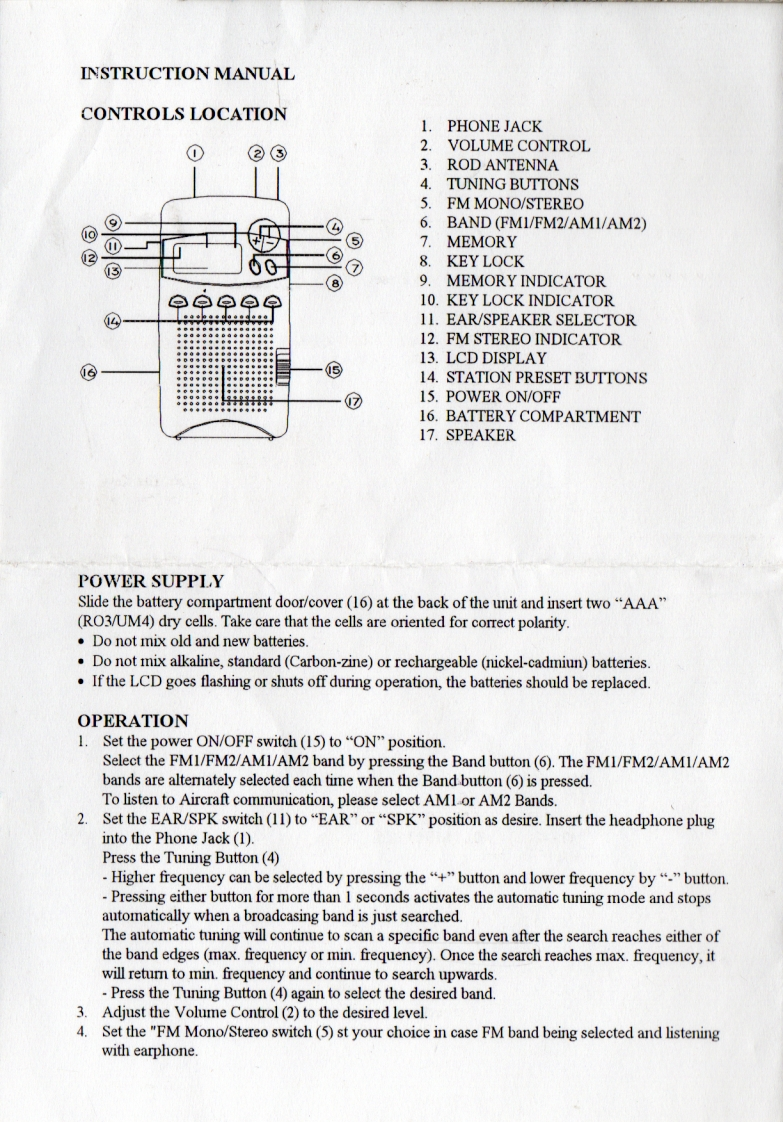
INSTRUCTION MANUALCONTROLS LOCATION1.PHONE JACK②③2.VOLUME CONTROL3.ROD ANTENNA4.TUNING BUTTONS5.FM MONO/STEREO©6.BAND (FM1/FM2/AMI/AM2)⑤7.MEMORY⑦8.KEY LOCK⑧9.MEMORY INDICATOR白⊙p白单10.KEY LOCK INDICATOR11.EAR/SPEAKER SELECTOR12.FM STEREO INDICATOR13.LCD DISPLAY⑤14.STATION PRESET BUTTONS⑦15.POWER ON/OFF16.BATTERY COMPARTMENT17.SPEAKERPOWER SUPPLYSlide the battery compartment door/cover(16)at the back of the unit and insert two "AAA"(RO3/UM4)dry cells.Take care that the cells are oriented for correct polarity.Do not mix old and new batteries.Do not mix alkaline,standard (Carbon-zine)or rechargeable (nickel-cadmiun)batteries.If the LCD goes flashing or shuts off during operation,the batteries should be replaced.OPERATION1.Set the power ON/OFF switch(15)to"ON"position.Select the FM1/FM2/AM1/AM2 band by pressing the Band button(6).The FM1/FM2/AM1/AM2bands are alternately selected each time when the Band button (6)is pressed.To listen to Aircraft communication,please select AMlor AM2 Bands.2.Set the EAR/SPK switch(11)to "EAR"or "SPK"position as desire.Insert the headphone pluginto the Phone Jack (1).Press the Tuning Button(4)Higher frequency can be selected by pressing the"+"button and lower frequency by""button.Pressing either button for more than I seconds activates the automatic tuning mode and stopsautomatically when a broadcasing band is just searched.The automatic tuning will continue to scan a specific band even after the search reaches either ofthe band edges (max.frequency or min.frequency).Once the search reaches max.frequency,itwill retum to min.frequency and continue to search upwards.-Press the Tuning Button (4)again to select the desired band3.Adjust the Volume Control (2)to the desired level.4.Set the "FM Mono/Stereo switch(5)st your choice in case FM band being selected and listeningwith earphone.


请登录后查看评论内容