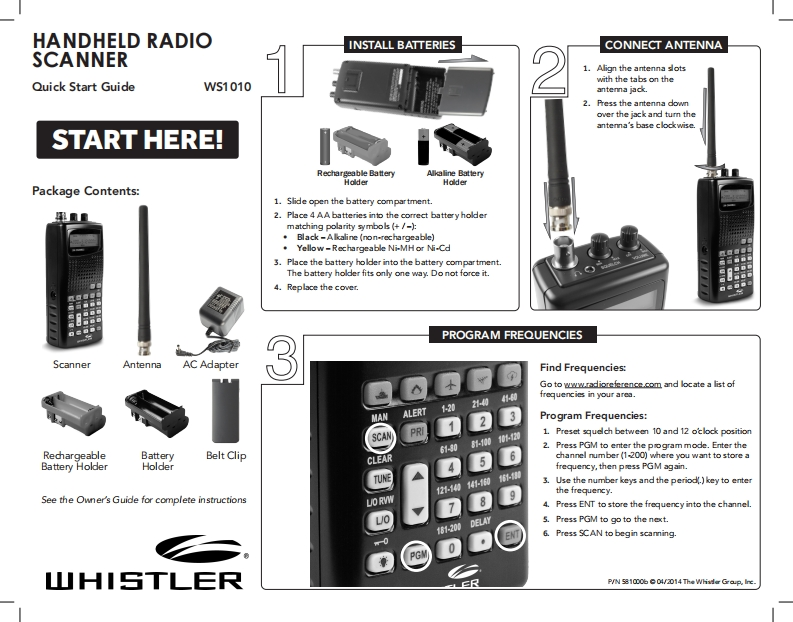
HANDHELD RADIOINSTALL BATTERIESCONNECT ANTENNASCANNER1.Align the antenna sotswith the tabs on theQuick Start GuideWS1010antenna jack.2.Press the antenna downover the jack and tum theantenna's base clockwise.START HERE!Rechargeable BatteryAlkaline BatteryHolderHolderPackage Contents:1.Slide open the battery compartment.2.Place 4 AA batteries into the correct battery holdermatching polarity symbols (+/-).Black-Alkaline(non-rechargeable)Yellow-Rechargeable Ni-MH or Ni-Cd3.Place the battery holder into the battery compartment.The battery holder fits only one way.Do not force it.4.Replace the cover.PROGRAM FREQUENCIESScannerAntennaAC Adapter3Find Frequencies:Go to wwradioreferencecom and lcate a list offrequencies in your area.MANALERT20Program Frequencies:SCAN1.Preset squdch between 10 and 12 otlock position-00外22.Press PGM to enter the pogram mode.Enter theRechargeableBatteryBelt Clip61-N0CLEAR6channel number (1-200)where you want to store aBattery HolderHolderfrequency,then pess PGM again.TUNE3.Use the number keys and the period key to enter2-10the frequency.See the Owner's Guide for complete instructionsLO RVW4.Press ENT to store the frequency into the channel.5.Press PGM to go to the next.161-200DELAY6.Press SCAN to begin scaning.山HISTLERLRP/N 581000b 04/2014 The Whisder Grap.Iine.


请登录后查看评论内容