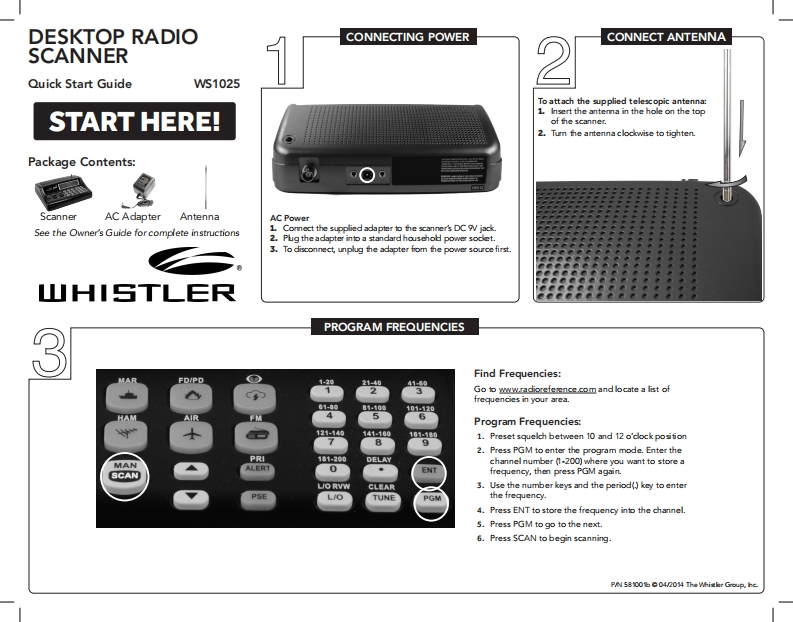
DESKTOP RADIOCONNECTING POWERCONNECT ANTENNASCANNERQuick Start GuideWs1025To attach the supplied telescopic antenna:START HERE!1.Insert the antemna in the hole on the topof the scanner.2.Tumn the antenna clockwise to tighten.Package Contents:ScannerAC AdapterAntennaAC PowerSee the Owner's Guide for complete instructions1.Comect the supplied adapter to the scanner's DC W jack.2.Pug the adapter into a standard househod power sodet.3.To disconnect,unplug the adapter fom the power source first.线山HISTLERPROGRAM FREQUENCIESFind Frequencies:MARFD/PD2140△2Go to wow.radioreferencecom and locate a list offrequencies in your area.81-481-10101.120HAMAIR56Program Frequencies:121-140141.180101-1801.Preset squelch between 10 and 12 o'cock posifion892.Press PGM to enter the program mode.Enter thePRI181-200DELAYMANchannel number (1-200)where you want to store aALERT0ENTSCANfrequency,then press PGM again.LIO RVWCLEAR3.Use the number keys and the period()key to enterPSEL/OTUNEPGMthe freqμenq4.Press ENT to store the frequency into the channel.5.Press PGM to go to the next.6.Press SCAN to begin scanning.P/58100b04/2014 The Whislr Group.he


请登录后查看评论内容