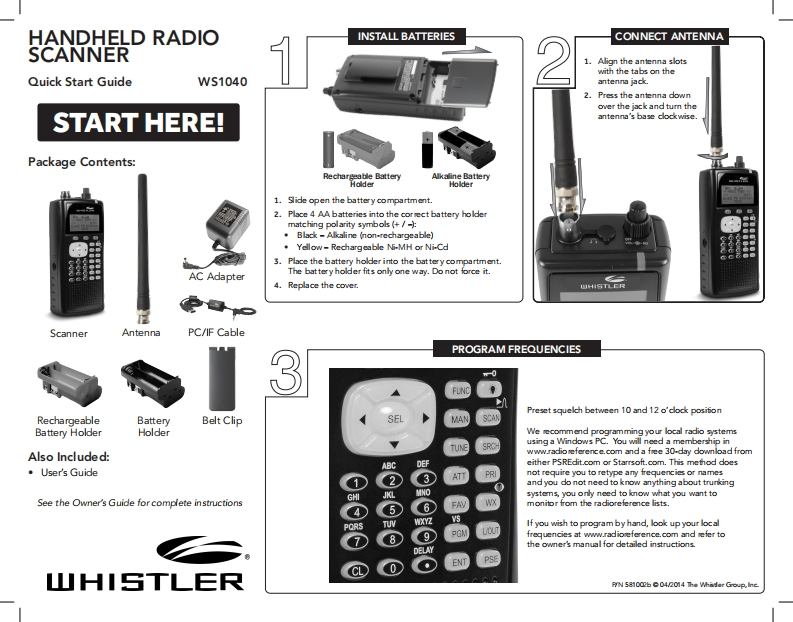
HANDHELD RADIOINSTALL BATTERIESCONNECT ANTENNASCANNER1.Align the antenna slots地with the tabs on theQuick Start GuideWs1040antenna jack.2.Press the antenna downover the jack and tum theSTART HERE!antenna's base clockwise.Package Contents:Pech图rgeable BatteAlkaline BatteryHolderHolder1.Slide open the battery compartment.2.Place 4 AA batteries into the corect battery holdermatching polarity symbols (+/-)Black-Alkaline (non-rechargeable)Yellow-Rechargeable Ni-MH or Ni-Cd5.Place the battery holder into the battery compartment.AC AdapterThe battery holder fits only one way.Do not force it.4.Replace the cover.山HISTLERScannerAntennaPC/IF CablePROGRAM FREQUENCIES3Preset squelch between 10 and 12 o'clock posifionRechargeableBatteryBelt ClipSELMANBattery HolderHolderWe ecommend programming your local radio systemsTUNESROusing a Windows PC.You will need a membership inAlso Included:wwwradioeference.com and a fee 30-day downlad from。User's GuideABCDEFeither PSREdit.com or Starrsoft.com.This method does①3not require you to retype any frequencies or namesand you do not need to know anything about trunkingsystems,you only need to know what you want toSee the Owner's Guide for complete instructionsmonitor from the radioreference lists.If you wish to program by hand,look up your local8frequencies at www.radioeference.com and sefer tothe owner's manual for detailed instructions.SE0山HISTLERPyN 581002b 04/2014 The Whader Group.Iine


请登录后查看评论内容