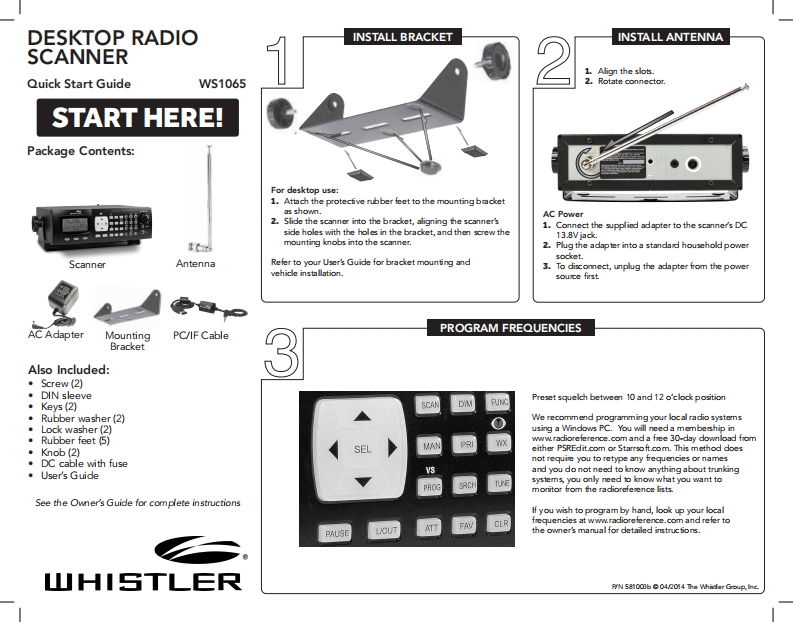
DESKTOP RADIOINSTALL BRACKETINSTALL ANTENNASCANNER1.Align the slots.Quick Start GuideW510652.Rotate connector.START HERE!Package Contents:For desktop use:1.Attach the protective rubber feet to the mounting bracketa部shon.AC Power2.Slide the scanner into the bracket,aligning the scanner's1.Connect the supplied adapter to the scanners DCside holes with the holes in the bracket,and then screw the13.8Vjack.4mounting knobs into the scanner.2.Plug the adapter into a standad household powersodket.ScannerAntennaRefer to your User's Guide for bracket mounfing and3.To discomnect,unplug the adapter from the powervehidle installation.souce firstAC AdapterPROGRAM FREQUENCIESMountingPC/IF CableBracketAlso Included:·Screw(2)·DIN sleevePreset squekh between 10 and 12 o'clock positionKeys (2)SCAN·Rubber washer(2)We recommend programming your local radio systems·Lock washer(2)using a Windows PC.You will need a membeship in·Rubber feet5】PRwww.radioreference.com and a free 30-day download foomMAN·Knob2)either PSREdit.com or Starrsoft.com.This method does·DC cable with fusenot requie you to retype any frequencies or names·User's GuideVSand you do not need to know anything about trunkingTUNEsystems,you only need to know what you want tomonitor from the radiorefesence lists.See the Owner's Guide for complete instructionsIf you wish to program by hand,look up your localCLRfequencies at www.radioreference.com and refer toPAUSEthe owner's manual for detailed instrucfons.山HISTLERPyN 581003b 04/2014 The Whider Group,Ine


请登录后查看评论内容