
第1页 / 共4页
试读已结束,还剩3页,您可下载完整版后进行离线阅读
THE END
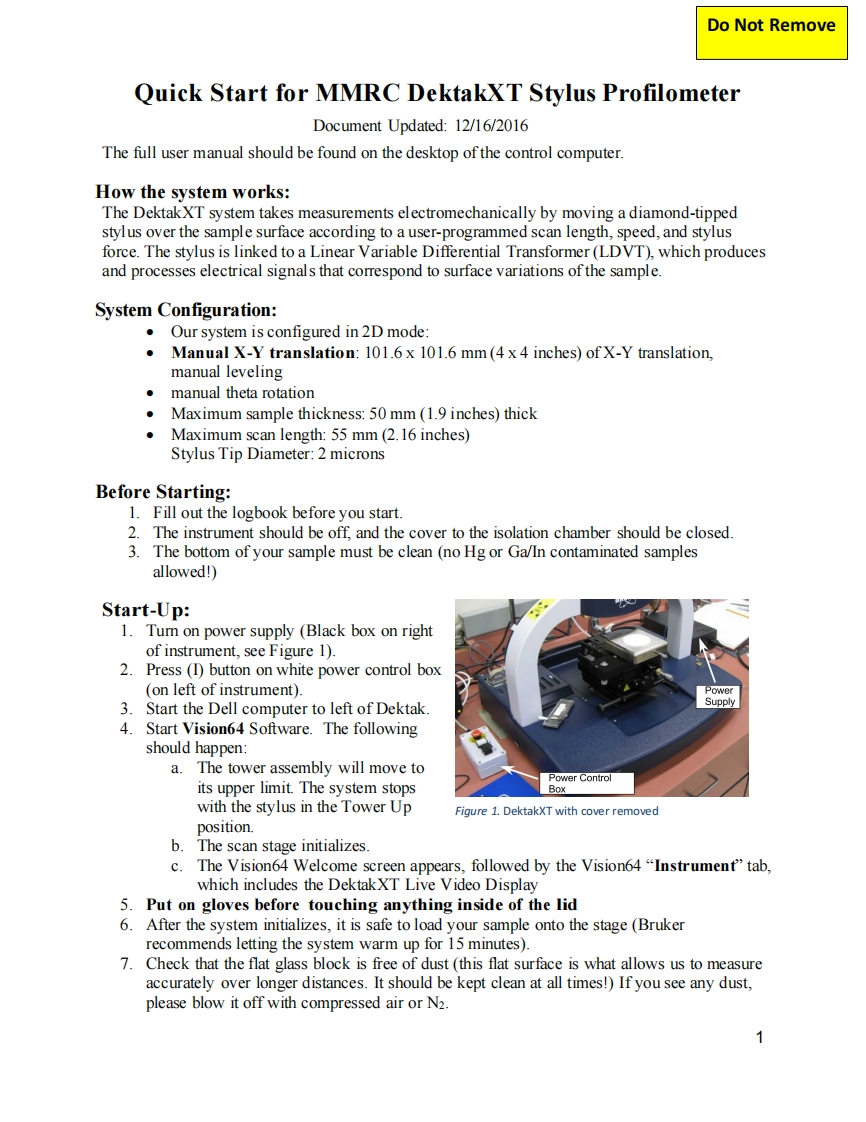
Do Not RemoveQuick Start for MMRC DektakXT Stylus ProfilometerDocument Updated:12/16/2016The full user manual should be found on the desktop of the control computer.How the system works:The DektakXT system takes measurements electromechanically by moving a diamond-tippedstylus over the sample surface according to a user-programmed scan length,speed,and stylusforce.The stylus is linked to a Linear Variable Differential Transformer (LDVT),which producesand processes electrical signals that correspond to surface variations of the sample.System Configuration:Our system is configured in 2D mode:.Manual X-Y translation:101.6 x 101.6 mm (4 x 4 inches)of X-Y translation,manual leveling.manual theta rotationMaximum sample thickness:50 mm(1.9 inches)thickMaximum scan length:55 mm(2.16 inches)Stylus Tip Diameter:2 micronsBefore Starting:1.Fill out the logbook before you start.2.The instrument should be off,and the cover to the isolation chamber should be closed.3.The bottom of your sample must be clean (no Hg or Ga/In contaminated samplesallowed!)Start-Up:1.Tumn on power supply (Black box on rightof instrument,see Figure 1).2.Press (I)button on white power control box(on left of instrument).Power3.Start the Dell computer to left of DektakSupply4.Start Vision64 Software.The followingshould happen:a.The tower assembly will move toPower Controlits upper limit.The system stopsBoxwith the stylus in the Tower UpFigure 1.DektakXT with cover removedposition.b.The scan stage initializes.c.The Vision64 Welcome screen appears,followed by the Vision64"Instrument"tab,which includes the DektakXT Live Video Display5.Put on gloves before touching anything inside of the lid6.After the system initializes,it is safe to load your sample onto the stage (Brukerrecommends letting the system warm up for 15 minutes).7.Check that the flat glass block is free of dust (this flat surface is what allows us to measureaccurately over longer distances.It should be kept clean at all times!)If you see any dust,please blow it off with compressed air or N2.1


请登录后查看评论内容