
第1页 / 共4页
试读已结束,还剩3页,您可下载完整版后进行离线阅读
THE END
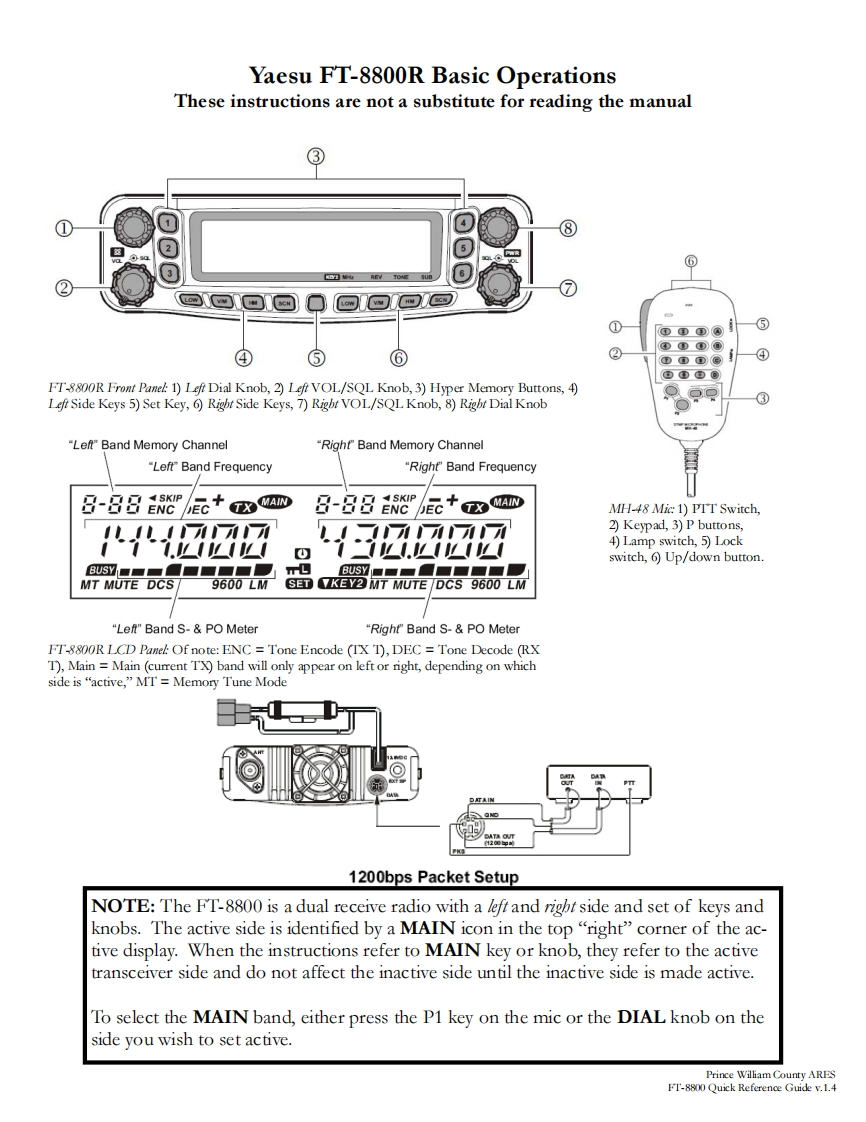
Yaesu FT-8800R Basic OperationsThese instructions are not a substitute for reading the manual⑥①①①①®⑤④⑤⑥②④①①@①①①●④⊙Do@FT-8800R Front Panel:1)Left Dial Knob,2)Lef VOL/SQL Knob,3)Hyper Memory Buttons,4)Lef Side Keys 5)Set Key,6)Right Side Keys,7)Right VOL/SQL Knob,8)Right Dial Knob"Left"Band Memory Channel"Right"Band Memory Channel"Left"Band Frequency"Right"Band Frequency-ENEC+-ENC EC+CHMH-48 Mic:1)PTT Switch,1101i7八1.升72)Keypad,3)P buttons,4)Lamp switch,5)Lockswitch,6)Up/down button.8USY■■■■■■■■CBUSY■■■■■■MT MUTE DCS9600LMSET KEY2 MT MUTE DCS 9600 LM“Lef"Band S-&PO Meter"Right"Band S-&PO MeterFT-8800R LCD Panel Of note:ENC Tone Encode (IX T),DEC Tone Decode (RXT),Main =Main (current TX)band will only appear on left or right,depending on whichside is“active,”T=Memory Tune Mode1200bps Packet SetupNOTE:The FT-8800 is a dual receive radio with a lft and rigbt side and set of keys andknobs.The active side is identified by a MAIN icon in the top"right"corner of the ac-tive display.When the instructions refer to MAIN key or knob,they refer to the activetransceiver side and do not affect the inactive side until the inactive side is made active.To select the MAIN band,either press the P1 key on the mic or the DIAL knob on theside you wish to set active.Prince William County ARESFI-8800 Quick Reference Guide v.1.4


请登录后查看评论内容