
第1页 / 共2页
试读已结束,还剩1页,您可下载完整版后进行离线阅读
THE END
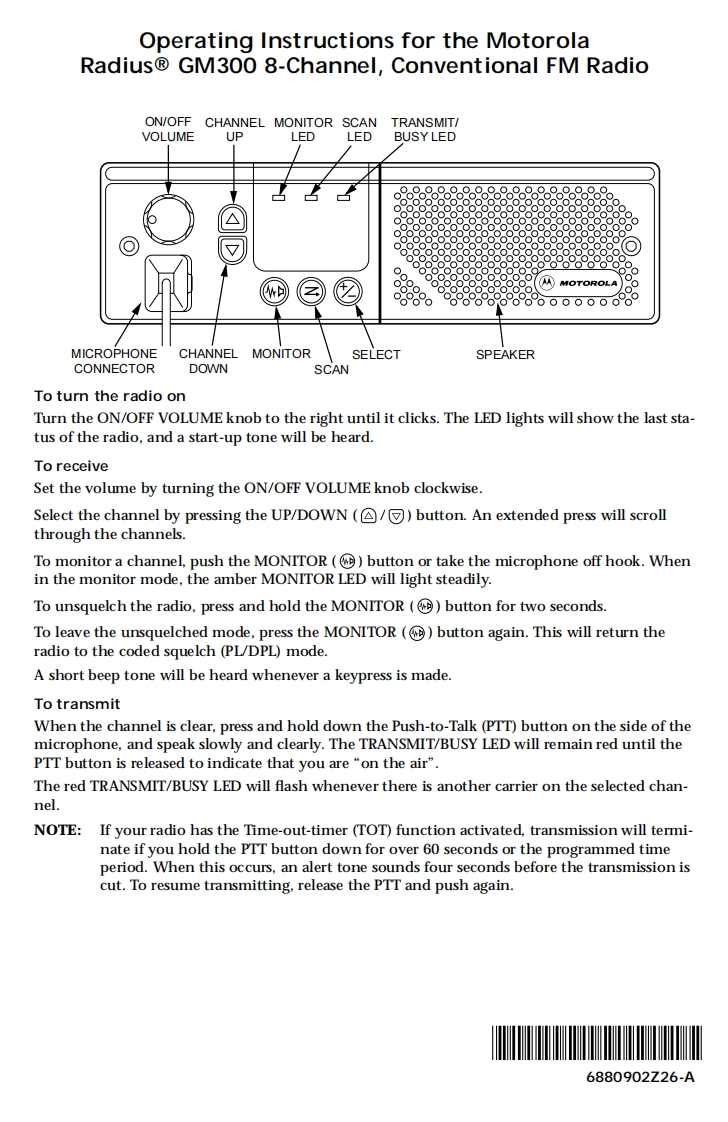
Operating Instructions for the MotorolaRadius GM300 8-Channel,Conventional FM RadioON/OFF CHANNEL MONITOR SCANTRANSMIT/VOLUMEUPLEDLEDBUSY LED△●888●o88MOTOROLA8888800000MICROPHONECHANNEL MONITORSELECTSPEAKERCONNECTORDOWNSCANTo turn the radio onTurn the ON/OFF VOLUME knob to the right until it clicks.The LED lights will show the last sta-tus of the radio,and a start-up tone will be heard.To receiveSet the volume by turning the ON/OFF VOLUME knob clockwise.Select the channel by pressing the UP/DOWN (/button.An extended press will scrollthrough the channels.To monitor a channel,push the MONITOR (button or take the microphone off hook.Whenin the monitor mode,the amber MONITOR LED will light steadily.To unsquelch the radio,press and hold the MONITOR (button for two seconds.To leave the unsquelched mode,press the MONITOR (button again.This will return theradio to the coded squelch (PL/DPL)mode.A short beep tone will be heard whenever a keypress is made.To transmitWhen the channel is clear,press and hold down the Push-to-Talk(PTT)button on the side of themicrophone,and speak slowly and clearly.The TRANSMIT/BUSY LED will remain red until thePTT button is released to indicate that you are "on the air".The red TRANSMIT/BUSY LED will flash whenever there is another carrier on the selected chan-nel.NOTE:If your radio has the Time-out-timer (TOT)function activated,transmission will termi-nate if you hold the PTT button down for over 60 seconds or the programmed timeperiod.When this occurs,an alert tone sounds four seconds before the transmission iscut.To resume transmitting,release the PTT and push again.6880902Z26-A


请登录后查看评论内容