
第1页 / 共12页
第2页 / 共12页
第3页 / 共12页
第4页 / 共12页
第5页 / 共12页
试读已结束,还剩7页,您可下载完整版后进行离线阅读
THE END
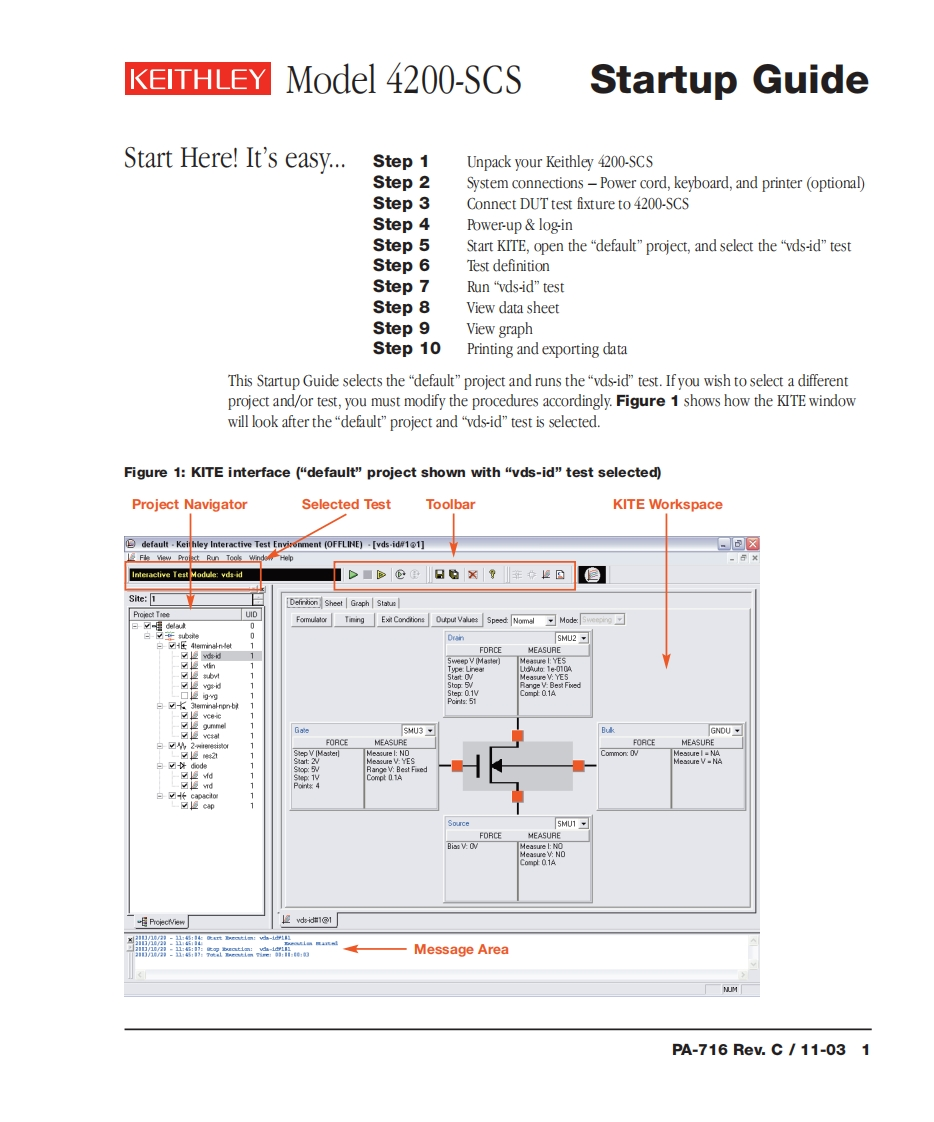
KEITHLEY Model 4200-SCSStartup GuideStart Here!It's easy..…Step 1Unpack your Keithley 4200-SCSStep 2System connections -Power cord,keyboard,and printer (optional)Step 3Connect DUT test fixture to 4200-SCSStep 4Power-up log-inStep 5Start KITE,open the"default"project,and select the"vds-id"testStep 6Test definitionStep 7Run"vds-id”testStep 8View data sheetStep 9View graphStep 10Printing and exporting dataThis Startup Guide selects the "default"project and runs the"vds-id"test.If you wish to select a differentproject and/or test,you must modify the procedures accordingly.Figure 1 shows how the KITE windowwill look after the"default"project and "vds-id"test is selected.Figure 1:KITE interface ("default"project shown with "vds-id"test selected)Project NavigatorSelected TestToolbarKITE Workspacedefault Keihley Interactive Test (OFFLINE)[vds-id11]-包☒Fie view Profxt Ran Tooks windo-×Interactive Test Module:vds-idD■@Site:1Defiriion Sheet Graph StabusProject ToeeUID0SMU2白之E4 mminal-n-城FORCEHEASURE复切SweepV [Master)Meatue l YESype:Lneat:Te-010A111Step:0.1V01aYE edPonts:51一☑e☑12gmSMU3BukGNDU%2FORCEMEASUREFORCEMEASURE1Step V Ma:terMea:ure I NAdiode11Meaiure V-NA☑慢d白fca34clSource5MU1-FORCEMEASUREgis:V CVProiecivie时:出:,Message AreaPA-716ReV.C/11-031


请登录后查看评论内容