
第1页 / 共16页
第2页 / 共16页
试读已结束,还剩14页,您可下载完整版后进行离线阅读
THE END
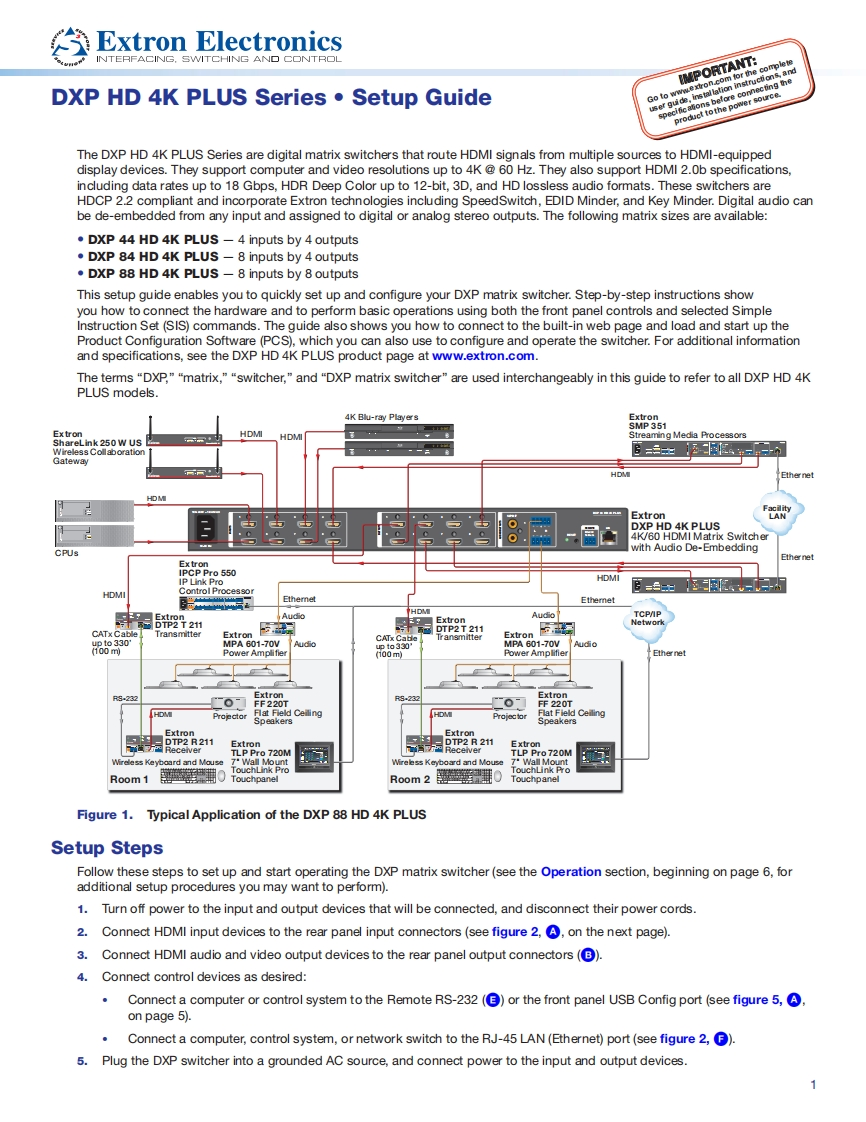
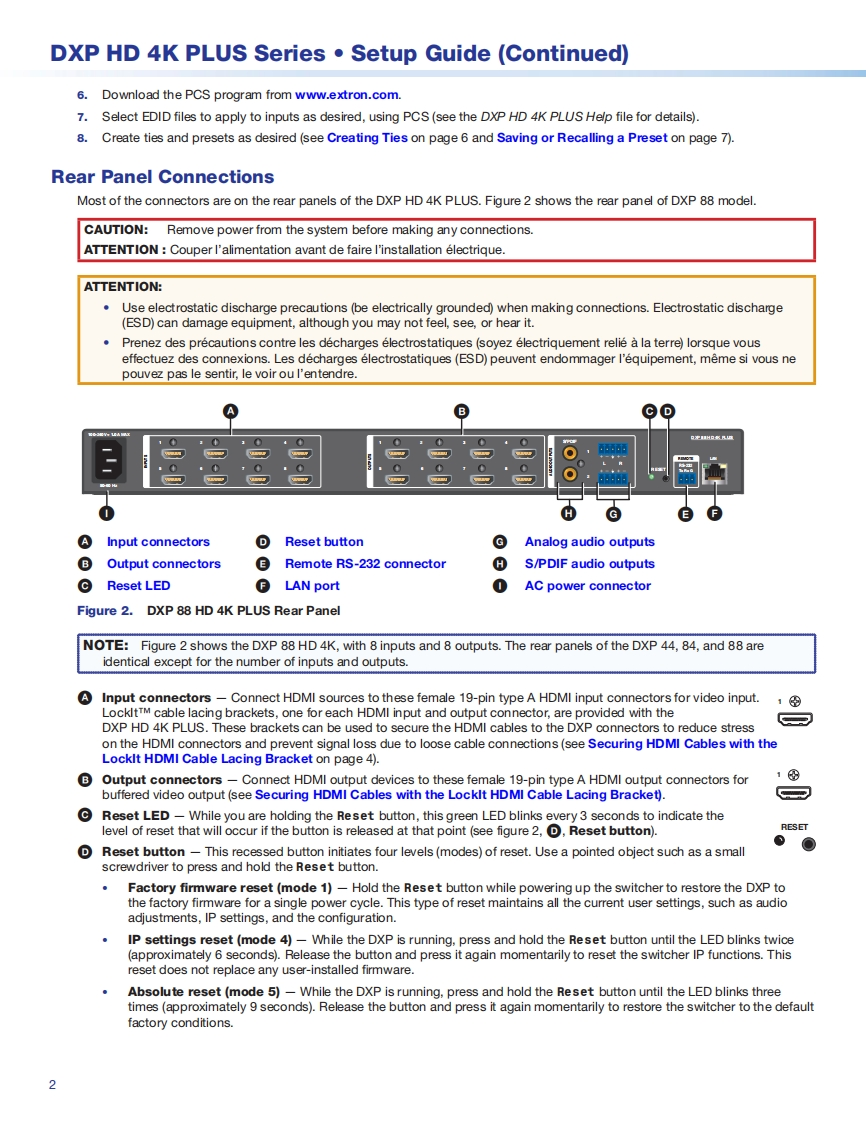
Extron ElectronicsNTERFACING.SWITCHING AND CONTROLIMPORTANT:DXP HD 4K PLUS Series.Setup GuideGo to wwe边nnecting theproduct tothe power source.alc移user guThe DXP HD 4K PLUS Series are digital matrix switchers that route HDMI signals from multiple sources to HDMI-equippeddisplay devices.They support computer and video resolutions up to 4K@60 Hz.They also support HDMI 2.0b specifications,including data rates up to 18 Gbps,HDR Deep Color up to 12-bit,3D,and HD lossless audio formats.These switchers areHDCP 2.2 compliant and incorporate Extron technologies including SpeedSwitch,EDID Minder,and Key Minder.Digital audio canbe de-embedded from any input and assigned to digital or analog stereo outputs.The following matrix sizes are available:DXP 44 HD 4K PLUS -4 inputs by 4 outputsDXP 84 HD 4K PLUS -8 inputs by 4 outputsDXP 88 HD 4K PLUS-8 inputs by 8 outputsThis setup guide enables you to quickly set up and configure your DXP matrix switcher.Step-by-step instructions showyou how to connect the hardware and to perform basic operations using both the front panel controls and selected SimpleInstruction Set (SIS)commands.The guide also shows you how to connect to the built-in web page and load and start up theProduct Configuration Software (PCS).which you can also use to configure and operate the switcher.For additional informationand specifications,see the DXP HD 4K PLUS product page at www.extron.com.The terms "DXP,""matrix,""switcher,"and "DXP matrix switcher"are used interchangeably in this guide to refer to all DXP HD 4KPLUS models.4K Blu-ray PlayersExtronSMP 351Ex tronHDMIShareLink 250 W USHDMIStreaming Media Processors旧=HDMExtronDXP HD 4K PLUS4K/60 HDMI Matrix SwitcherCPUswith Audio De-EmbeddingEthernetPr0550日=HDMIControl ProcessoEthemet5821AudioTCPAIPCATx Cable器P2211司Network0330ExtronExtron100MPA601-70WAudioto330MPA601-70WAudio00m5.230-09.230-F220TProjectorSpeakersHDMExtronExtronExtronExtronTLP Pro 720MTLP Pro720MWireless Keyboard and MouseWall MountWireless Keyboard and MouseRoom 10Room2警0panelFigure 1.Typical Application of the DXP 88 HD 4K PLUSSetup StepsFollow these steps to set up and start operating the DXP matrix switcher(see the Operation section,beginning on page 6,foradditional setup procedures you may want to perform).1.Turn off power to the input and output devices that will be connected,and disconnect their power cords.2.Connect HDMI input devices to the rear panel input connectors(see figure 2,,on the next page).3.Connect HDMI audio and video output devices to the rear panel output connectors(B).4.Connect control devices as desired:Connect a computer or control system to the Remote RS-232(3)or the front panel USB Config port (see figure 5,on page 5).Connect a computer,control system,or network switch to the RJ-45 LAN(Ethernet)port(see figure 2,).5.Plug the DXP switcher into a grounded AC source,and connect power to the input and output devices.


请登录后查看评论内容