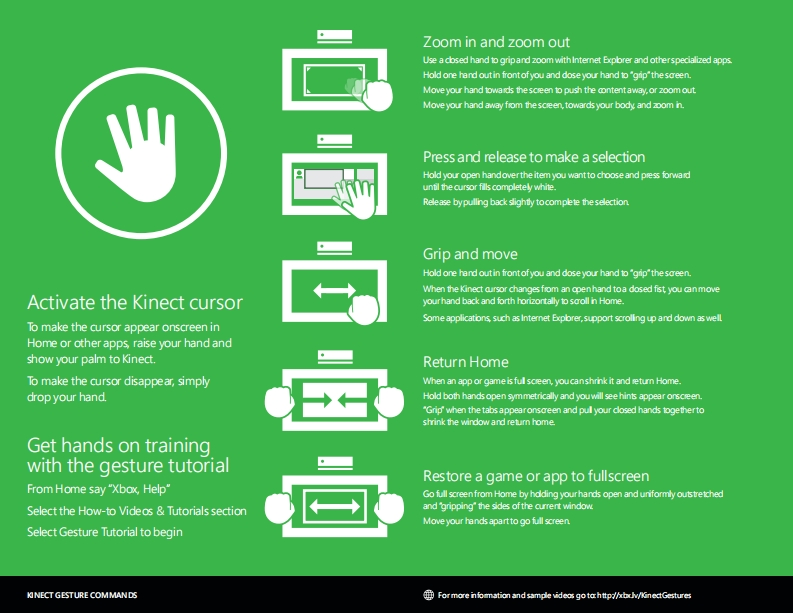
Zoom in and zoom outUse a dbsed hand to gripand zoom withIntemnet Expbrer and otherspecialized appsHold one hand out in frontofyou and dose your hand togrip"the screen.Move your hand towads thesceen to push the contentaway,or zoom outMove your hand away fom thesceen,towards your body and zoom h.Press and release to make a selectionHold your open handoverthe item you wantto choose and pess forwaduntil the cursor fills completely white.Release bypulling back slighty tocomplete the selectionGrip and moveHold one hand outin frontofyou and dose your hand togrip"thescreen.When the Kinect aursor changes fom an openhand toa dosed fist you canmoveActivate the Kinect cursoryourhand back and forth horizontally to scoll in Home.Some applications such as Intemnet Expbrer,support scroling up and down as wellTo make the cursor appear onscreen inHome or other apps raise your hand andshow your palm to Kinect.Return HomeTo make the cursor disappear,simplyWhen an app or game is ful sceen,youcanshrhnk it and eturn Home.drop your hand.Hold both handsopen symmetrically and youwill see hints appear onsceen.'Grip'when the tabs appearonscreen and pul your cosed hands togethertoshrink the window and return homeGet hands on trainingwith the gesture tutorialRestore a game or app to fullscreenFrom Home say "Xbox,Help"Go full screenfrom Home by hdding yourhands open and uniformly outstretchedSelect the How-to Videos Tutorials sectionand gripping"the sides ofthe current windowMove your hands apartto go full screenSelect Gesture Tutorial to beginKINECT GESTURE COMMANDSFormore in fomation and sample videos go torhttp//bv/KinectGestures


请登录后查看评论内容