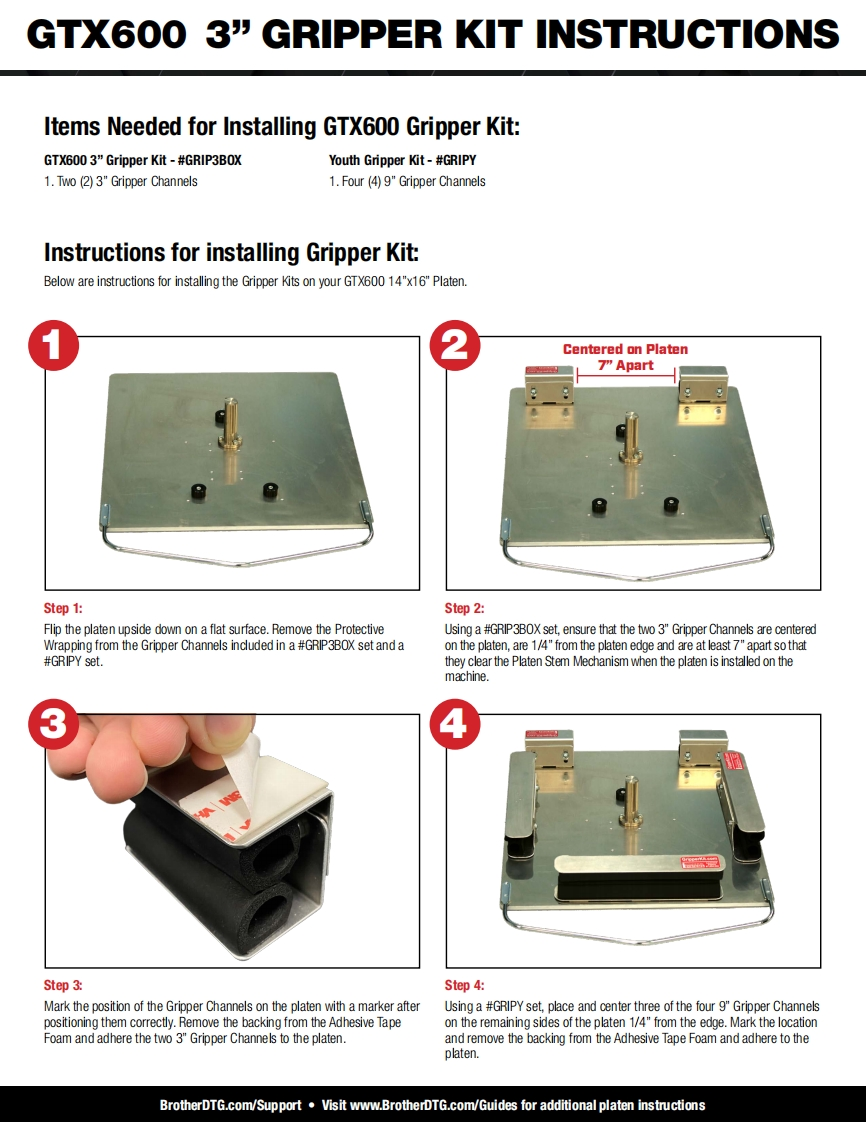
GTX600 3"GRIPPER KIT INSTRUCTIONSItems Needed for Installing GTX600 Gripper Kit:GTX600 3"Gripper Kit-#GRIP3BOXYouth Gripper Kit-#GRIPY1.Two (2)3"Gripper Channels1.Four(4)9"Gripper ChannelsInstructions for installing Gripper Kit:Below are instructions for installing the Gripper Kits on your GTX600 14"x16"Platen.Centered on Platen7"ApartStep 1:Step 2:Flip the platen upside down on a flat surface.Remove the ProtectiveUsing a #GRIP3BOX set,ensure that the two 3"Gripper Channels are centeredWrapping from the Gripper Channels included in a #GRIP3BOX set and aon the platen,are 1/4"from the platen edge and are at least 7"apart sothat#GRIPY set.they clear the Platen Stem Mechanism when the platen is installed on themachine.Step 3:Step 4:Mark the position of the Gripper Channels on the platen with a marker afterUsing a #GRIPY set,place and center three of the four 9"Gripper Channelspositioning them correctly.Remove the backing from the Adhesive Tapeon the remaining sides of the platen 1/4"from the edge.Mark the locationFoam and adhere the two 3"Gripper Channels to the platen.and remove the backing from the Adhesive Tape Foam and adhere to theplaten.BrotherDTG.com/Support.Visit www.BrotherDTG.com/Guides for additional platen instructions


请登录后查看评论内容