
第1页 / 共20页
试读已结束,还剩19页,您可下载完整版后进行离线阅读
THE END
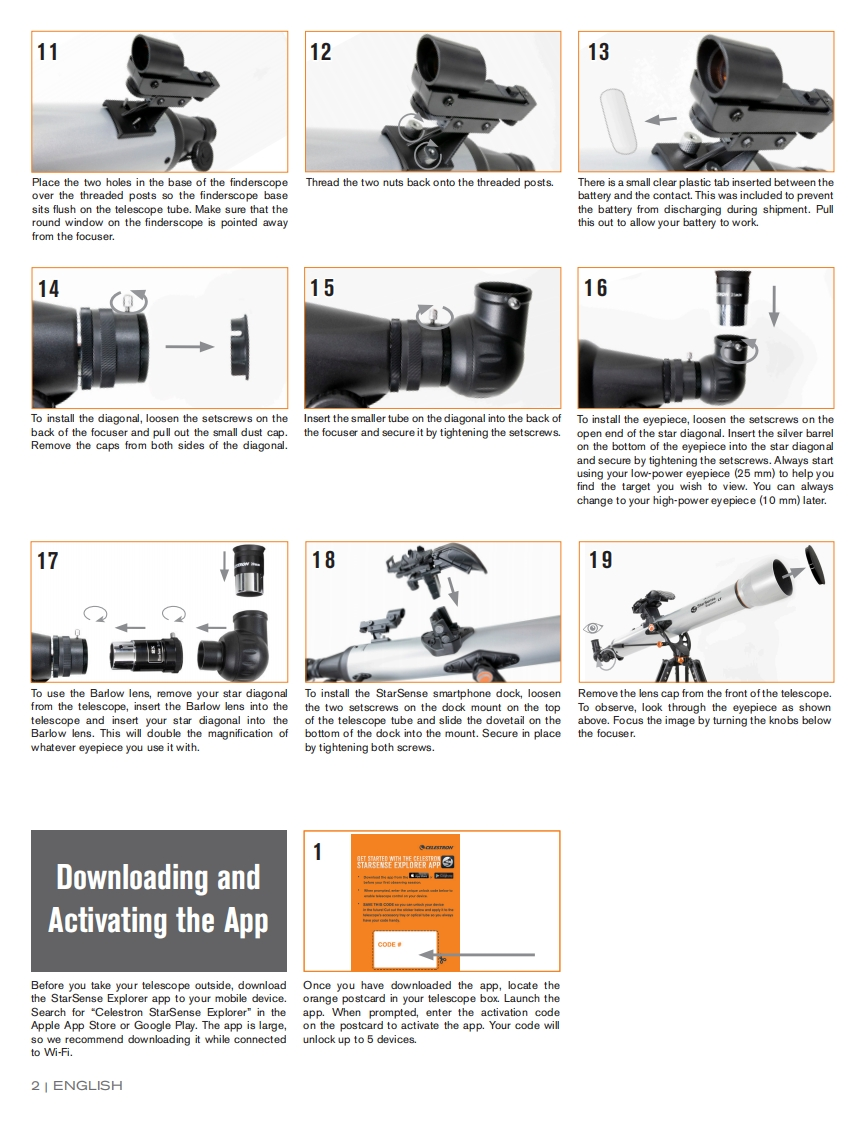
111213Place the two holes in the base of the finderscopeThread the two nuts back onto the threaded posts.There is a small clear plastic tab inserted between theover the threaded posts so the finderscope basebattery and the contact.This was included to preventsits flush on the telescope tube.Make sure that thethe battery from discharging during shipment.Pullround window on the finderscope is pointed awaythis out to allow your battery to work.from the focuser.141516To install the diagonal,loosen the setscrews on theInsert the smaller tube on the diagonal into the back ofTo install the eyepiece,loosen the setscrews on theback of the focuser and pull out the small dust capthe focuser and secure it by tightening the setscrewsopen end of the star diagonal.Insert the silver barrelRemove the caps from both sides of the diagonal.on the bottom of the eyepiece into the star diagonaland secure by tightening the setscrews.Always startusing your low-power eyepiece (25 mm)to help youfind the target you wish to view.You can alwayschange to your high-power eyepiece (10 mm)later.171819To use the Barlow lens,remove your star diagonalTo install the StarSense smartphone dock,loosenRemove the lens cap from the front ofthe telescopefrom the telescope,insert the Barlow lens into thethe two setscrews on the dock mount on the topTo observe,look through the eyepiece as showntelescope and insert your star diagonal into theof the telescope tube and slide the dovetail on theabove.Focus the image by turning the knobs belowBarlow lens.This will double the magnification ofbottom of the dock into the mount.Secure in placethe focuser.whatever eyepiece you use it with.by tightening both screws.限罗©Downloading and■Activating the AppCODEBefore you take your telescope outside,downloadOnce you have downloaded the app,locate thethe StarSense Explorer app to your mobile device.orange postcard in your telescope box.Launch theSearch for "Celestron StarSense Explorer"in theapp.When prompted,enter the activation codeApple App Store or Google Play.The app is large,on the postcard to activate the app.Your code willso we recommend downloading it while connected unlock up to 5 devices.to Wi-Fi.2I ENGLISH



请登录后查看评论内容