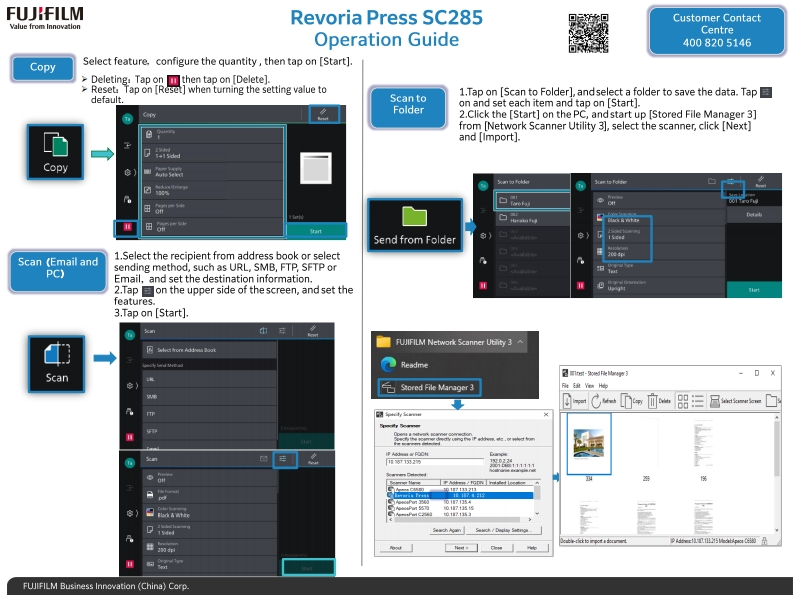
FUJ:FILMRevoria Press SC285Customer ContactValue from InnovationCentreOperation Guide4008205146CopySelect feature.configure the quantity,then tap on [Start].>Deleting:Tap on then tap on [Delete].>Reset Tap on [Reset]when turning the setting value to1.Tap on [Scan to Folder],andselect a folder to save the data.Tapdefault.Scan toFolderon and set each item and tap on [Start].C2.Click the [Start]on the PC,and start up [Stored File Manager 3]from [Network Scanner Utility 3],select the scanner,click [Next]and [Import].Copye)头n初从知Scan ts PolderTare Fas南te日mSend from FolderScan (Email and1.Select the recipient from address book or selectPC)sending method,such as URL,SMB,FTP,SFTP orEmail,and set the destination information.2.Tap on the upper side of the screen,and set thefeatures.3.Tap on [Start].FUJIFILM Network Scanner Utility 3Select fror Addnoss BoakScan己国际-影化学D X气Stored File Manager 3t脑H悔DCapy ua BSMe SoI2与么n单人5小到0制回FNibess/Foti iddled logaign017111213a下,1174107.I54日017.13线格01713线15/D5n-P1里5 edibApeo随马FUJIFILM Business Innovation (China)Corp.



请登录后查看评论内容