
第1页 / 共8页
第2页 / 共8页
试读已结束,还剩6页,您可下载完整版后进行离线阅读
THE END
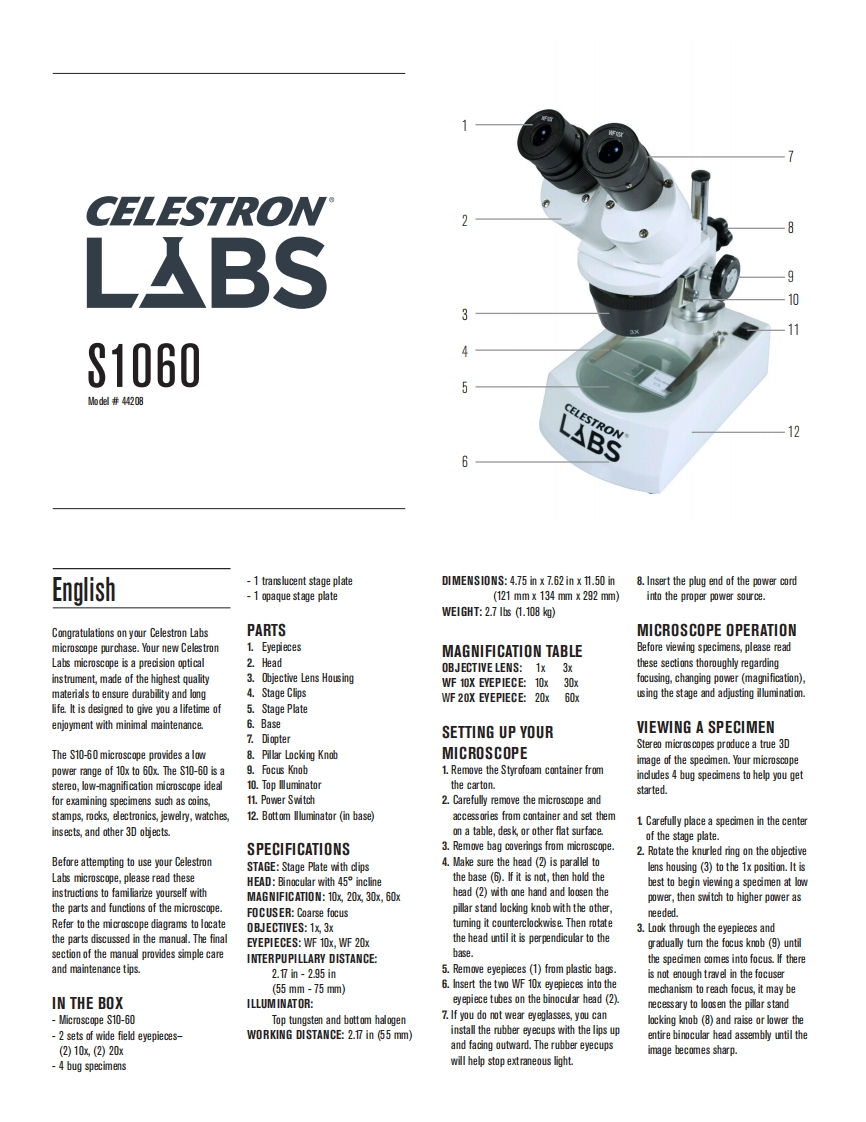
CELESTRONLABSS1060bd#4420CELESTRONLABSEnglish-1 translucent stage plateDIMENSIONS:4.75 in x 7.62 in x 11.50 in8.Insert the plug end of the power cord-1 opaque stage plate(121mmx134mmx292mm)into the proper power source.WEIGHT:2.7 Ibs (1.108 kg)Congratulations on your Celestron LabsPARTSMICROSCOPE OPERATIONmicroscope purchase.Your new Celestron1.EyepiecesMAGNIFICATION TABLEBefore viewing specimens,please readLabs microscope is a precision optical2.HeadOBJECTIVE LENS:1x 3xthese sections thoroughly regardinginstrument made of the highest quality3.Objective Lens HousingWF 10X EYEPIECE:10x 30xfocusing,changing power(magnification)materials to ensure durability and long4.Stage ClipsWF 20X EYEPIECE:20x 60xusing the stage and adjusting illumination.life is desiged togive you aifetime of5.Stage Plateenjoyment with minimal maintenance.6.BaseVIEWING A SPECIMEN7.DiopterSETTING UP YOURStereo microscopes produce a true 3DThe S10-60 microscope provides a low8.Pillar Locking KnobMICROSCOPEimage of the specimen.Your microscopepower range of 10x to 60x.The S10-60 is a9.Focus Knob1.Remove the Styrofoam container fromincudes4 bug specimens to help you getstere,ow-maficiomicroscope ideal10.Top Muminatorthe carton.started.for examining specimens such as coins,11.Power Switch2.Carefully remove the microscope andstamps,rocks,electronics,jewelry,watches12.Bottom lluminator (in base)accessories from container and set them1 Carefully place a specimen in the centerinsects,and other 3D objects.on a table,desk or other flat surface.of the stage plate.SPECIFICATIONS3.Remove bag coverings from microscope.2.Rotate the knurled ring on the objectiveBefore attempting to use your CelestronSTAGE:Stage Plate with clips4.Make sure the head (2)is parallel tolens housing (3)to the 1x position.It isLabs microscope,please read theseHEAD:Binocular with 45 inclinethe base (6).If it is not,then hold thebest to begin viewing a specimen at lowinstructions to familiarize yourself withMAGNIFICATION:10x,20x,30x,60xhead (2)with one hand and loosen thepower,then switch to higher power asthe parts and functions of the microscope.FOCUSER:Coarse focuspillar stand locking knob with the otherneeded.Refer to the microscope diagrams to locateOBJECTIVES:1x,3xtuming it counterclockwise.Then rotate3.Look through the eyepieces andthe parts discussed in the manual.The finalEYEPIECES:WF 10x,WF 20xthe head until it is perpendicular to thegradually tum the focus knob (9)untilsection of the manual provides simple careINTERPUPILLARY DISTANCE:base.the specimen comes into focus.If thereand maintenance tips.2.7in-295in5.Remove eyepieces (1)from plastic bagsis not enough travel in the focuser(55mm-75mm)6.Insert thetwo WF 10x eyepieces into themechanism to reach focus,it may beIN THE BOXILLUMINATOR:eyepiece tubeson the binocuar head (2).necessary to loosen the pillar standMicroscope $10-60Top tungsten and bottom halogen7.If you do not wear eyeglasses,you canlocking knob (8)and raise or lower the-2 sets of wide field eyepi


请登录后查看评论内容