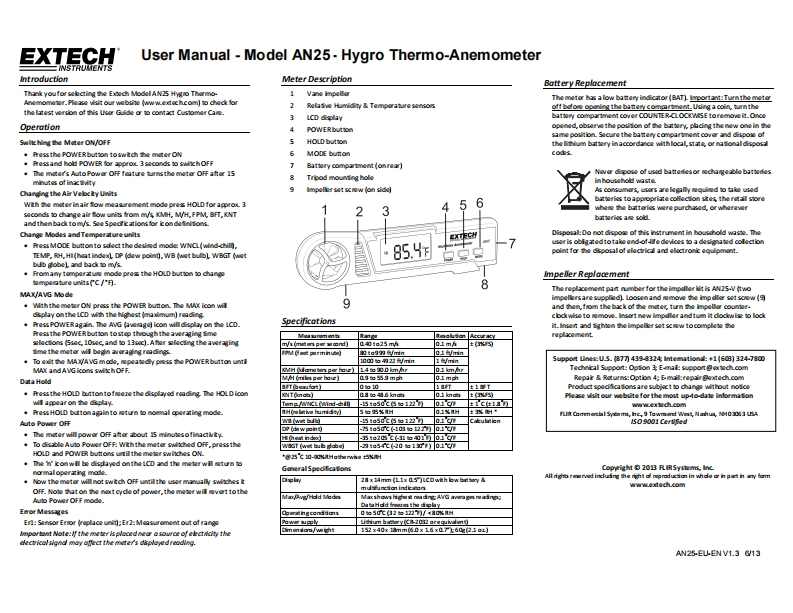
EXTECHUser Manual Model AN25-Hygro Thermo-AnemometerINSTRUCENTSIntroductionMeter DescriptionBattery ReplacementThank youfor selecting the Exech Model AN25 Hygno Tharmo-1 Vane impellorThe metor has a low battery indicator(BAT)lmportant:Tumn the meterN0Nwr.f10 e visit our web0 wwextechcom到0中N线o2Rela tve Humidity Temparature sensooff befone o2r恤the battery com四sLUg1Goih,uatethe latest version of this Usor Guide or to contact Customer Cane.3LCD dplaybattery compartment cover COUNTER-CLOCKWSE toremove it.OnceOperation4POWER buttonopened,observe the positon of the battery,phding the new one in thesame position.Seoure the battery compartment cover and dispore ofSwit hing the Meter ON/OFFHOLD buttonthe lithium battery in accordance with local,state or na tional disposl·he丝the POWER button toswitch the meter ON6MODE buttonco生·mes3 nd holdd PO球agOL3o出0 vihOFF7Battery6opa¥et(o0fe3].The moter's Auto Power OFF feature turnsthe metor OFF aftor 15Never dipose of used batteres or chargeable batteresminutes of inac iity8Tripod mouning holein househod waste9Changing the Air Velocty UnitsImpeller set scew (on siddlAs comumars,usars arelegally wquined to take used56batteries to appropri里ea0 lecion建e鲜the retail storeWth the meter in air fow measurement mode pres HOLD for approx 3conds to change a面Mawi名ommW年H,WH,FPM BFT,T34where The batteries were purdhased,or whereverb超sa最auand then back tom/s.See Spedfications for icondefinitons.Change Modes andTemperature unitsDisposal:Do not dispore of this instrument in housdhold waste.The.Press MODE button to sdect the desined mode WNCL(wind-chill.user is oblgated totake end-offe devices to a designated collectionTEMP,RH,HI(heat indexL DP (dew point),WB (wet bulbl WBGT (wet85.4spoint for the dsposal of electrical and electronic equipmant.bub globel and back to m/s.From any temperatue mode prexs the HOLD button to changeimpeller Replacementwg0 atureunits(c/"可-8The replacement part number for the impdler kit is AN25-V (twoMAX/AVG Modego金sare supplied)Lo0 nand0e20redM0tasw(月With the meter ON press the POWER button.The MAX icon will9and ten from the back of te moter,tumn thhe impellor counter.dsplay on the LCD with the highest (maximum)readingPress POWERagain The AVG白ge]icon will display on the LCD】Specificationsclodwise to move.Insart new impdler and tum it dodewise to lodkt.6an2d5 hien the impeller set父wwto0ogle经PePress the POWER button tostop theough the averaging simeMeasurementangaegutian Acerayreplxcementslectons (5sec,10sec,and to 13sc).Afer slecing the averagingTya (miten p知四nd)040te25 mh01 mAme the meter wil begin averaging readings.01/min·T白e MAXAVG mode,图e3wyPw路e POWER button unti00四如22卫/n1minSupport Lines:U.5.(877 439-8324 Intemationl:+1(608]324-7800MA and AVG icons swichOFF.KVH Odanetr ger heur)L4 to 900 kmhr01 km hrTechnical Support:Opton E-mal:support @extech.comData HoldM/H (mikn per hour)09如59m九01m动Repair Roturs:Option 4:E.mail:repair@extech.comaT0在aua】0g101下士1yTProduct spedficatons are subjoct to change without not


请登录后查看评论内容