
第1页 / 共5页
试读已结束,还剩4页,您可下载完整版后进行离线阅读
THE END
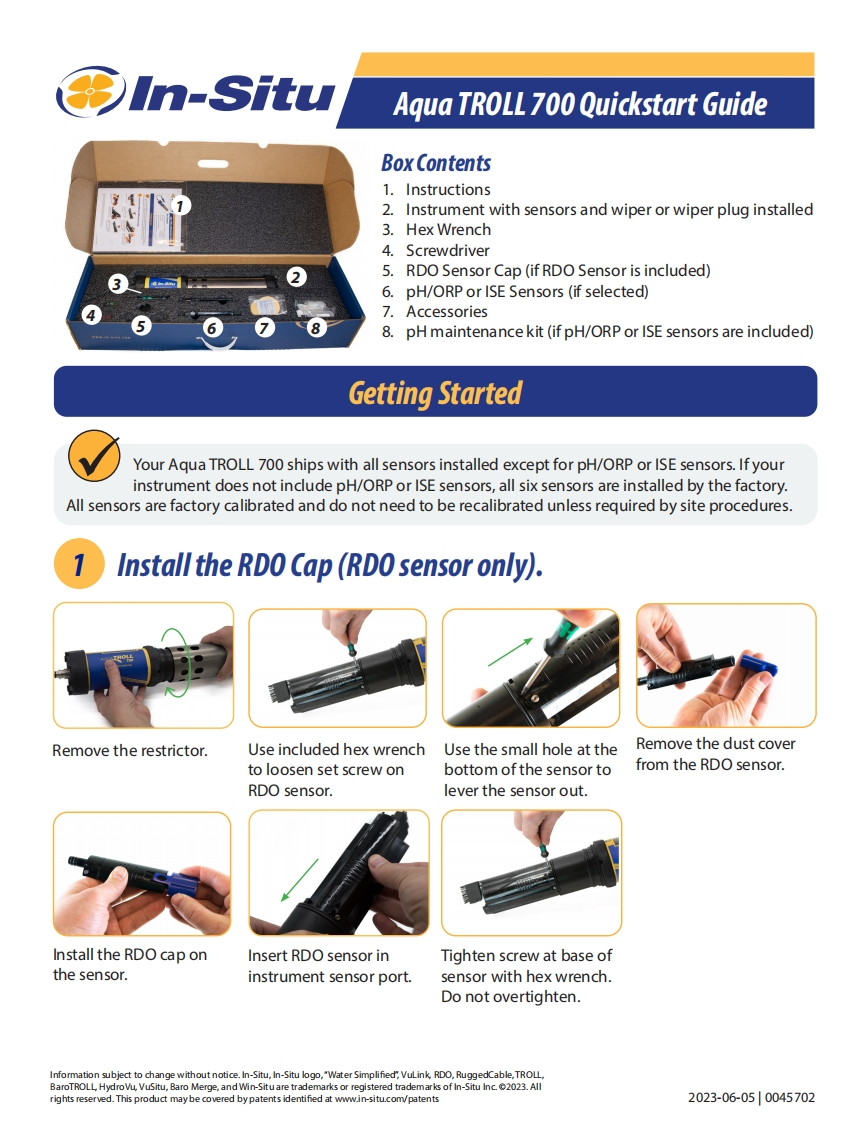
In-SituAqua TROLL 700 Quickstart GuideBox Contents1.Instructions2.Instrument with sensors and wiper or wiper plug installed3.Hex Wrench4.Screwdriver5.RDO Sensor Cap(if RDO Sensor is included)36.pH/ORP or ISE Sensors (if selected)7.Accessories68.pH maintenance kit (if pH/ORP or ISE sensors are included)Getting StartedYour Aqua TROLL 700 ships with all sensors installed except for pH/ORP or ISE sensors.If yourinstrument does not include pH/ORP or ISE sensors,all six sensors are installed by the factory.All sensors are factory calibrated and do not need to be recalibrated unless required by site procedures.Install the RDO Cap(RDO sensor only).Remove the restrictor.Use included hex wrench Use the small hole at theRemove the dust coverto loosen set screw onbottom of the sensor tofrom the RDO sensor.RDO sensor.lever the sensor out.Install the RDO cap onInsert RDO sensor inTighten screw at base ofthe sensor.instrument sensor port.sensor with hex wrench.Do not overtighten.Information subject to change without notice.In-Situ,In-Situ logo,"Water Simplified,VuLink RDO,RuggedCable,TROLL,BaroTROLL HydroVu,VuSitu,Baro Merge,and Win-Situare trademarks or registered trademarks of In-Situ Inc.2023.Allrights reserved.This product may be covered by patents identified at www.in-situ.com/patents2023-06-05|0045702


请登录后查看评论内容