
第1页 / 共3页
试读已结束,还剩2页,您可下载完整版后进行离线阅读
THE END
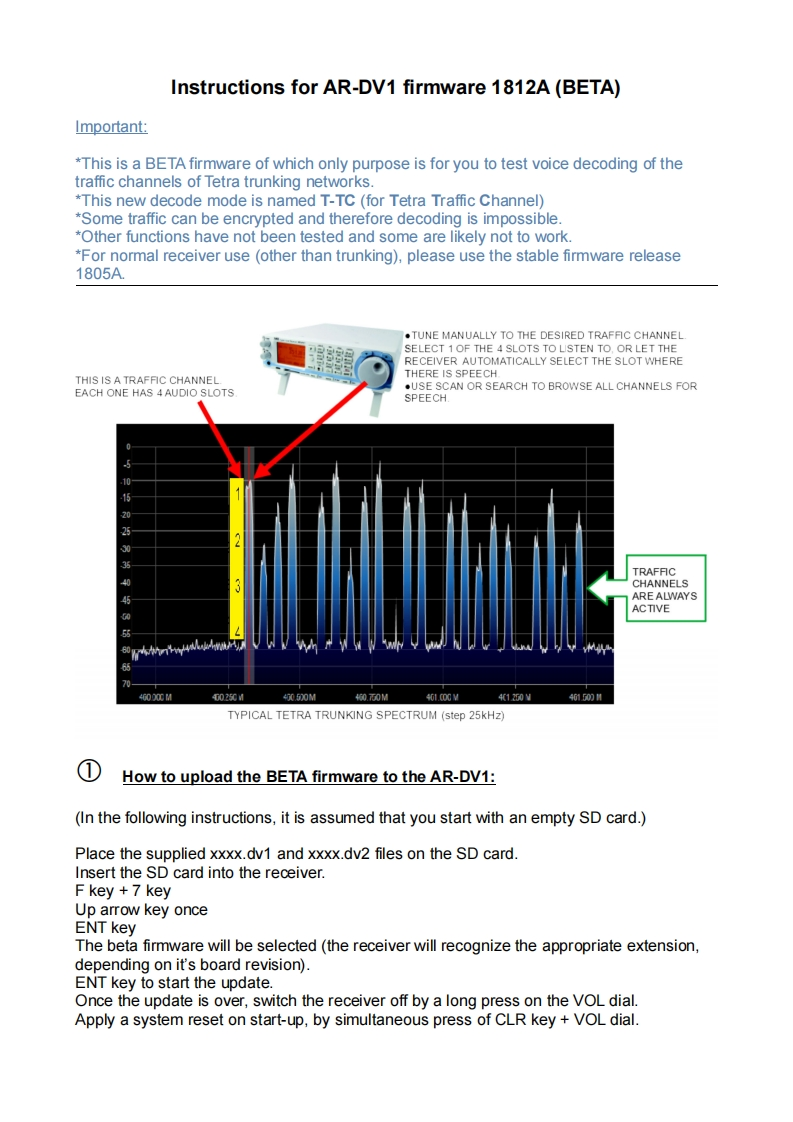
Instructions for AR-DV1 firmware 1812A(BETA)Important:*This is a BETA firmware of which only purpose is for you to test voice decoding of thetraffic channels of Tetra trunking networks.*This new decode mode is named T-TC(for Tetra Traffic Channel)*Some traffic can be encrypted and therefore decoding is impossible.*Other functions have not been tested and some are likely not to work*For normal receiver use (other than trunking),please use the stable firmware release1805A.TUNE MANUALLY TO THE DESIRED TRAFFIC CHANNELSELECT 1 OF THE 4 SLOTS TO LSTEN TO,OR LET THERECEIVER AUTOMATICALLY SELECT THE SLOT WHERETHERE IS SPEECHTHIS IS A TRAFFIC CHANNELEACH ONE HAS 4 AUDIO SLOTS.USE SCAN OR SEARCH TO BROWSE ALL CHANNELS FORSPEECH102530TRAFAIC4CHANNELSARE ALWAYSACTIVE4G000C M002M00M0.元0M401.00M412T0N46的00MTYPICAL TETRA TRUNKING SPECTRUM(step 25kHz)①How to upload the BETA firmware to the AR-DV1:(In the following instructions,it is assumed that you start with an empty SD card.)Place the supplied xxxx.dv1 and xxxx.dv2 files on the SD card.Insert the SD card into the receiver.F key +7 keyUp arrow key onceENT keyThe beta firmware will be selected (the receiver will recognize the appropriate extension,depending on it's board revision).ENT key to start the update.Once the update is over,switch the receiver off by a long press on the VOL dial.Apply a system reset on start-up,by simultaneous press of CLR key VOL dial.


请登录后查看评论内容