
第1页 / 共8页
试读已结束,还剩7页,您可下载完整版后进行离线阅读
THE END
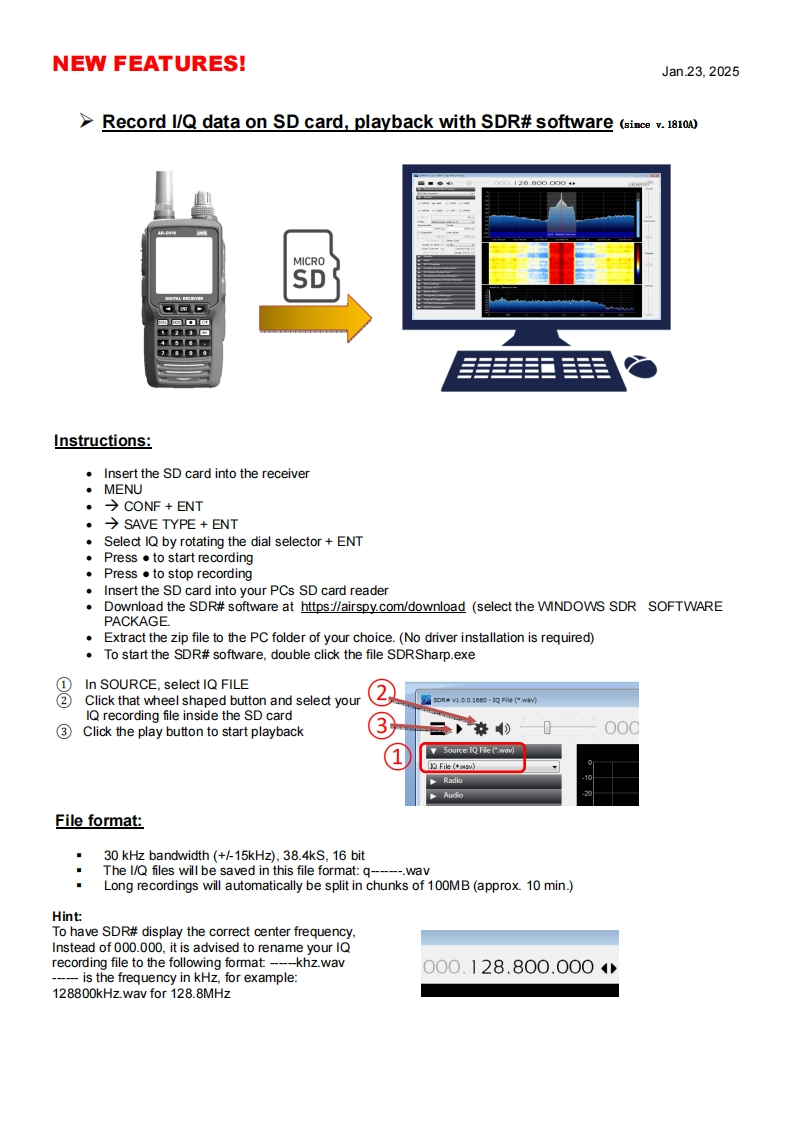
NEW FEATURES!Jan23,2025>Record I/Q data on SD card,playback with SDR#software (ince v.1810120.00o.0004MICROSD✉m-23的436口agg毛手王手羊Instructions:Insert the SD card into the receiver·MENU·→CONF+ENT·→SAVE TYPE+ENTSelect IQ by rotating the dial selector ENT◆Press●to start recording.Press to stop recordingInsert the SD card into your PCs SD card readerDownload the SDR#software at https://airspy.com/download (select the WINDOWS SDR SOFTWAREPACKAGE.Extract the zip file to the PC folder of your choice.(No driver installation is required)To start the SDR#software,double click the file SDRSharp.exe1 In SOURCE,select IQ FILE②Click that wheel shaped button and select yourIQ recording file inside the SD card3 Click the play button to start playback30o00Source IQ Fle (".wav)File》RadloFile format:30 kHz bandwidth (+/-15kHz).38.4kS.16 bitThe l/Q files will be saved in this file format:q----.wavLong recordings will automatically be split in chunks of 100MB(approx.10 min.)HintTo have SDR#display the correct center frequencyInstead of 000.000,it is advised to rename your IQrecording file to the following format:---khz.wav000.128.800.000--is the frequency in kHz,for example:128800kHz.wav for 128.8MHz


请登录后查看评论内容