
第1页 / 共3页
试读已结束,还剩2页,您可下载完整版后进行离线阅读
THE END
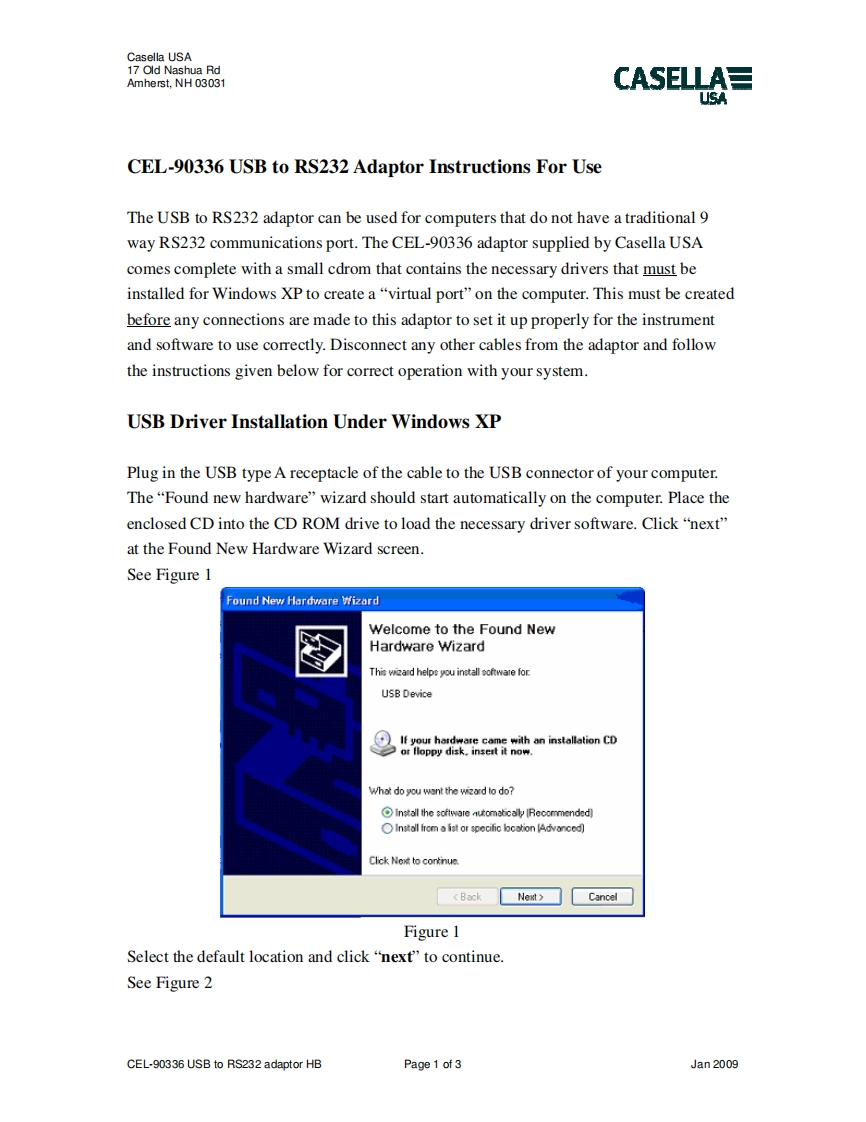
Casella USA17 Old Nashua RdAmherst,NH03031CASELLA日USACEL-90336 USB to RS232 Adaptor Instructions For UseThe USB to RS232 adaptor can be used for computers that do not have a traditional 9way RS232 communications port.The CEL-90336 adaptor supplied by Casella USAcomes complete with a small cdrom that contains the necessary drivers that must beinstalled for Windows XP to create a "virtual port"on the computer.This must be createdbefore any connections are made to this adaptor to set it up properly for the instrumentand software to use correctly.Disconnect any other cables from the adaptor and followthe instructions given below for correct operation with your system.USB Driver Installation Under Windows XPPlug in the USB type A receptacle of the cable to the USB connector of your computer.The "Found new hardware"wizard should start automatically on the computer.Place theenclosed CD into the CD ROM drive to load the necessary driver software.Click "next"at the Found New Hardware Wizard screen.See Figure 1Found New Hardware WizardWelcome to the Found NewHardware WizardThis wezand helps you install softwate forUSB DeviceIf your hardware cme with an installation CDor Hoppy disk.insest it now.What do you want the wizard to do?Install the software numtical (Recommended)OInstall from a list or specific lcstion [Advanced)Click Ne to continueCancelFigure 1Select the default location and click"next"to continue.See Figure 2CEL-90336 USB to RS232 adaptor HBPage 1 of 3Jan 2009


请登录后查看评论内容