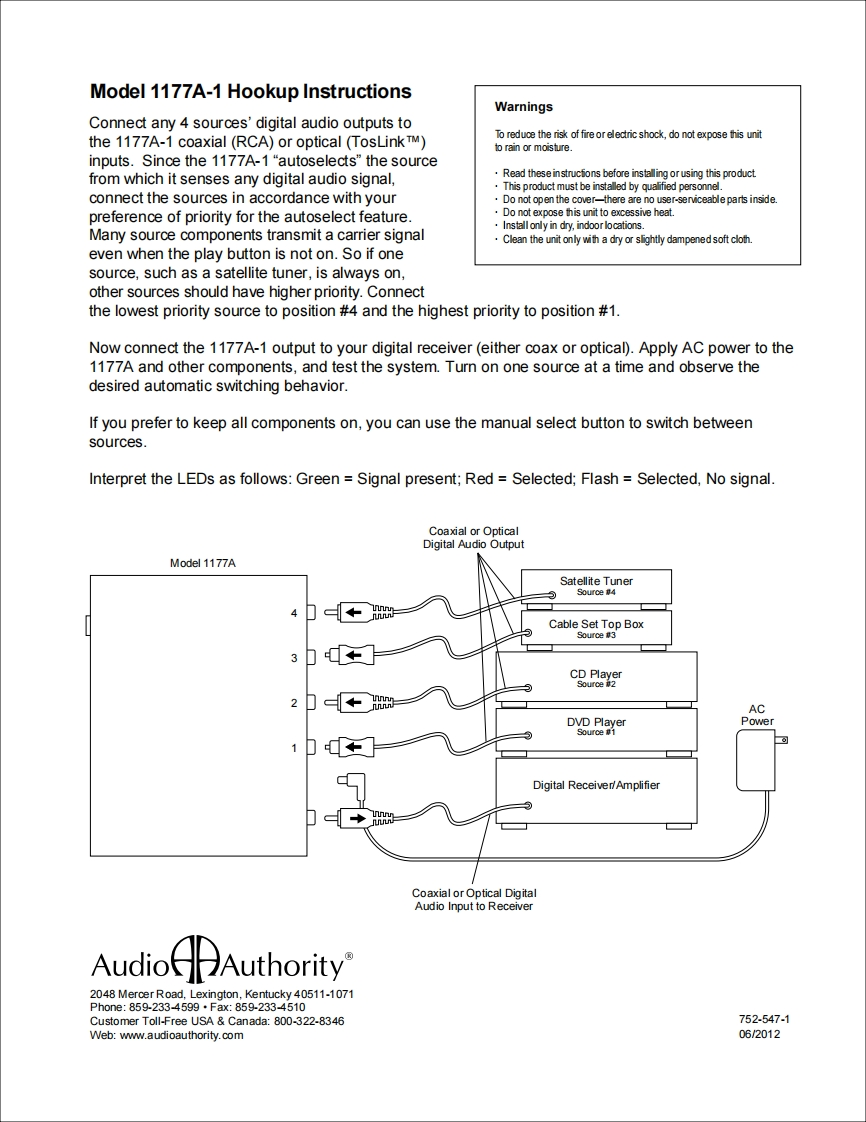
Model 1177A-1 Hookup InstructionsWarningsConnect any 4 sources'digital audio outputs tothe 1177A-1 coaxial (RCA)or optical (TosLinkTM)To reduce the risk of fire orelectric shock,do not expose this unitto rain or moisture.inputs.Since the 1177A-1 "autoselects"the sourcefrom which it senses any digital audio signal,Read these instrucfions before installing or using this productThis product must be installed by qualified personnel.connect the sources in accordance with yourDo not open the cover-there are no user-serviceable parts inside.preference of priority for the autoselect feature.Do not expose this unit to excessive heat.Install only in dry,indoor locations.Many source components transmit a carrier signalClean the unit only with a dry or slightly dampened soft cloth.even when the play button is not on.So if onesource,such as a satellite tuner,is always on,other sources should have higher priority.Connectthe lowest priority source to position #4 and the highest priority to position #1.Now connect the 1177A-1 output to your digital receiver(either coax or optical).Apply AC power to the1177A and other components,and test the system.Turn on one source at a time and observe thedesired automatic switching behavior.If you prefer to keep all components on,you can use the manual select button to switch betweensources.Interpret the LEDs as follows:Green Signal present;Red Selected;Flash Selected,No signal.Coaxial or OpticalDigital Audio OutputModel 1177ASatellite Tuner4力←Cable Set Top Box0山■c833+CDPYer2力-←ACPower1Digital Receiver/AmplifierCoaxial or Optical DigitalAudio Input to ReceiverAudioDAuthority'2048 Mercer Road,Lexington,Kentucky 40511-1071Phone:859-233-4599·Fax:859-233-4510Customer Toll-Free USA Canada:800-322-8346752-547-1Web:www.audioauthority.com06/2012


请登录后查看评论内容