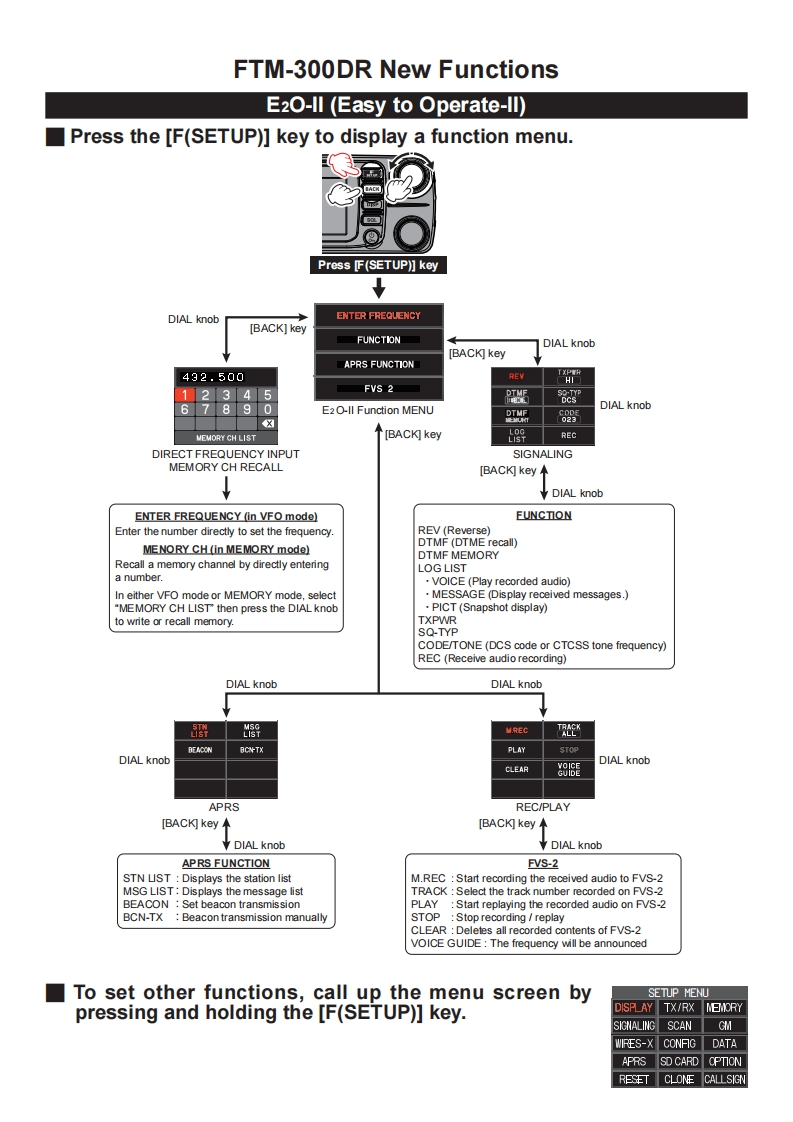
FTM-300DR New FunctionsE2O-ll (Easy to Operate-ll)Press the [F(SETUP)]key to display a function menu.Press [F(SETUP】kCyDIAL knobENTER FREQUENCY[BACK]keyFUNCTIONDIAL knob[BACK]keyAPRS FUNCTION432.500REV102345FVS2■Dcs67890E2O-ll Function MENUDIAL knobXD82MEMORY CH LIST[BACK]keyRECDIRECT FREQUENCY INPUTSIGNALINGMEMORY CH RECALL[BACK灯key◆DIAL knobENTER FREQUENCY (in VFO mode)FUNCTIONEnter the number directly to set the frequency.REV(Reverse)MENORY CH (in MEMORY mode)DTMF (DTME recall)DTMF MEMORYRecall a memory channel by directly enteringLOG LISTa number.VOICE (Play recorded audio)In either VFO mode or MEMORY mode,selectMESSAGE(Display received messages.)"MEMORY CH LIST then press the DIAL knobPICT(Snapshot display)to wrte or recall memory.TXPWRSQ-TYPCODE/TONE(DCS code or CTCSS tone frequency)REC (Receive audio recording)DIAL knobDIAL knob澀僻M.RECTRLEKBEACONBCN-TXPLAY9T09DIAL knob916图DIAL knobCLEARAPRSREC/PLAY[BACK]key◆[BACK]key个DIAL knobDIAL knobAPRS FUNCTIONFVS-2STN LST Displays the station listM.REC Start recording the received audio to FVS-2MSG LIST:Displays the message listTRACK Select the track number recorded on FVS-2BEACON Set beacon transmissionPLAY Start replaying the recorded audio on FVS-2BCN-TX Beacon transmission manuallySTOP Stop recording replayCLEAR Deletes all recorded contents of FVS-2VOICE GUIDE The frequency will be announcedTo set other functions,call up the menu screen bySETUP MENUpressing and holding the [F(SETUP)]key.DISPLAY TX/RX NEMORYSIGNALING SCAN GMWIRES-X CONFIG DATAAPRS SD CARD OPTIONRESET CLONE CALLSIGN



请登录后查看评论内容