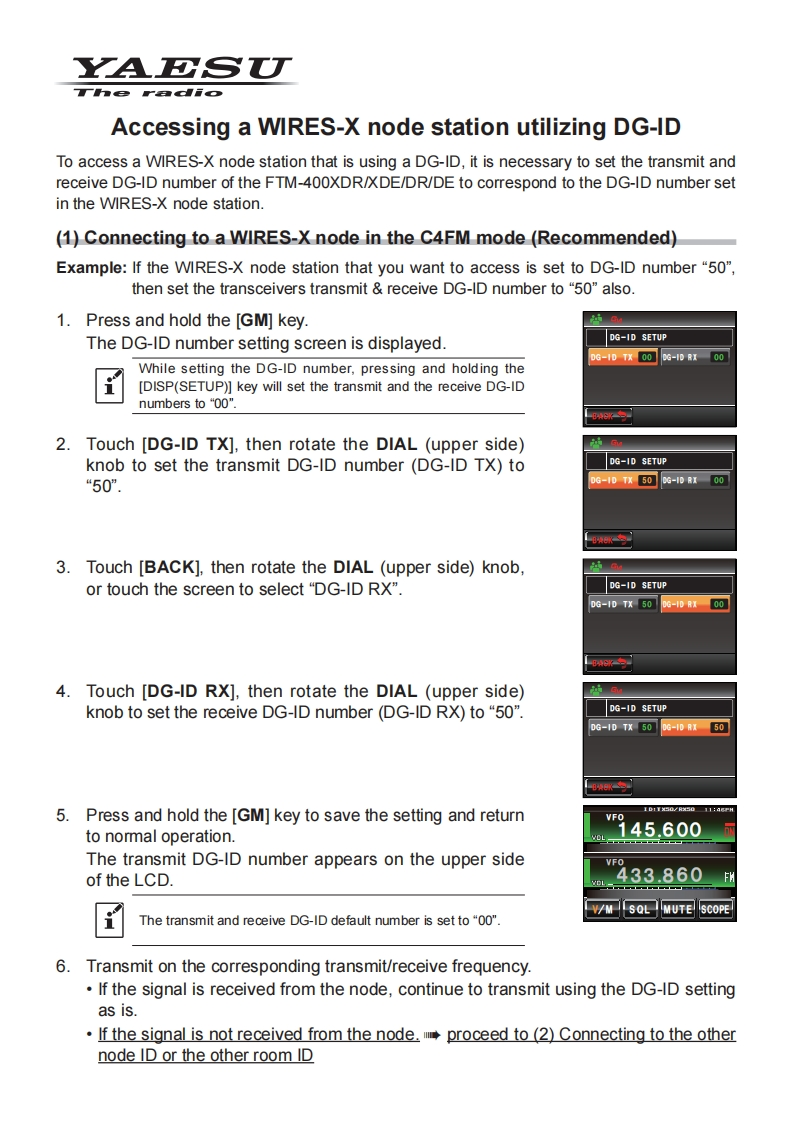
YAESUThe radioAccessing a WIRES-X node station utilizing DG-IDTo access a WIRES-X node station that is using a DG-ID,it is necessary to set the transmit andreceive DG-ID number of the FTM-400XDR/XDE/DR/DE to correspond to the DG-ID number setin the WIRES-X node station.(1)Connecting to a WIRES-X node in the C4FM mode (Recommended)Example:If the WIRES-X node station that you want to access is set to DG-ID number "50",then set the transceivers transmit receive DG-ID number to "50"also.1.Press and hold the [GM]key.The DG-ID number setting screen is displayed.DG-ID SETUPD6-1D%00G-08r00While setting the DG-ID number,pressing and holding the[DISP(SETUP)]key will set the transmit and the receive DG-IDnumbers to“o0"2.Touch [DG-ID TX],then rotate the DIAL (upper side)knob to set the transmit DG-ID number (DG-ID TX)toDG-ID SETUP“50”.DG-ID TX 50DG-ID RX 003.Touch [BACK].then rotate the DIAL (upper side)knob,or touch the screen to select "DG-ID RX".DG-ID SETUPDG-1DTX506-01004.Touch [DG-ID RX],then rotate the DIAL (upper side)knob to set the receive DG-ID number (DG-ID RX)to "50".DG-ID SETUP0G-1DTx5006-40B1505.Press and hold the [GM]key to save the setting and return1B1T50VR5011:aHVFOto normal operation.145.600The transmit DG-ID number appears on the upper sideVFOof the LCD.433.860FV/M SQLIMUTE SCOPEThe transmit and receive DG-ID default number is set to "00".6.Transmit on the corresponding transmit/receive frequency.If the signal is received from the node,continue to transmit using the DG-ID settingas is.If the signal is not received from the node.proceed to (2)Connecting to the othernode ID or the other room ID



请登录后查看评论内容