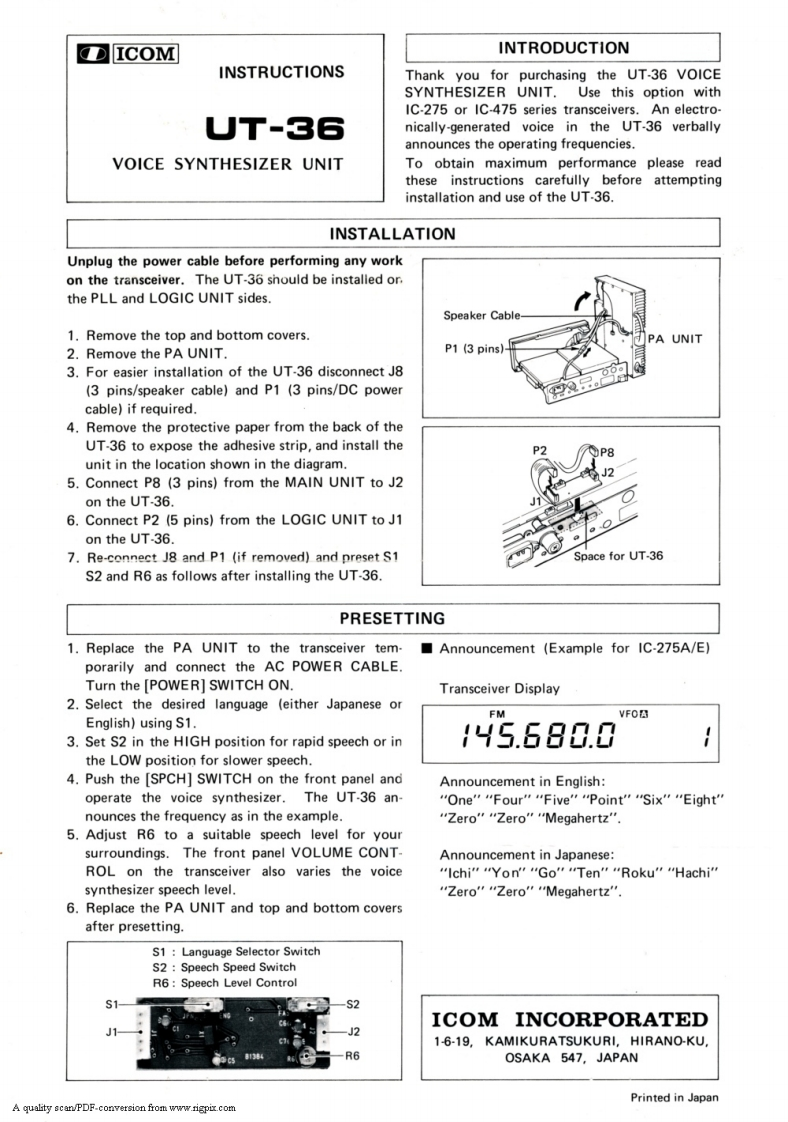
ICOMINTRODUCTIONINSTRUCTIONSThank you for purchasing the UT-36 VOICESYNTHESIZER UNIT.Use this option withIC-275 or IC-475 series transceivers.An electro-UT-36nically-generated voice in the UT-36 verballyannounces the operating frequencies.VOICE SYNTHESIZER UNITTo obtain maximum performance please readthese instructions carefully before attemptinginstallation and use of the UT-36.INSTALLATIONUnplug the power cable before performing any workon the transceiver.The UT-36 should be installed or.the PLL and LOGIC UNIT sides.Speaker Cable1.Remove the top and bottom covers.PA UNIT2.Remove the PA UNIT.P1 (3 pins)3.For easier installation of the UT-36 disconnect J8(3 pins/speaker cable)and P1 (3 pins/DC powercable)if required.4.Remove the protective paper from the back of theUT-36 to expose the adhesive strip,and install the8unit in the location shown in the diagram.5.Connect P8 (3 pins)from the MAIN UNIT to J2on the UT-36.6.Connect P2 (5 pins)from the LOGIC UNIT to J1on the UT-36.7.Re-connect J8 and P1 (if removed)and preset S1Space for UT-36S2 and R6 as follows after installing the UT-36.PRESETTING1.Replace the PA UNIT to the transceiver tem-Announcement (Example for IC-275A/E)porarily and connect the AC POWER CABLE.Turn the [POWER]SWITCH ON.Transceiver Display2.Select the desired language (either Japanese orFMEnglish)using S1.3.Set S2 in the HIGH position for rapid speech or in45.680.0the LOW position for slower speech.4.Push the [SPCH]SWITCH on the front panel andAnnouncement in English:operate the voice synthesizer.The UT-36 an-“One"“Four"“Five“Point'"“Six"“Eight'nounces the frequency as in the example.“Zero”“Zero"Megahertz'"5.Adjust R6 to a suitable speech level for yoursurroundings.The front panel VOLUME CONT-Announcement in Japanese:ROL on the transceiver also varies the voice“Ichi""Yon''“Go"“Ten"“Roku"“Hachi'"synthesizer speech level."Zero"“Zero"“Megahertz'6.Replace the PA UNIT and top and bottom coversafter presetting.S1 Language Selector SwitchS2:Speech Speed SwitchR6:Speech Level ControlS1ICOM INCORPORATEDJ21-6-19,KAMIKURATSUKURI,HIRANO-KU,R6OSAKA 547,JAPANPrinted in JapanA quality scan/PDF-conversion from www.rigpir.com



请登录后查看评论内容