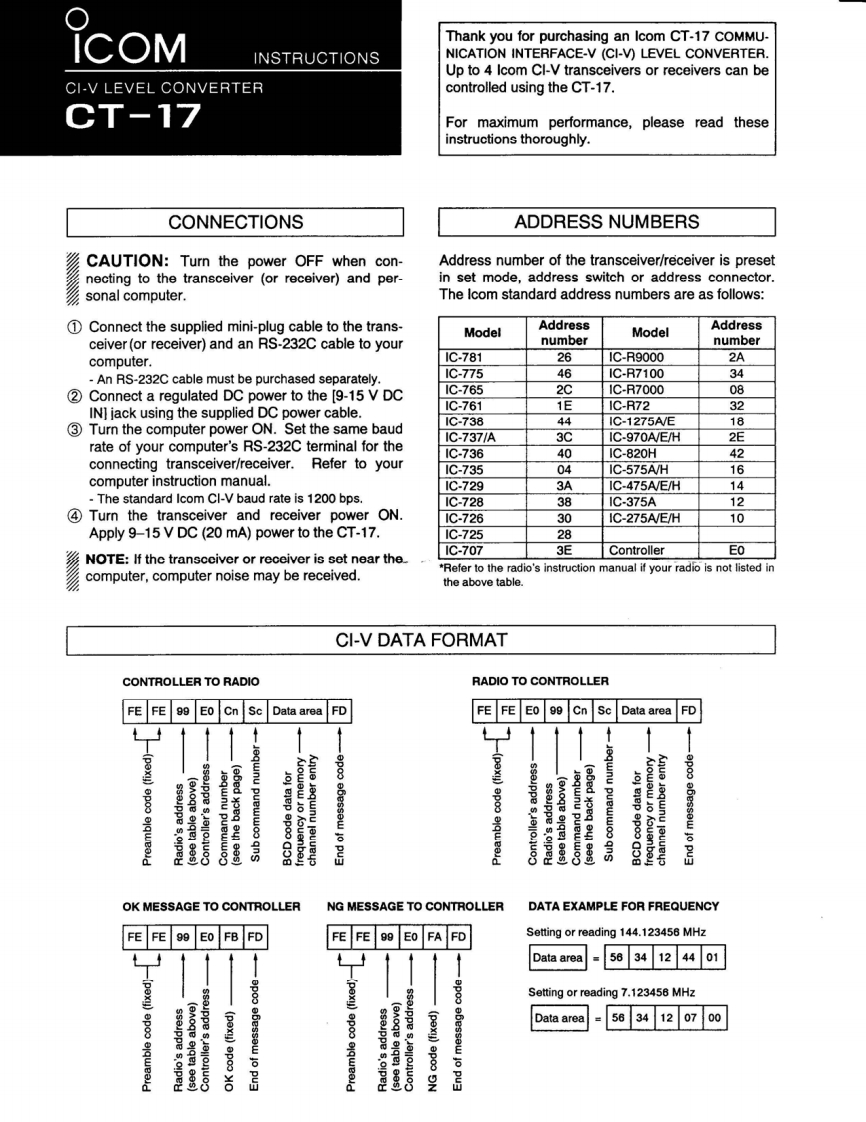
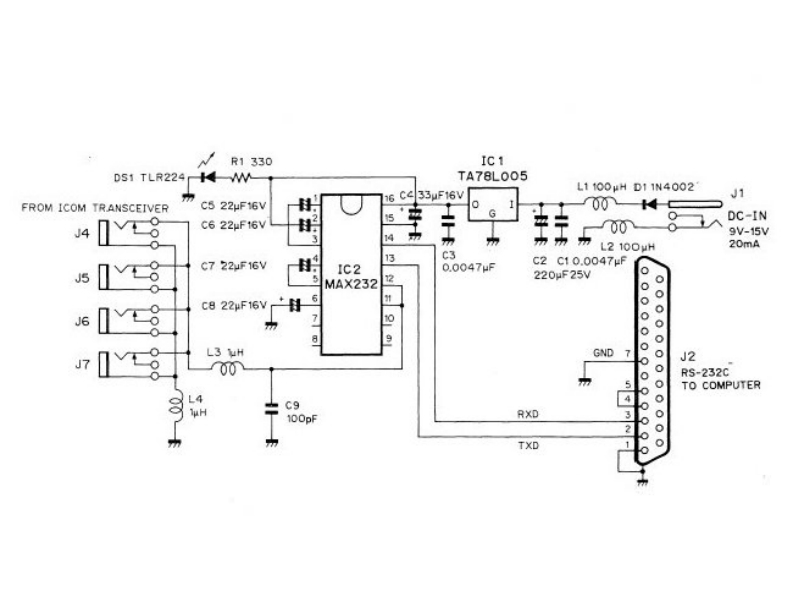
IcOMThank you for purchasing an Icom CT-17 COMMU-INSTRUCTIONSNICATION INTERFACE-V(CI-V)LEVEL CONVERTER.Up to 4 Icom CI-V transceivers or receivers can beCI-V LEVEL CONVERTERcontrolled using the CT-17.CT-17For maximum performance,please read theseinstructions thoroughly.CONNECTIONSADDRESS NUMBERSCAUTION:Turn the power OFF when con-Address number of the transceiver/receiver is presetnecting to the transceiver (or receiver)and per-in set mode,address switch or address connector.sonal computer.The Icom standard address numbers are as follows:1 Connect the supplied mini-plug cable to the trans-ModelAddressModelAddressceiver(or receiver)and an RS-232C cable to yournumbernumbercomputer.1C-78126I1C-R90002A-An RS-232C cable must be purchased separately.1C-775461C-R7100342 Connect a regulated DC power to the [9-15 V DC1C-76521C-R700008IN]jack using the supplied DC power cable.1C-7611E1C-R72321C-73844IC-1275A/E183 Turn the computer power ON.Set the same baudrate of your computer's RS-232C terminal for the1C-737/A3CIC-970A/E/H2E1C-736401C-820H42connecting transceiver/receiver.Refer to your1C-735041C-575AV/H16computer instruction manual.1C-7293AIC-475A/E/H14The standard Icom CI-V baud rate is 1200 bps.1C-72838IC-375A124 Turn the transceiver and receiver power ON.IC-72630IC-275A/E/H10Apply 9-15 V DC (20 mA)power to the CT-17.1C-725281C-7073EControllerEoNOTE:If the transcciver or receiver is set near the*Refer to the radio's instruction manual if your radio is not listed incomputer,computer noise may be received.the above table.CI-V DATA FORMATCONTROLLER TO RADIORADIO TO CONTROLLERFE FE 99 Eo Cn ScData areaFDFE FE EO 99 Cn ScData area FD点6epoouppe墨ejqel eos)器OK MESSAGE TO CONTROLLERNG MESSAGE TO CONTROLLERDATA EXAMPLE FOR FREQUENCYFEFE99EoFBFDFEFE99EoFAFDSetting or reading 144.123456 MHzData area5634124401pexy)Setting or reading 7.123456 MHzData area5634120700epoo兰



请登录后查看评论内容