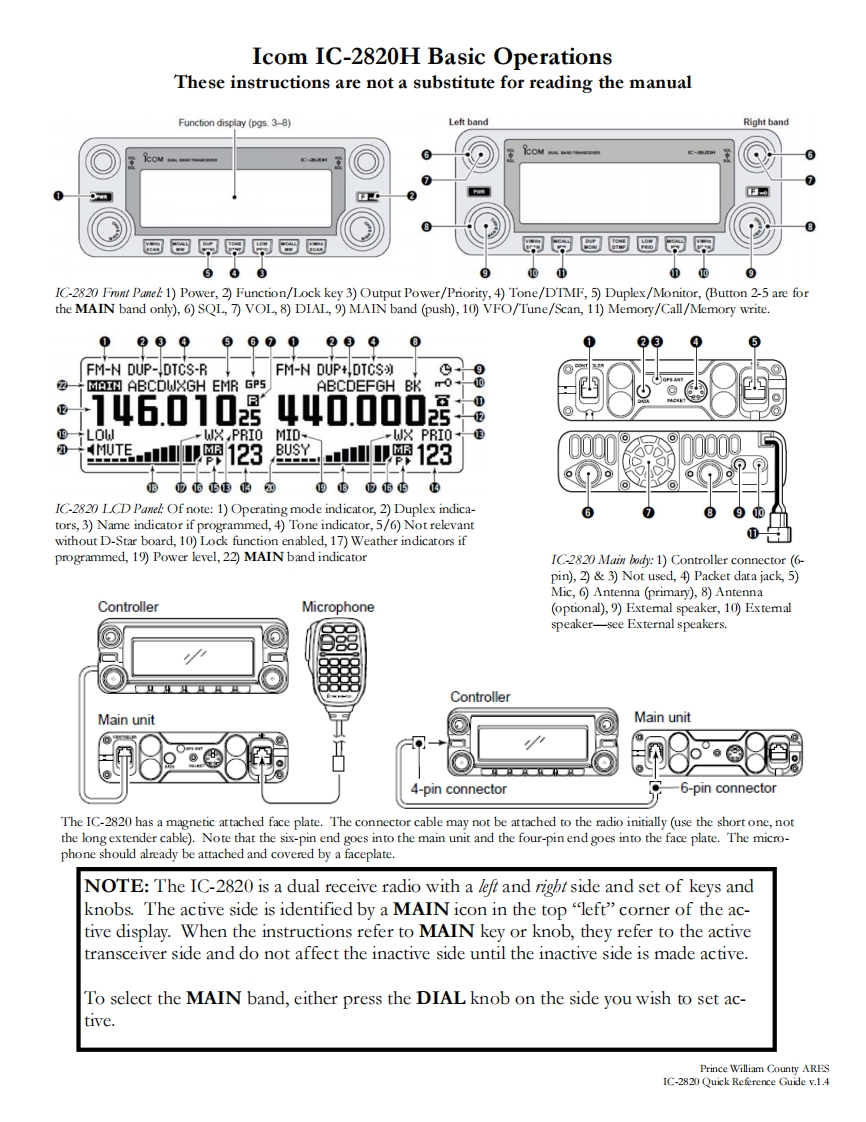
Icom IC-2820H Basic OperationsThese instructions are not a substitute for reading the manualFunction display(pgs.3-8)Left bandRight bandC-⑦8园回母早罩回✉600IC-2820 Frnt Panel 1)Power,2)Function/Lock key 3)Output Power/Priority,4)Tone/DTMF,5)Duplex/Monitor,(Button 2-5 are forthe MAIN band only),6)SQL,7)VOL,8)DIAL,9)MAIN band (push),10)VFO/Tune/Scan,11)Memory/Call/Memory write.0909000023FM-N DUP-IDTCS-RFM-N DUP+DTCS)ABCDWXGH EMR GPSABCDEFGH BK46.010440.000虽WPRIOMIOWX PRIO+4T123BUSY山腰123而65电的西电电面西西9IC-2820 LCD Panel Of note:1)Operating mode indicator,2)Duplex indica-tors,3)Name indicator if programmed,4)Tone indicator,5/6)Not relevantwithout D-Star board,10)Lock function enabled,17)Weather indicators ifprogrammed,19)Power level,22)MAIN band indicatorIC-2820 Main body:1)Controller connector (6-pin),2)&3)Not used,4)Packet data jack,5)Mic,6)Antenna (primary),8)AntennaControllerMicrophone(optional),9)Extemal speaker,10)Extemalspeaker-see External speakers.ControllerMain unitMain unit4-pin connector6-pin connectorThe IC-2820 has a magnetic attached face plate.The connector cable may not be attached to the radio initially (use the short one,notthe longextender cable).Note that the six-pin end goes into the main unit and the four-pin end goes into the face plate.The micro-phone should already be attached and covered by a faceplate.NOTE:The IC-2820 is a dual receive radio with a lef and rigbt side and set of keys andknobs.The active side is identified by a MAIN icon in the top"left"corner of the ac-tive display.When the instructions refer to MAIN key or knob,they refer to the activetransceiver side and do not affect the inactive side until the inactive side is made active.To select the MAIN band,either press the DIAL knob on the side you wish to set ac-tivePrince William County ARESIC-2820 Quick Reference Guide v.1.4



请登录后查看评论内容