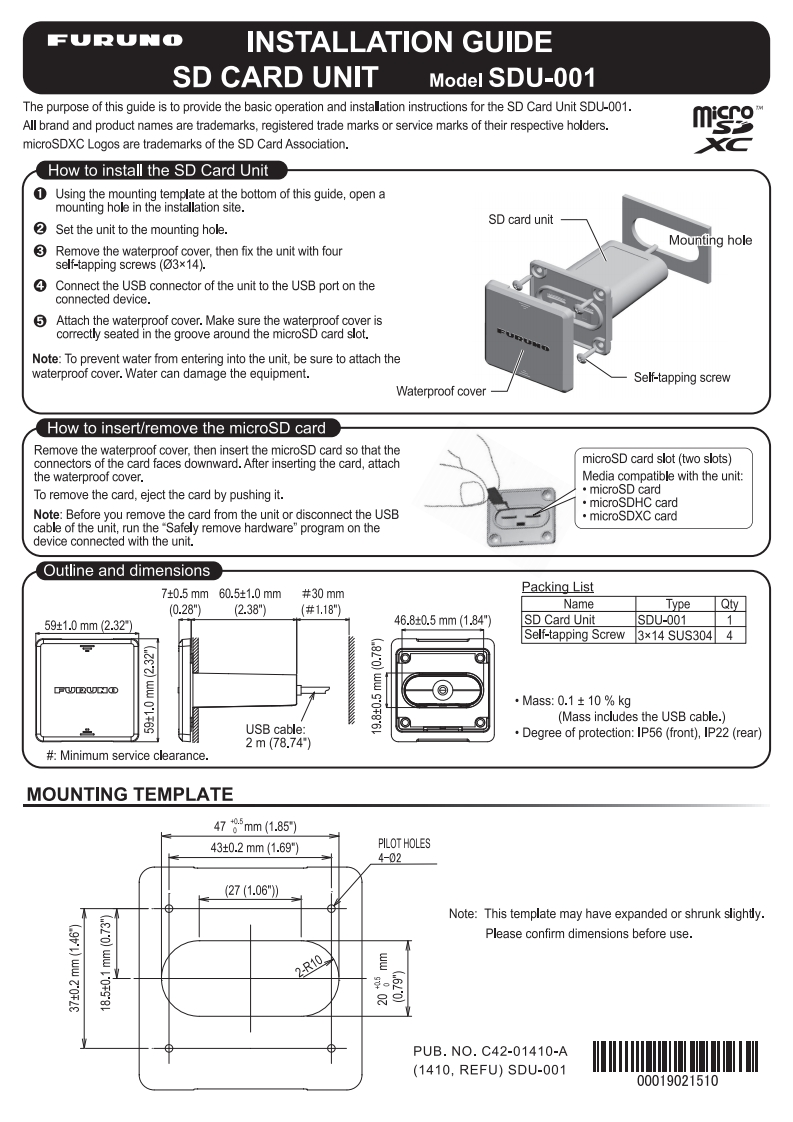
FURUNOINSTALLATION GUIDESD CARD UNITModel SDU-001The purpose of this guide is to provide the basic operation and installation instructions for the SD Card Unit SDU-001.All brand and product names are trademarks,registered trade marks or service marks of their respective holders.mmicroSDXC Logos are trademarks of the SD Card Association.How to install the SD Card Unit1 Using the mounting template at the bottom of this guide,open amounting hole in the installation site.2SD card unitSet the unit to the mounting hole.Remove the waterproof cover,then fix the unit with fourMounting holeself-tapping screws (03x14).Connect the USB connector of the unit to the USB port on theconnected device.Attach the waterproof cover.Make sure the waterproof cover iscorrectly seated in the groove around the microSD card slot.Note:To prevent water from entering into the unit,be sure to attach thewaterproof cover.Water can damage the equipment.Self-tapping screwWaterproof coverHow to insert/remove the microSD cardRemove the waterproof cover,then insert the microSD card so that theconnectors of the card faces downward.After inserting the card,attachmicroSD card slot (two slots)the waterproof cover.Media compatible with the unit:To remove the card,eject the card by pushing it.·microSD card·microSDHC cardNote:Before you remove the card from the unit or disconnect the USB·microSDXC cardcable of the unit,run the "Safely remove hardware"program on thedevice connected with the unit.Outline and dimensions7±0.5mm60.5±1.0mm#30mmPacking List(0.28")(2.38")#1.18"NameTypeQty59±1.0mm(2.3246.80.5mm(1.84"7SD Card UnitSDU-0011Self-tapping Screw 3x14 SUS304 4PMIRWCKD·Mass:0.1±10%kg(Mass includes the USB cable.)USB cable:Degree of protection:IP56(front),IP22(rear)2m(78.74#Minimum service clearance.MOUNTING TEMPLATE4785mm(1.85)43±0.2mm(1.69)PILOT HOLES4-0227(1.06")Note:This template may have expanded or shrunk slightly.Please confirm dimensions before use.2-R10到PUB.N0.C42-01410-A(1410,REFU)SDU-00100019021510



请登录后查看评论内容