
第1页 / 共3页
试读已结束,还剩2页,您可下载完整版后进行离线阅读
THE END
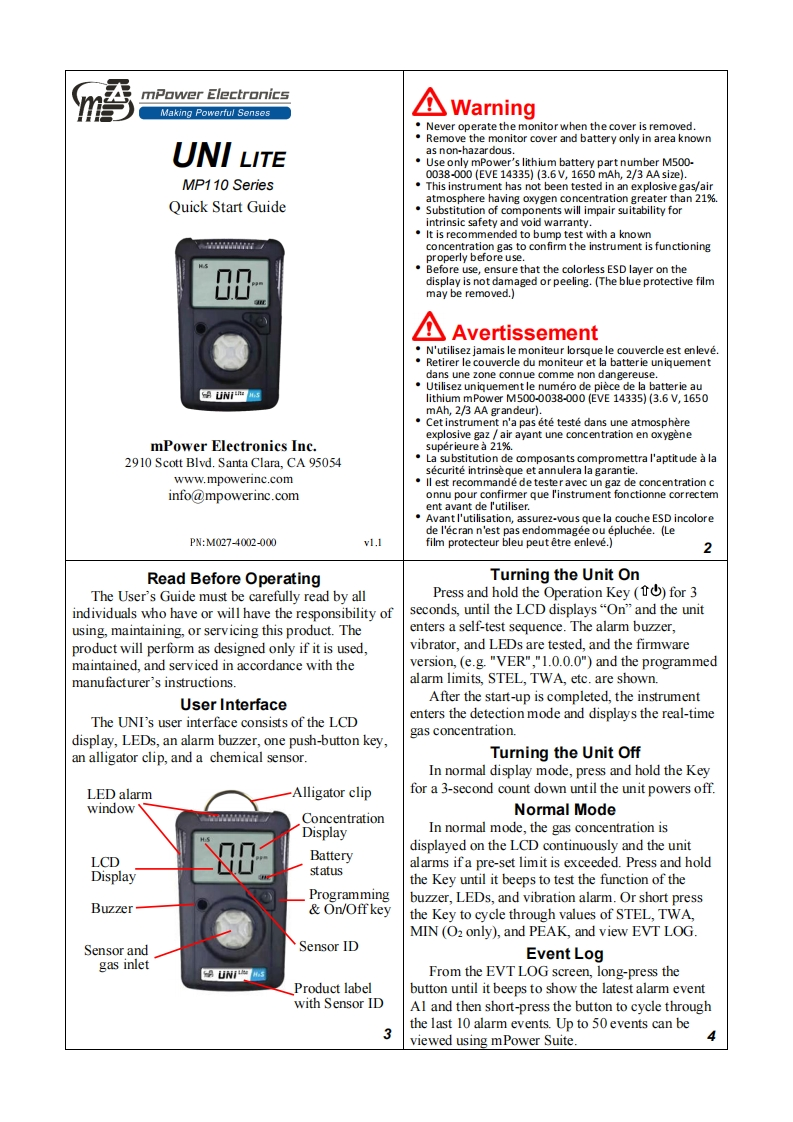
mPower ElectronicsMaking Powerful SensesWarningNever operate the monitor when the cover is removed.Remove the monitor cover and battery only in area knownUNI LITEas non-hazardous.Use only mPower's lithium battery part number M500-0038-000(EVE14335)(3.6V,1650mAh,2/3 AA size.MP110 SeriesThis instrument has not been tested in an explosive gas/airQuick Start Guideatmosphere having oxygen concentration greater than 21%.Substitution of components will impair suitability forintrinsic safety and void warranty.It is recommended to bump test with a knownconcentration gas to confirm the instrument is functioningproperly before use.nn.Before use,ensure that the colorless ESD layer on thedisplay is not damaged or peeling.(The blue protective filmU.Umay be removed.)个AvertissementN'utilisez jamais le moniteur lorsque le couvercle est enleve.Retirer le couvercle du moniteur et la batterie uniquementdans une zone connue comme non dangereuse.Utilisez uniquementle numero de piece de la batterie au的UNi▣slithium mPower M.500-0038-000(EVE14335)(3.6V,1650mAh,2/3 AA grandeur).Cet instrument n'a pas ete teste dans une atmosphereexplosive gaz air ayant une concentration en oxygenemPower Electronics Inc.superieure a 21%.2910 Scott Blvd.Santa Clara.CA 95054La substitution de composants compromettra l'aptitude a lasecurite intrinse que et annulera la garantie.www.mpowerinc.comll est recommande de tester avec un gaz de concentration cinfo@mpowerinc.comonnu pour confirmer que l'instrument fonctionne correctement avant de l'utiliser.Avant I'utilisation,assurez-vous que la couche ESD incolorede l'ecran n'est pas endommagee ou epluchee.(LePN:M027-4002000vl.Ifilm protecteur bleu peut etre enleve.)2Read Before OperatingTurning the Unit OnThe User's Guide must be carefully read by allPress and hold the Operation Key (for 3individuals who have or will have the responsibility ofseconds,until the LCD displays"On"and the unitusing,maintaining,or servicing this product.Theenters a self-test sequence.The alarm buzzer,product will perform as designed only if it is used,vibrator,and LEDs are tested,and the firmwaremaintained,and serviced in accordance with theversion,(e.g."VER","1.0.0.0")and the programmedmanufacturer's instructions.alarm limits,STEL,TWA,etc.are shown.User InterfaceAfter the start-up is completed,the instrumentThe UNI's user interface consists of the LCDenters the detection mode and displays the real-timegas concentration.display,LEDs,an alarm buzzer,one push-button key,an alligator clip,and a chemical sensor.Turning the Unit OffIn normal display mode,press and hold the KeyLED alarmAlligator clipfor a 3-second count down until the unit powers off.windowNormal ModeConcentrationDisplayIn normal mode,the gas concentration isdisplayed on the LCD continuously and the unitLCDBatterystatusalarms if a pre-set limit is exceeded.Press and holdDisplaythe Key until it beeps to test the function of theProgrammingbuzzer,LEDs,and vibration alarm.Or short pressBuzzer&On/Offkeythe Key to cy


请登录后查看评论内容