
第1页 / 共3页
试读已结束,还剩2页,您可下载完整版后进行离线阅读
THE END
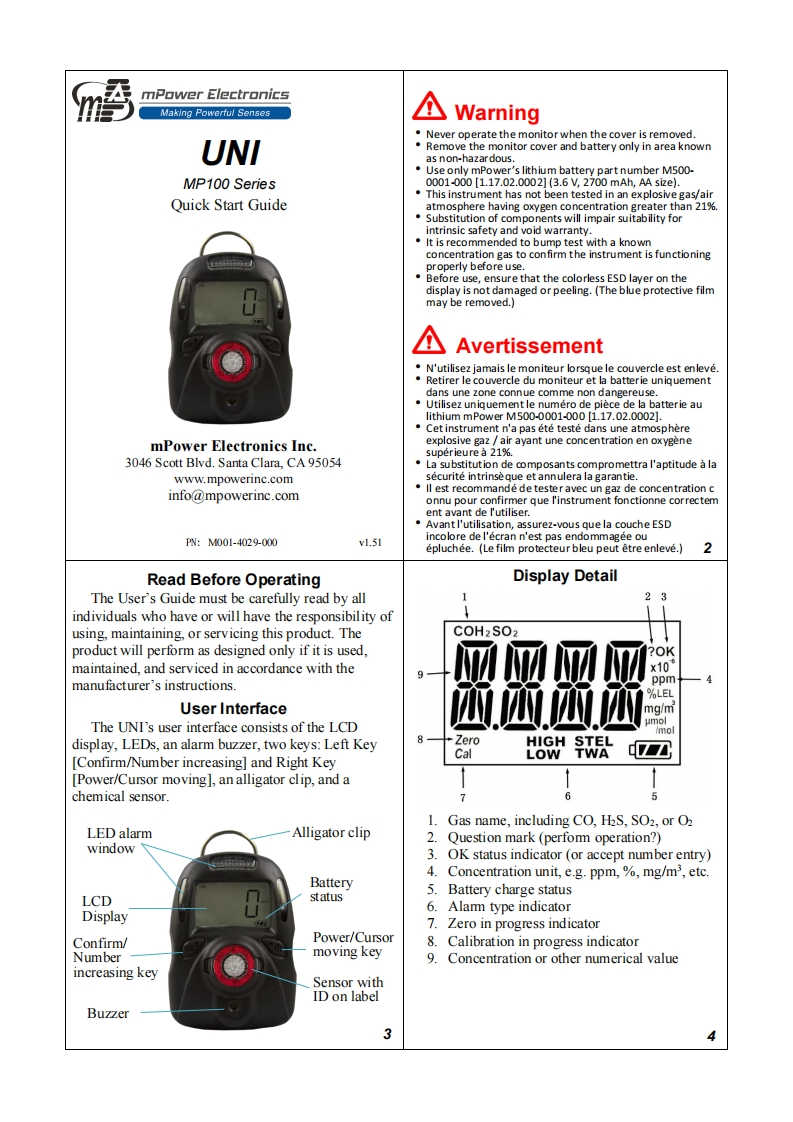
mPower ElectronicsMaking Powerful SensesWarningNever operate the monitor when the cover is removed.UNIRemove the monitor cover and battery only in area knownas non-hazar dous..Use only mPower's lithium battery part number M500-MP100 Series0001-000[1.17.02.0002](3.6V,2700mAh,AAsi2e)..This instrument has not been tested in an explosive gas/airQuick Start Guideatmosphere having oxygen concentration greater than 21%..Substitution of components will impair suitability forintrinsic safety and void warranty.It is recommended to bump test with a knownconcentration gas to confirm the instrument is functioningproperly before use.Before use,ensure that the colorless ESD layer on thedisplay is not damaged or peeling.(The blue protective filmmay be removed.)AvertissementN'utilisez jamais le moniteur lorsque le couvercle est enleve.Retirer le couvercle du moniteur et la batterie uniquementdans une zone connue comme non dangereuse.Utilisez uniquementle numero de piece de la batterie aulithium mPower M.500-0001-000[1.17.02.0002].Cet instrument n'a pas ete teste dans une atmospheremPower Electronics Inc.explosive gaz /air ayant une concentration en oxygenesuperieure a 21%.3046 Scott Blvd.Santa Clara.CA95054La substitution de composants compromettra l'aptitude a lawww.mpowerinc.comsecurite intrinse que et annulera la garantie.info@mpowerinc.comll est recommande de tester avec un gaz de concentration connu pour confirmer que l'instrument fonctionne correctement avant de l'utiliser.Avant I'utilisation,assurez-vous que la couche ESDPWN:M001-4029-000vl.51incolore de l'ecran n'est pas endommagee ouepluchee.(Le film protecteur bleu peut etre enleve.)3Read Before OperatingDisplay DetailThe User's Guide must be carefully read by all2individuals who have or will have the responsibility ofusing,maintaining,or servicing this product.TheCOH2 SO2product will perform as designed only if it is used.maintained,and serviced in accordance with thex104manufacturer's instructions.ppm%LELUser Interfacemq/mThe UNI's user interface consists of the LCDumol/moldisplay,LEDs,an alarm buzzer,two keys:Left KeyZeroHIGHSTELCalLOW TWA[Confirm/Number increasing]and Right Key[Power/Cursor moving],an alligator clip,and achemical sensor.1Gas name,including CO,H2S,SO2,or O2LED alarmAlligator clip2.Question mark(perfomm operation?)window3.OK status indicator (or accept number entry)4.Concentration unit,e.g.ppm,%mg/m3,etc.Battery5.Battery charge statusLCDstatus6.DisplayAlam type indicator7.Zero in progress indicatorConfirm/Power/Cursor8.moving keyCalibration in progress indicatorNumber9.Concentration or other numerical valueincreasing keySensor withID on labelBuzzer3


请登录后查看评论内容