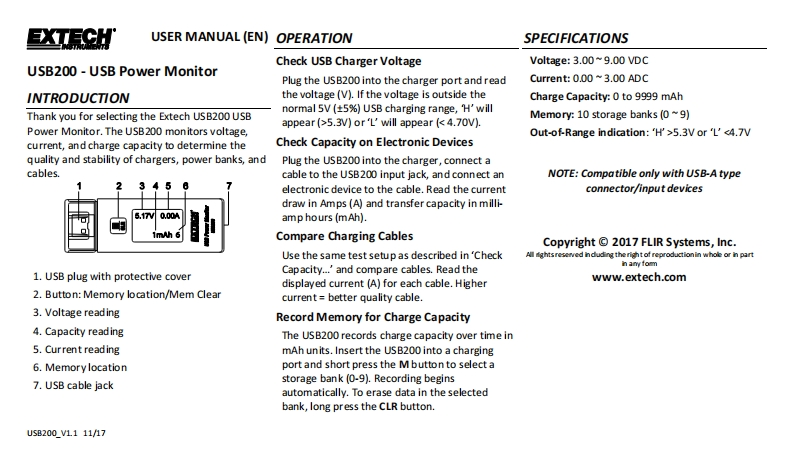
USER MANUAL(EN)OPERATIONSPECIFICATIONSCheck USB Charger VoltageVoltage:3.00~9.00 VDCUSB200-USB Power MonitorPlug the USB200 into the charger port and readCurrent:0.00 ~3.00 ADCINTRODUCTIONthe voltage (V).If the voltage is outside theCharge Capacity:0 to 9999 mAhnormal 5V (5%)USB charging range,H'willThank you for selecting the Extech USB200 USBMemory:10 storage banks(0~9)appear (>5.3V)or'L'will appear (<4.70V).Power Monitor.The USB200 monitors voltage,Out-of-Range indication:'H'>5.3V or 'L'<4.7Vcurrent,and charge capacity to determine theCheck Capacity on Electronic Devicesquality and stability of chargers,power banks,andPlug the USB200 into the charger,connect acables.cable to the USB200 input jack,and connect anNOTE:Compatible only with USB-A typeelectronic device to the cable.Read the currentconnector/input devicesdraw in Amps(A)and transfer capacity in milli-0.00amp hours(mAh).Im/hCompare Charging CablesCopyright C 2017 FLIR Systems,Inc.Use the same test setup as described in'CheckAll ights reserved induding the right of reproductionin whole or in part1.USB plug with protective coverCapacity...'and compare cables.Read thein any fomdisplayed current (A)for each cable.Higherwww.extech.com2.Button:Memory location/Mem Clearcurrent=better quality cable.3.Voltage readingRecord Memory for Charge Capacity4.Capacity readingThe USB200 records charge capacity over time in5.Current readingmAh units.Insert the USB200 into a charging6.Memory locationport and short press the Mbutton to select a7.USB cable jackstorage bank(0-9).Recording beginsautomatically.To erase data in the selectedbank,long press the CLR button.UsB200_V1111/17


请登录后查看评论内容