
第1页 / 共6页
试读已结束,还剩5页,您可下载完整版后进行离线阅读
THE END
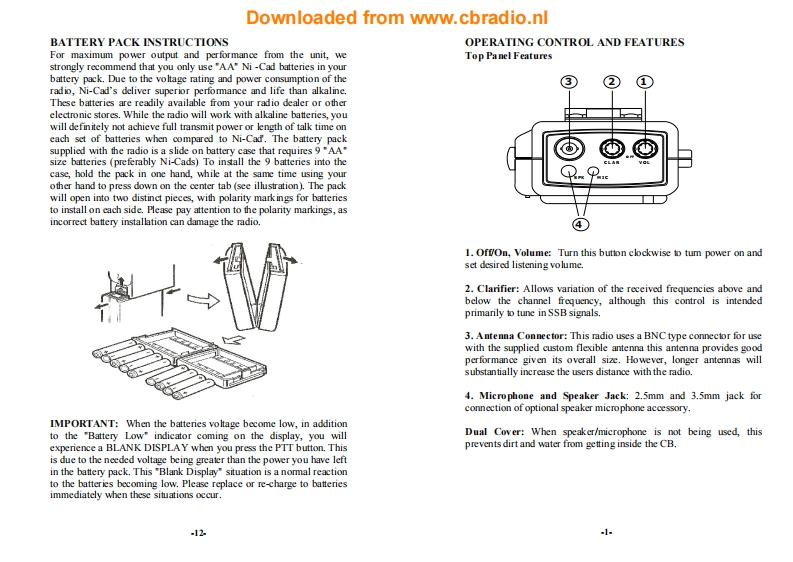
Downloaded from www.cbradio.nlBATTERY PACK INSTRUCTIONSOPERATING CONTROL AND FEATURESFor maximum power output and performance from the unit,weTop Panel Featuresstrongly recommend that you only use"AA"Ni-Cad batteries in yourbattery pack.Due to the voltage rating and power consumption of theradio,Ni-Cad's deliver superior performance and life than alkaline.These batteries are readily available from your radio dealer or otherelectronic stores.While the radio will work with alkaline batteries,youwill definitely not achieve full transmit power or length of talk time oneach set of batteries when compared to Ni-Cad.The battery packsupplied with the radio is a slide on battery case that requires 9"AA"size batteries (preferably Ni-Cads)To install the 9 batteries into thecase,hold the pack in one hand,while at the same time using yourother hand to press down on the center tab (see illustration).The packwill open into two distinct pieces,with polarity markings for batteriesto install on each side.Please pay attention to the polarity markings,asincorrect battery installation can damage the radio.1.Off/On,Volume:Turn this button clockwise to tum power on andset desired listening volume.2.Clarifier:Allows variation of the received frequencies above andbelow the channel frequency,although this control is intendedprimarily to tune in SSB signals.3.Antenna Connector:This radio uses a BNC type connector for usewith the supplied custom flexible antenna this antenna provides goodperformance given its overall size.However,longer antennas willsubstantially increase the users distance with the radio.4.Microphone and Speaker Jack:2.5mm and 3.5mm jack forconnection of optional speaker microphone accessory.IMPORTANT:When the batteries voltage become low,in additionto the "Battery Low"indicator coming on the display,you willDual Cover:When speaker/microphone is not being used,thisexperience a BLANK DISPLAY when you press the PTT button.Thisprevents dirt and water from getting inside the CB.is due to the needed voltage being greater than the power you have leftin the battery pack.This "Blank Display"situation is a normal reactionto the batteries becoming low.Please replace or re-charge to batteriesimmediately when these situations occur.121


请登录后查看评论内容