
第1页 / 共22页
第2页 / 共22页
试读已结束,还剩20页,您可下载完整版后进行离线阅读
THE END
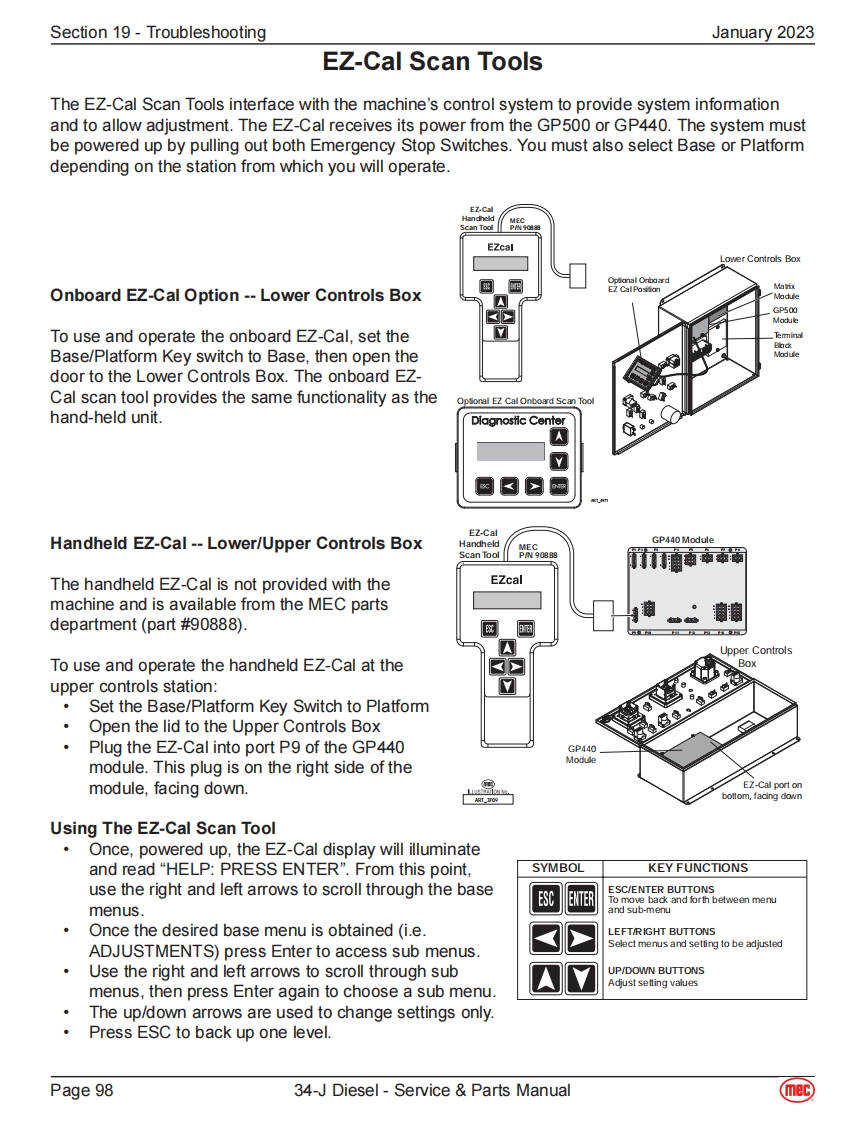
Section 19-TroubleshootingJanuary 2023EZ-Cal Scan ToolsThe EZ-Cal Scan Tools interface with the machine's control system to provide system informationand to allow adjustment.The EZ-Cal receives its power from the GP500 or GP440.The system mustbe powered up by pulling out both Emergency Stop Switches.You must also select Base or Platformdepending on the station from which you will operate.EZcalLower Controls BoxOptional OnboardEZ CalPosition档Onboard EZ-Cal Option--Lower Controls Box"ModuleGP500To use and operate the onboard EZ-Cal,set theBase/Platform Key switch to Base,then open thedoor to the Lower Controls Box.The onboard EZ-Cal scan tool provides the same functionality as theOptional EZ Cal Onboard Scan Toolhand-held unit.Dlagnostic CenterEZ.CalHandheld EZ-Cal--Lower/Upper Controls BoxHandheldGP440 ModuleScan ToolThe handheld EZ-Cal is not provided with theEZcalmachine and is available from the MEC partsdepartment (part #90888).■1Upper ControlsTo use and operate the handheld EZ-Cal at theBoxupper controls station:Set the Base/Platform Key Switch to Platform。Open the lid to the Upper Controls BoxPlug the EZ-Cal into port P9 of the GP440GP440,Modulemodule.This plug is on the right side of themodule,facing down.EZ-Cal port onART_bottom,fading downUsing The EZ-Cal Scan ToolOnce,powered up,the EZ-Cal display will illuminateand read“HELP:PRESS ENTER”.From this point,SYMBOLKEY FUNCTIONSuse the right and left arrows to scroll through the baseESC/ENTER BUTTONSESCENTERTo move back and forth between menumenus.and sub-menuOnce the desired base menu is obtained (i.e.LEFTRIGHT BUTTONSADJUSTMENTS)press Enter to access sub menus.Select menus and setting to be adjustedUse the right and left arrows to scroll through subUP/DOWN BUTTONSAdjust setting valuesmenus,then press Enter again to choose a sub menu.The up/down arrows are used to change settings only.Press ESC to back up one level.Page 9834-J Diesel-Service Parts Manual(mec)


请登录后查看评论内容