
第1页 / 共2页
试读已结束,还剩1页,您可下载完整版后进行离线阅读
THE END
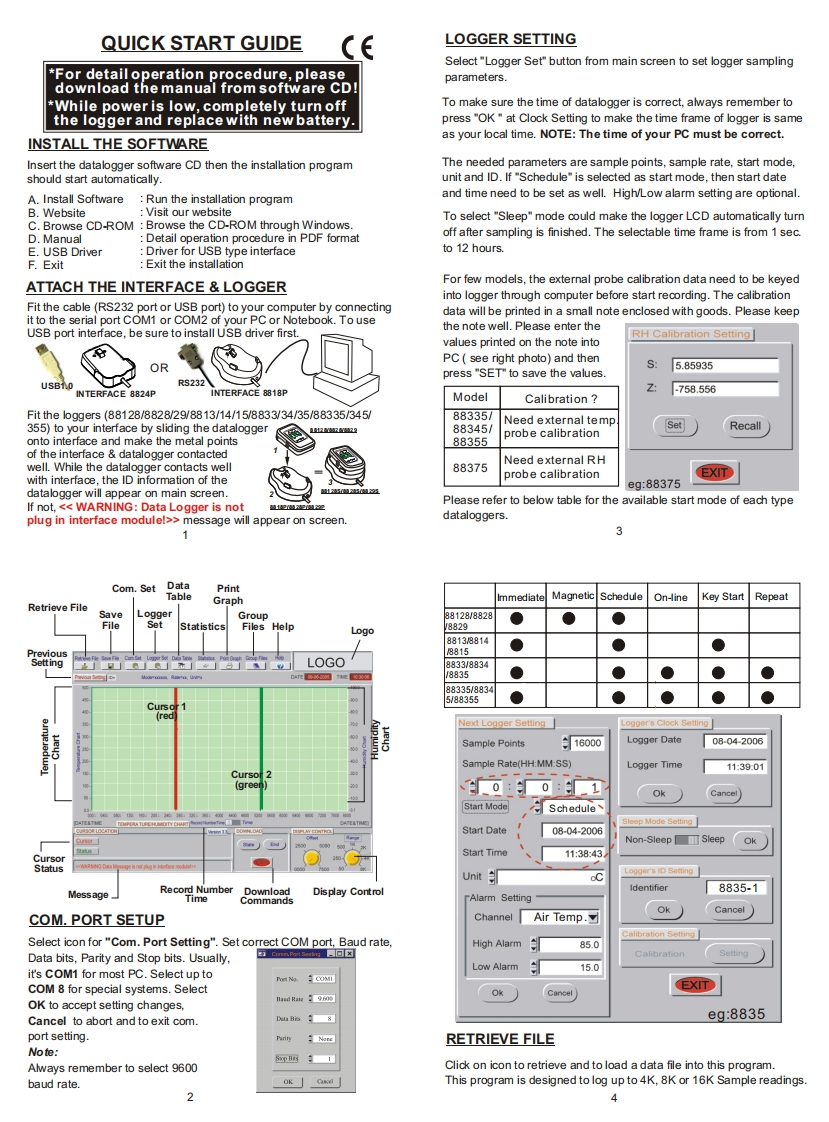
QUICK START GUIDELOGGER SETTINGSelect "Logger Set"button from main screen to set logger sampling*For detailoperation procedure,pleaseparameters.download the manual from software CD*While power is low,completely turn offTo make sure the time of datalogger is correct,always remember tothe logger and replace with new battery.press"OK"at Clock Setting to make the time frame of logger is sameINSTALL THE SOFTWAREas your local time.NOTE:The time of your PC must be correct.Insert the datalogger software CD then the installation programThe needed parameters are sample points,sample rate,start mode,should start automatically.unit and ID.If "Schedule"is selected as start mode,then start dateA.Install SoftwareRun the installation programand time need to be set as well.High/Low alarm setting are optional.B.WebsiteVisit our websiteTo select "Sleep"mode could make the logger LCD automatically turnC.Browse CD-ROM Browse the CD-ROM through Windows.D.ManualDetail operation procedure in PDF formatoff after sampling is finished.The selectable time frame is from 1 sec.E.USB DriverDriver for USB type interfaceto 12 hours.F.ExitExit the installationATTACH THE INTERFACE LOGGERFor few models,the external probe calibration data need to be keyedinto logger through computer before start recording.The calibrationFit the cable(RS232 port or USB port)to your computer by connectingdata will be printed in a small note enclosed with goods.Please keepit to the serial port COM1 or COM2 of your PC or Notebook.To useUSB port interface,be sure to install USB driver first.the note well.Please enter theRH Calibration Setting]values printed on the note intoPC see right photo)and thenORpress"SET"to save the values.5.85935USBnRS232INTERFACE 8824PINTERFACE 8818PZ:-758.556ModelCalibrationFit the lo9gers(88128/8828/29/8813/14/15/8833/34/35/88335/34588335/Need external temp355)to your interface by sliding the datalogger288345/SetRecallprobe calibrationonto interface and make the metal points88355of the interface datalogger contactedNeed external RHwell.While the datalogger contacts well88375probe calibrationEXITwith interface,the ID information of theeg:88375datalogger will appear on main screen.If not,>message will appear on screen.dataloggers.3Com.SetDataPrintTableGraphImmediateMagneticScheduleOn-ineKey StartRepeatRetrieve FileSaveLoggerGroup8128/8828●●StatisticsFiles Help0g0882g881388148815LOGO8833/883488350023写00345/88355CursoNext Logger Setting」ogger's Clock SettingSample Points:16000Logger Date08-04-2006Sample Rate(HH:MM:SS)Logger Time113901Cursor0:OkCancelStart ModeScheduleep Mode SettingStart Date08-04-2006Non-Sleep☐SleepOkStart Time11:38:43StatusUnitLogger's ID SettingMessageRecord NumberDisplay ControlIdentifier8835-1TimeCommands-Alarm SettingCancelCOM.PORT SETUPChannelAir Temp.☑OkSelect icon for"Com.Port Setting".Set correct COM port,Baud rate,Calibration Setting


请登录后查看评论内容