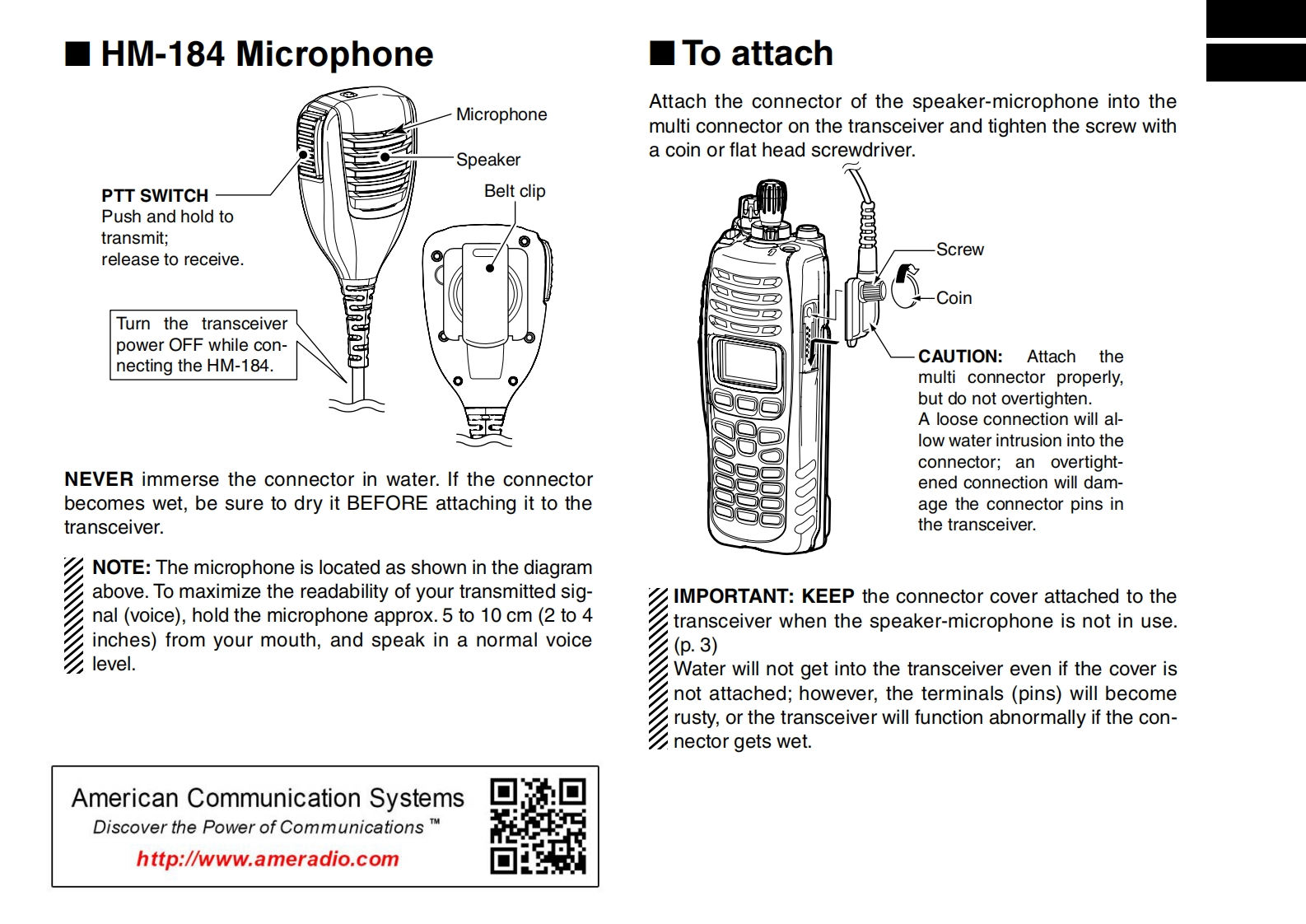
☐HM-184 Microphone☐To attachMicrophoneAttach the connector of the speaker-microphone into themulti connector on the transceiver and tighten the screw withSpeakera coin or flat head screwdriver.PTT SWITCHBelt clipPush and hold totransmit;release to receive.ScrewCoinTurn the transceiverpower OFF while con-necting the HM-184.CAUTION:Attach themulti connector properly,but do not overtighten.A loose connection will al-low water intrusion into theconnector:an overtight-NEVER immerse the connector in water.If the connectorened connection will dam-becomes wet,be sure to dry it BEFORE attaching it to theage the connector pins intransceiver.the transceiver.NOTE:The microphone is located as shown in the diagramabove.To maximize the readability of your transmitted sig-IMPORTANT:KEEP the connector cover attached to thenal (voice),hold the microphone approx.5 to 10 cm(2 to 4transceiver when the speaker-microphone is not in use.inches)from your mouth,and speak in a normal voice(p.3)level.Water will not get into the transceiver even if the cover isnot attached;however,the terminals (pins)will becomerusty,or the transceiver will function abnormally if the con-nector gets wet.American Communication SystemsDiscover the Power of Communications TMhttp://www.ameradio.com▣



请登录后查看评论内容