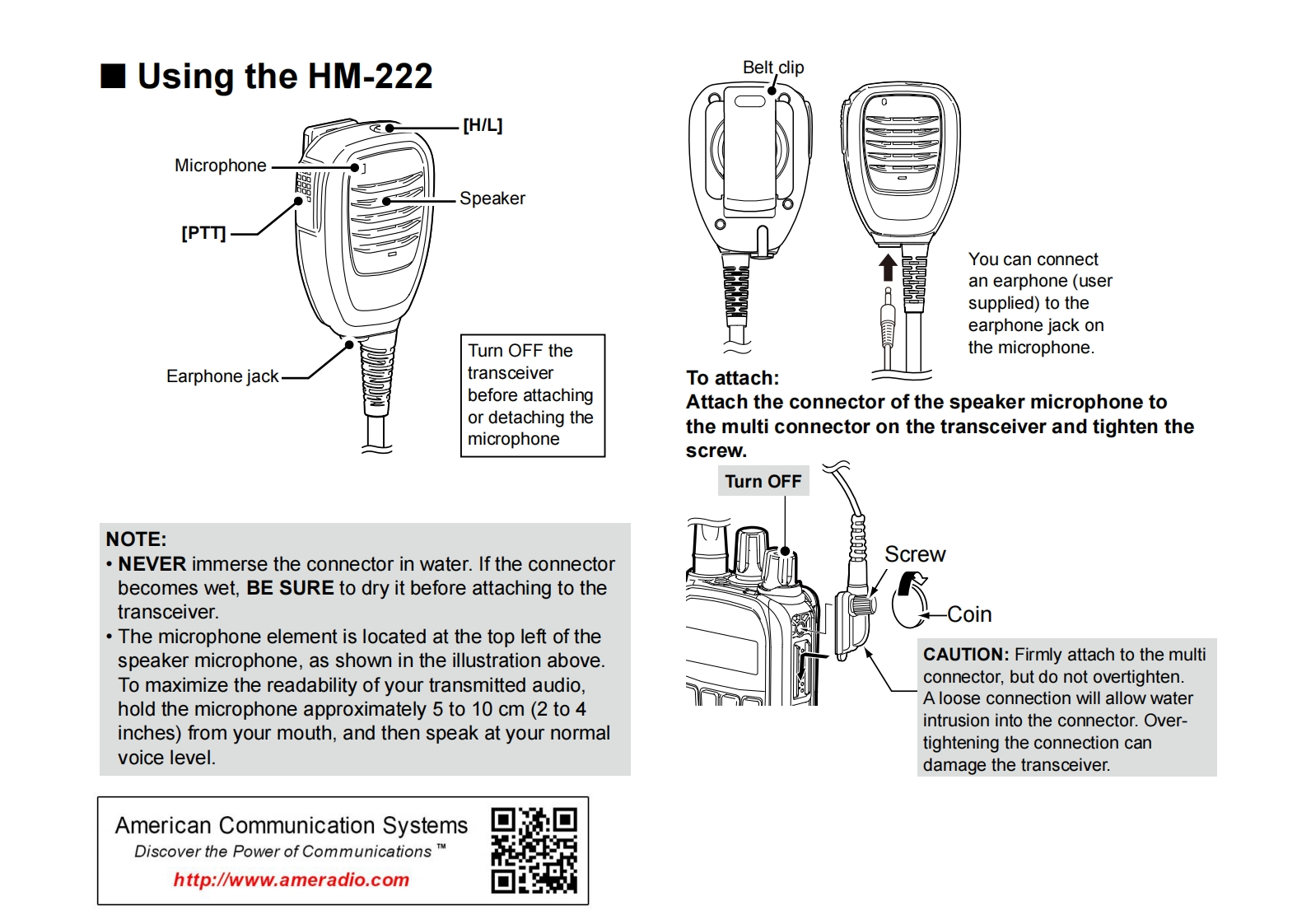
■Using the HM-222Belt.clip[H/L]MicrophoneSpeaker[PTT]You can connectan earphone (usersupplied)to theearphone jack onTurn OFF thethe microphone.Earphone jacktransceiverTo attach:before attachingAttach the connector of the speaker microphone toor detaching thethe multi connector on the transceiver and tighten themicrophonescrew.Turn OFFNOTE:NEVER immerse the connector in water.If the connectorScrewbecomes wet,BE SURE to dry it before attaching to thetransceiver.CoinThe microphone element is located at the top left of thespeaker microphone,as shown in the illustration above.CAUTION:Firmly attach to the multiTo maximize the readability of your transmitted audio,connector,but do not overtighten.A loose connection will allow waterhold the microphone approximately 5 to 10 cm(2 to 4intrusion into the connector.Over-inches)from your mouth,and then speak at your normaltightening the connection canvoice level.damage the transceiver.American Communication SystemsDiscover the Power of Communications TMhttp://www.ameradio.com



请登录后查看评论内容